


Allied Telesis CentreCOM GS970M Manual
PDF manual · 100 Pages
English



Quick check
Incorrect answer, please try again.
Chat with your Allied Telesis CentreCOM GS970M manual using AI
Get instant AI answers from your Allied Telesis CentreCOM GS970M manual
Ask anything about the Allied Telesis CentreCOM GS970M. Answers come from this manual, with the pages they are based on.
Ask a Question
Do you recommend CentreCOM GS970M?
Yes NoFrequently Asked Questions
It is designed to connect multiple wired devices in a small office or edge network, while also offering SFP uplinks for fiber or longer-distance connections. It suits managed environments that need stable Gigabit switching.
Is this answer helpful?
This model provides 8 RJ-45 Gigabit Ethernet ports and 2 SFP slots. That gives you a mix of copper access ports and flexible uplink or expansion options.
Is this answer helpful?
The GS970M family includes PoE-capable variants, but not every model supports it. If PoE is needed, choose a PS version and confirm the available power budget for your connected devices.
Is this answer helpful?
No. The SFP transceivers are typically sold separately. You need to select compatible modules based on the fiber type and speed required by your network.
Is this answer helpful?
Yes. The switch family supports desktop placement, rack mounting, and wall mounting depending on the model and mounting kit used. This makes it adaptable to different setups.
Is this answer helpful?
It turns off the front-panel port LEDs to reduce power use when monitoring is not needed. It does not affect network operation, and the POWER LED and SD card LED remain separate.
Is this answer helpful?
Advantages and Disadvantages
Advantages

- Eight RJ-45 Gigabit ports provide solid access connectivity for small to mid-sized networks.
- Two SFP slots add flexible uplink and long-distance fiber expansion options.
- Management via CLI and GUI makes configuration and monitoring easier.
- Eco-friendly power features help reduce energy use during lighter operation.
Disadvantages

- SFP transceivers are not included and must be purchased separately.
- Class A compliance means it may not be ideal for residential settings.
- PoE models have power budgets, so not every device can be powered at once.
- Some advanced setup requires correct port settings and cabling to avoid link issues.
Product Specification
Function
Switch
Type
Standalone, Rackmount (via optional mounting bracket), Wall mount (via optional mounting bracket)
Network ports
8x RJ-45, 2x SFP
Speeds
8x RJ-45 (10/100/1000Base-T), 2x SFP (100M/1Gb/s)
PoE
N/A
Backplane
20Gb/s, 14.9Mp/s, 10KB Jumboframes, 1.5MB Packet buffer, 16K MAC addresses
Officially supported standards
802.1AB, 802.1AX, 802.1D, 802.1Q, 802.1X, 802.1p, 802.1s, 802.1v, 802.1w, 802.2, 802.3, 802.3ab, 802.3ac, 802.3az, 802.3u, 802.3x, 802.3z, IGMPv3, MLDv2
Configuration
Web interface, Console, Serial (RJ-45), Card reader (SD Card)
Cooling
Passive
Dimensions (WxHxD)
10.43x1.69x7.09in, 1U
Weight
3.31lb
Color
Light gray
Special features
Metal housing, Firmware updates possible
Product Description
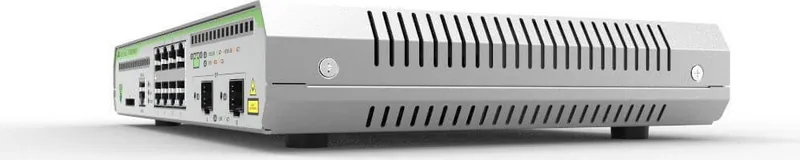
Allied Telesis CentreCOM GS970M Desktop Gigabit Managed Switch, 8x RJ-45, 2x SFP Manual
Compact switching with room to grow
The Allied Telesis CentreCOM GS970M Desktop Gigabit Managed Switch, 8x RJ-45, 2x SFP Manual is built for networks that need reliable performance in a small footprint. It combines eight Gigabit copper ports with two SFP uplinks, giving you a practical mix of everyday device connectivity and higher-speed fiber expansion. For offices, branch locations, and edge deployments, that balance is especially valuable.
What makes this switch appealing is its flexibility. The RJ-45 ports support standard 10/100/1000Mbps connections with auto-negotiation and auto-MDI/MDIX, so setup is straightforward whether you are linking PCs, printers, cameras, or access points. The SFP slots add another layer of versatility, allowing long-distance fiber connections or additional uplink paths when the network needs to extend beyond copper limits.
This model is also designed with management in mind. A built-in management platform offers both CLI and GUI access, making it suitable for administrators who want precise control without unnecessary complexity. The front-panel console port is useful for local setup and troubleshooting, while the LED indicators help you quickly check link status, speed, activity, and system health.
Energy-conscious features are another strong point. The ecofriendly button can disable most front-panel LEDs to reduce power use when monitoring is not needed, and the switch family includes power-saving behaviors such as power scaling and shutdown on unused ports. In practical terms, that means the switch is not just compact—it is also mindful of operational efficiency.
Depending on the variant, PoE and PoE+ support can further increase its usefulness by powering devices over the same cable used for data. That makes the platform a smart fit for modern office equipment, especially when outlet placement is limited. Add support for rack, desktop, or wall installation, and you get a switch that adapts easily to different environments.
Notes
- SFP transceivers are typically purchased separately.
- The switch is intended for commercial and controlled environments.
- Cable quality and port settings matter for best results, especially with older devices.
Quick takeaway
If you want a manageable, energy-aware Gigabit switch with fiber-ready expansion and compact deployment options, this GS970M model is a strong all-around choice.
Search for 67,732 Manuals online


Type-in Brand or Model