


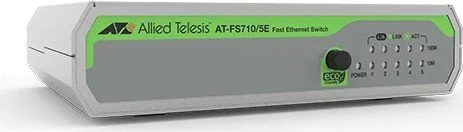
Allied Telesis CentreCOM AT-FS710/5E Manual
PDF manual · 64 Pages
English



Quick check
Incorrect answer, please try again.
Chat with your Allied Telesis CentreCOM AT-FS710/5E manual using AI
Get instant AI answers from your Allied Telesis CentreCOM AT-FS710/5E manual
Ask anything about the Allied Telesis CentreCOM AT-FS710/5E. Answers come from this manual, with the pages they are based on.
Ask a Question
Do you recommend CentreCOM AT-FS710/5E?
Yes NoFrequently Asked Questions
The FS710 supports 10Base-T and 100Base-TX speeds. Use Category 3 or better UTP for 10 Mbps and Category 5 (or better) UTP for 100 Mbps. Maximum cable length per port is 100 meters (328 feet).
Is this answer helpful?
Yes. The DC-version uses the supplied external AC/DC adapter rated for 5 VDC, 2 A. Use only the provided adapter or an exact equivalent to avoid damage. Ensure the plug matches your regional outlet and connect the DC plug to the switch before powering the adapter.
Is this answer helpful?
The 5-port models include bottom-mounted wall key-holes for wall mounting. Rack mounting is not supported for the 5-port model. Larger FS710 models support optional wall or rack kits which must be ordered separately.
Is this answer helpful?
No. The FS710 is an unmanaged, plug-and-play switch with no web UI, CLI, or SNMP. It provides automatic link negotiation and basic flow control but does not offer advanced configuration features.
Is this answer helpful?
Ports auto-negotiate duplex. For full-duplex links the switch supports IEEE 802.3x PAUSE-frame flow control; for half-duplex it uses backpressure (collision-based) control. Ensure connected devices also use auto-negotiation to avoid duplex mismatches.
Is this answer helpful?
Front-panel LEDs indicate power and per-port link/activity. A green link LED shows an active connection; blinking indicates traffic. If power LED is off, verify the adapter and outlet. Use LED states to troubleshoot cabling and link problems.
Is this answer helpful?
The FS710 complies with relevant EMI and safety standards (FCC Class A/B variants, EN 55032/24, UL/CSA/EN safety certificates) and is RoHS-compliant. Note Class A models may cause radio interference in residential areas; follow recommended mitigation steps if interference occurs.
Is this answer helpful?
Advantages and Disadvantages
Advantages

- Compact 5-port design: small footprint for desktops, wall mounting, and tight spaces.
- Auto-negotiation and auto MDI/MDI-X: plug-and-play ease with any straight-through cable.
- Low-power DC operation: uses an external 5V DC adapter for flexible power options.
- Wire-speed, store-and-forward switching: validates frames to reduce noise and errors.
- Transparent VLAN/BPDU pass-through: coexists with managed equipment without interfering.
Disadvantages

- Unmanaged: no VLAN configuration, QoS, or SNMP for advanced network control.
- Limited to 10/100 Mbps: not suitable for Gigabit-only deployment requirements.
- Small MAC table (model-dependent): may be constrained in larger device-dense setups.
- External adapter reliance: requires correct adapter and regional plug for DC models.
- No PoE: cannot power devices such as access points or cameras over Ethernet.
Product Specification
Function
Switch
Type
Standalone, Wall mount
Network ports
5x RJ-45 (rear)
Speeds
5x RJ-45 (10/100Base-T)
PoE
N/A
Backplane
1Gb/s, 744kp/s, 2KB Jumbo frames, 96kB packet buffer, 2K MAC addresses
Officially supported standards
802.3, 802.3u, 802.3x, 802.3az
Configuration
unmanaged
Cooling
passive
Dimensions (WxHxD)
5.16x1.18x3.98in
Weight
0.84lb
Color
light gray
Special features
Metal housing, external power supply
Product Description
Allied Telesis CentreCOM FS710 Desktop Switch, 5x RJ-45, DC-Version Manual
The Allied Telesis CentreCOM FS710 Desktop Switch, 5x RJ-45, DC-Version is a compact, unmanaged 10/100 Mbps Ethernet switch designed for simple, reliable network connectivity. Built for desktop or wall-mounted deployment, this DC-powered FS710 model offers five RJ-45 ports with auto-negotiation, auto MDI/MDI-X and support for half- and full-duplex operation. Its straightforward plug-and-play design makes it ideal for small offices, home labs, retail points of sale, and edge networking where ease of use, low power consumption, and consistent wired performance matter.
Product highlights and functionality
This FS710 DC-version delivers wire-speed forwarding with store-and-forward switching, ensuring frames are validated before forwarding to reduce network errors. The switch supports IEEE 802.3u auto-negotiation and IEEE 802.3x flow control (PAUSE frames) for full-duplex links and backpressure for half-duplex links, helping to manage traffic between devices of differing speeds. LEDs on the front panel show power and per-port link/activity status so you can quickly verify connectivity.
Compact physical dimensions and low weight allow flexible placement. The DC-powered E variant uses an external AC/DC adapter (5 V, 2 A) for regions where an external power brick is preferred; the desktop form factor can also be wall-mounted using built-in mounting points. With jitter-free forwarding, support for tagged VLAN pass-through and BPDU transparency, it fits cleanly into simple switched topologies while coexisting with managed equipment.
Use cases and benefits
The FS710 DC 5-port switch is a no-fuss solution for expanding wired ports in small networked environments. It’s suitable for connecting workstations, printers, IP cameras, access points, and small servers. Its automatic cable polarity detection eliminates the need for crossover cables, and compatibility with standard Cat5/Cat5e cabling keeps installation straightforward. The unit’s RoHS compliance and adherence to EMI and safety standards make it appropriate for commercial and residential settings where compliance matters.
Notes
- Ports support 10/100 Mbps speeds; maximum cable run per port is 100 meters over appropriate UTP cabling.
- The external DC adapter supplied with the DC-version must be used; verify regional plug compatibility.
- LED indicators provide quick operational insight (power, link/activity, duplex/collision where applicable).
Search for 67,732 Manuals online


Type-in Brand or Model