

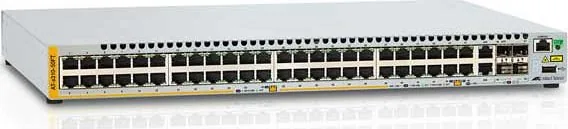

Allied Telesis AT-x310-50FT Manual
PDF manual · 116 Pages
English



Quick check
Incorrect answer, please try again.
Chat with your Allied Telesis AT-x310-50FT manual using AI
Get instant AI answers from your Allied Telesis AT-x310-50FT manual
Ask anything about the Allied Telesis AT-x310-50FT. Answers come from this manual, with the pages they are based on.
Ask a Question
Do you recommend AT-x310-50FT?
Yes NoFrequently Asked Questions
It is designed as a managed access switch for small to mid-sized networks. The series focuses on reliable Fast Ethernet switching, flexible uplinks, and multiple installation options for practical business deployments.
Is this answer helpful?
Depending on the model, the switch includes 24 or 48 RJ-45 access ports and 2 RJ-45/SFP combo ports. These combo ports let you choose either copper or fiber for the uplink path.
Is this answer helpful?
Yes, but only on the FP models. Those versions can deliver PoE and PoE+ to supported devices such as IP phones, wireless access points, and cameras through the twisted-pair ports.
Is this answer helpful?
Yes. It can be installed on a table, in a 19-inch rack, or on a wall when the proper brackets and mounting surface are used. The guide stresses airflow, stability, and safe cable access.
Is this answer helpful?
It turns the port LEDs on or off. This can reduce power usage and visual clutter without affecting normal network operation, which is useful in quiet offices or equipment rooms.
Is this answer helpful?
The dedicated stacking slots support VCStack with special transceivers. This allows multiple switches to operate as one logical unit, making management easier and improving deployment flexibility.
Is this answer helpful?
Advantages and Disadvantages
Advantages

- Flexible deployment: rack, wall, or desktop installation options.
- Combo uplinks support either RJ-45 or SFP for added network design freedom.
- PoE models can power phones, APs, and cameras over the same cable.
- Multiple management methods simplify setup, monitoring, and maintenance.
- Stacking support helps scale and manage several switches as one system.
Disadvantages

- PoE is available only on selected FP models, not on every switch.
- Power budget planning is necessary when many powered devices are connected.
- Wall mounting can require extra hardware and careful surface selection.
- Combo ports allow only one active link per pair at a time.
- Fast Ethernet access is practical, but not ideal for modern gigabit-heavy workloads.
Product Specification
Function
Switch
Type
Standalone, Rackmount (via mounting brackets), Wall mount (via mounting brackets)
Network ports
48x RJ-45, 2x RJ-45/SFP
Speeds
48x RJ-45 (10/100Base-T), 2x RJ-45 (10/100/1000Base-T), 2x SFP (100M/1Gb/s)
PoE
N/A
Backplane
17.6Gb/s, 13.1Mp/s, 12KB Jumboframes, 3MB packet buffer, 16K MAC addresses, 2x Stacking (SFP, 1Gb/s, dedicated, Virtual-Stacking)
Officially supported standards
802.1AB, 802.1AX, 802.1D, 802.1Q, 802.1X, 802.1p, 802.1s, 802.1v, 802.1w, 802.1X, 802.2, 802.3, 802.3ac, 802.3az, 802.3u, 802.3x, 802.3z, IGMPv3, MLDv2
Configuration
Web interface, Console, serial (RJ-45, USB-A 2.0)
Cooling
active
Dimensions (WxHxD)
17.32x1.73x12.20in, 1U
Weight
10.14 lb
Color
light gray
Special features
Metal housing, removable mounting brackets, Firmware updates possible, Display
Manufacturer's warranty
lifetime (10 years in AT/DE)
Product Description
Allied Telesis x310 Rackmount Managed Stack Switch
The Allied Telesis x310 family is built for busy networks that need dependable Fast Ethernet access with a practical mix of uplink flexibility, management tools, and installation choices. With up to 48 RJ-45 ports and 2 RJ-45/SFP combo ports, this switch line fits well in office, campus, and light enterprise environments where stable performance matters more than flashy extras.
What makes the x310 series appealing is its balance of accessibility and control. The RJ-45 access ports support 10/100 speeds, while the combo uplink design lets you choose between copper and fiber on the final ports, depending on the network layout. That makes it easier to connect longer-distance links, backbone segments, or nearby devices without redesigning the switching layer. On PoE-capable models, the switch can also power endpoints such as phones, access points, and cameras directly through the network cable.
The installation approach is equally versatile. Depending on the model and site, the switch can be placed on a table, mounted in a 19-inch rack, or installed on a wall with the proper brackets and support surface. The guide emphasizes safe placement, airflow, and cable planning, which is especially important in commercial spaces where equipment density is high. The eco-friendly button is a small but useful detail, letting administrators turn off port LEDs to reduce distractions and save power when visual status checks are not needed.
Management options are another strength. Local console access, web-based control, CLI management, and SNMP support give teams multiple ways to configure and monitor the switch. The x310 series also supports stacking through dedicated slots, allowing multiple units to act as one logical system when expansion or simplified administration is required.
In day-to-day use, the switch is designed to be practical rather than complicated. Clear LED indicators, straightforward port behavior, and predictable power handling make it easier to deploy and maintain. For network teams looking for a reliable access switch with optional PoE, combo uplinks, and strong installation flexibility, the x310 series remains a sensible choice.
Notes
- Best suited for access-layer deployments and compact wiring closets.
- Check PoE budget and supported devices before planning endpoint loads.
- Use the combo ports carefully: one copper or one SFP link per pair.
Search for 67,732 Manuals online


Type-in Brand or Model