
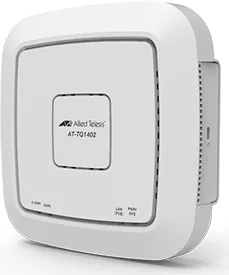
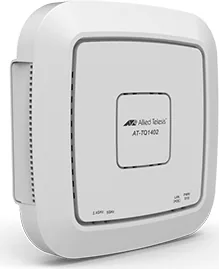
Allied Telesis AT-TQ1402 Manual
PDF manual · 146 Pages
English



Quick check
Incorrect answer, please try again.
Chat with your Allied Telesis AT-TQ1402 manual using AI
Get instant AI answers from your Allied Telesis AT-TQ1402 manual
Ask anything about the Allied Telesis AT-TQ1402. Answers come from this manual, with the pages they are based on.
Ask a Question
Do you recommend AT-TQ1402?
Yes NoFrequently Asked Questions
Connect your computer directly to the LAN port using an Ethernet cable. Set your computer's IP to 192.168.1.n and subnet mask to 255.255.255.0. Open a web browser and enter 192.168.1.230. Log in with the username manager and password friend.
Is this answer helpful?
No, the AT-TQ1402 only supports reading parameter settings via SNMPv1 and v2c. You cannot modify configurations using SNMP; all changes must be made through the web browser interface or management tools like Vista Manager.
Is this answer helpful?
Changing the country code disables the radios immediately. This action is disruptive if the unit is forwarding traffic. You must reconfigure all radio settings after changing the country code to restore functionality.
Is this answer helpful?
No, the access point does not have a real-time clock with a backup battery. If you manually set the date and time, they will revert to default values upon reset or power cycle. Using an NTP server is recommended.
Is this answer helpful?
Each radio supports up to eight virtual access points. However, Allied Telesis recommends using no more than five VAPs per radio to ensure the best performance and stability for your network.
Is this answer helpful?
Yes, DFS cannot be disabled on the wireless access points. It is an industry standard that prevents interference with radar signals on 5GHz channels. The device automatically switches channels if radar is detected.
Is this answer helpful?
Advantages and Disadvantages
Advantages

- Supports dual-band operation with 2.4GHz and 5GHz radios for optimal performance
- Enables up to eight virtual access points per radio for flexible network segmentation
- Includes built-in Quality of Service for traffic prioritization
- Offers secure management via HTTPS and SNMP monitoring capabilities
- Supports Power over Ethernet to simplify cabling and installation
Disadvantages

- Does not support SNMPv3 which limits advanced security options
- Cannot change country code on units sold in North America, Japan, or Taiwan
- Vista Manager EX cannot configure all settings like hostname or VLANs
- No real-time clock means manual time settings reset after power loss
- OpenFlow and LLDP protocols are not supported on this model
Product Specification
LAN
1x 1000Base-T (PoE PD)
Wireless
WLAN 802.11a/b/g/n/ac (Wi-Fi 5), simultaneous
Transmission Rate
400Mbps (2.4GHz), 867Mbps (5GHz)
Security
64/128bit WEP, WPA, WPA2
Antennas
internal
Ports
1x RJ-45 Management Port
Power Consumption
12W (consumption, operation), not specified (max power supply capacity)
Dimensions
6.50x6.42x1.69in
Features
IPv6, MU-MIMO, LACP, VLAN
Band Capability
Dual Band (simultaneous)
Product Description
Allied Telesis AT-TQ1402 Wireless Access Point Overview
The Allied Telesis AT-TQ1402 represents a robust solution for modern wireless networking environments, designed to deliver high performance and flexible management capabilities. This dual-band access point supports both 2.4GHz and 5GHz radios, allowing network administrators to optimize coverage and capacity based on specific deployment needs. With support for up to eight virtual access points per radio, the AT-TQ1402 enables the creation of multiple distinct wireless networks from a single hardware unit, making it ideal for enterprises, educational institutions, and large-scale public venues.
One of the standout features of this device is its comprehensive management interface accessible via a standard web browser. Users can easily configure settings such as IP addressing, time synchronization, and security protocols without requiring specialized software. The inclusion of SNMPv1 and v2c support further enhances monitoring capabilities, allowing integration with existing network management systems. For those seeking advanced control, the Vista Manager EX and AWC plug-in offer streamlined management for large deployments, although some basic settings remain exclusive to the web interface.
Security is paramount in the AT-TQ1402 design. It supports WPA Personal and WPA Enterprise standards, ensuring that data transmitted over the air remains encrypted and protected. Features like MAC address filtering and client isolation add layers of defense against unauthorized access. Additionally, the Captive Portal functionality allows organizations to present terms of service or authentication pages before granting network access, providing a professional user experience while maintaining control.
Quality of Service (QoS) mechanisms are built directly into the firmware, enabling traffic prioritization to ensure critical applications receive sufficient bandwidth. The device also supports Wireless Distribution System bridges, facilitating the extension of wired networks wirelessly between buildings or hard-to-reach areas. Power over Ethernet support simplifies installation by delivering both power and data through a single cable, reducing clutter and infrastructure costs.
Whether you are setting up a small office or managing a complex campus network, the Allied Telesis AT-TQ1402 provides the reliability and feature set necessary for seamless connectivity. Its ability to handle dynamic frequency selection ensures compliance with local regulations while minimizing interference from radar signals. By combining powerful hardware with intuitive software controls, this access point stands as a versatile choice for diverse networking requirements.
Search for 67,732 Manuals online


Type-in Brand or Model