

Allied Telesis AT-GS950/10PS Manual
PDF manual · 72 Pages
English



Quick check
Incorrect answer, please try again.
Chat with your Allied Telesis AT-GS950/10PS manual using AI
Get instant AI answers from your Allied Telesis AT-GS950/10PS manual
Ask anything about the Allied Telesis AT-GS950/10PS. Answers come from this manual, with the pages they are based on.
Ask a Question
Do you recommend AT-GS950/10PS?
Yes NoFrequently Asked Questions
The AT-GS950/10PS switch supports a maximum PoE power budget of 75 watts. This allows the switch to power multiple connected devices such as phones or cameras depending on their class requirements.
Is this answer helpful?
Yes, the AT-GS950/10PS, 16PS, and 28PS models support wall mounting. The 48PS model is too heavy and must be installed on a desk or in a rack.
Is this answer helpful?
No, SFP transceivers must be purchased separately. Ensure you check compatibility before installation.
Is this answer helpful?
Press and hold the eco-friendly button for more than 10 seconds. This will reboot the unit and restore factory settings including the default IP address.
Is this answer helpful?
Yes, the switch supports hot-swapping. However, you should remove the fiber cables before removing the transceiver to prevent damage.
Is this answer helpful?
For 1000 Mbps operation, you should use Category 5 or Enhanced Category 5 cabling. The maximum operating distance is 100 meters.
Is this answer helpful?
You can manage the switch using the pre-installed web-browser interface. Documentation such as the Web Interface User Guide is available online for specific models.
Is this answer helpful?
Advantages and Disadvantages
Advantages

- Supports PoE+ with up to 75W power budget for active devices.
- Includes combo ports allowing flexible RJ-45 and SFP uplink options.
- Offers multiple installation options including desktop, rack, and wall mounts.
- Features an eco-friendly button to toggle LEDs and save power.
- Managed via intuitive web-browser interface without CLI requirements.
Disadvantages

- Internal fans on larger models cannot be replaced by the user.
- SFP transceivers must be purchased separately for fiber connections.
- Heavy 48-port model is not rated for safe wall mounting.
- Resetting to factory defaults clears management IP settings.
- PoE power budget limits the number of simultaneous powered devices.
Product Specification
Function
Switch
Type
Standalone, Rackmount (via mounting brackets), Wall mount (via mounting brackets)
Network Ports
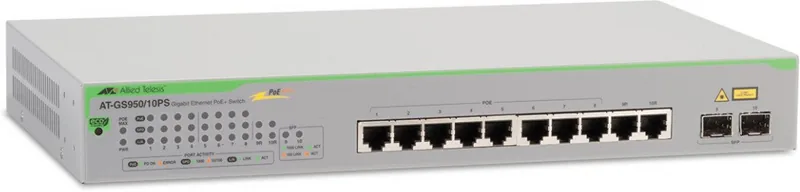
8x RJ-45, 2x RJ-45/SFP
Speeds
10x RJ-45 (10/100/1000Base-T), 2x SFP (100M/1Gb/s)
PoE
2x RJ-45 PoE+ or 4x RJ-45 PoE or 8x RJ-45 PoE (2x 30W or 4x 15.4W or 8x 7.5W), total: 75W
Backplane
20Gb/s, 14.88 Mpackets/s, 10KB Jumboframes, 128KB Packet buffer, 8K MAC addresses
Officially Supported Standards
802.1AX, 802.1D, 802.1Q, 802.1p, 802.1s, 802.1w, 802.1X, 802.3, 802.3af, 802.3at, 802.3az, 802.3i, 802.3u, 802.3x, 802.3z, IGMPv2
Configuration
Web interface
Cooling
Passive
Dimensions (W x H x D)
12.99 x 1.73 x 7.87 in, 1U
Weight
4.19 lbs
Color
Light Gray
Features
Metal chassis, removable mounting brackets, firmware updates possible
Note
For this device, "link aggregation" was officially specified using the obsolete standard IEEE802.3ad. The function has been managed since 2008 not by the IEEE "Working Group 3" (IEEE 802.3, CSMA/CD - Ethernet), but by "Working Group 1" (IEEE 802.1, High Level Interface - Internetworking) and is defined technically unchanged via IEEE 802.1AX.
Product Description
Allied Telesis GS950 Desktop Gigabit Smart Switch Overview
Networking infrastructure requires reliability and flexibility for modern businesses. The Allied Telesis GS950 Desktop Gigabit Smart Switch, 8x RJ-45, 2x RJ-45/SFP, 75W PoE+ Manual defines a robust solution for expanding connectivity options effectively. This series offers exceptional transfer rates suitable for demanding environments. Users benefit significantly from high-speed data links powered by Gigabit Ethernet standards ensuring fast throughput.
Hardware Features
The hardware configuration supports 10/100/1000 Mbps duplex links seamlessly. Specifically, the primary 10-port model features eight active PoE ports capable of delivering up to 75 watts of total power simultaneously. This allows network administrators to connect IP phones and cameras directly without needing separate power adapters. The remaining ports include two combo Gigabit RJ-45 ports and fiber SFP slots providing versatile uplink options.
Installation and Deployment
Deployment flexibility allows users to choose ideal locations easily. The unit can be placed on a flat desk using included rubber feet for stability. It also supports standard rack mounting in 19-inch cabinets. Wall installation is available for specific models to save valuable floor space. Proper ventilation is required around vents to maintain optimal operating temperatures and prevent overheating issues.
Management is handled through an intuitive web-browser interface without command line skills. No complex configuration steps are needed to set up VLANs or port security rules. The eco-friendly button provides a quick way to toggle status LEDs for energy savings when the switch is not being actively monitored. This feature helps reduce overall electricity usage in unattended office areas significantly.
Technical Performance
Performance remains consistent under heavy data loads effectively. The switch includes flow control to manage network traffic congestion during peak usage hours. Jumbo frames are supported for larger data packets common in storage networks. Security features help segment the network and control access levels to sensitive data effectively.
Power over Ethernet budgets vary by model version selected. The 75W model handles multiple high-consumption devices simultaneously without power drops. Power priority settings ensure critical equipment stays online during power budget limitations automatically. Fans assist in cooling for larger chassis models ensuring sustained operation without overheating concerns.
Compliance with safety standards ensures reliability in commercial business spaces fully. FCC and CE certifications indicate adherence to emission and safety norms required for legal operation. Regular maintenance keeps the system running smoothly for years. Contacting support is available through the official website for advanced troubleshooting needs. Overall, the design prioritizes ease of use and longevity for network expansion.
Search for 67,706 Manuals online


Type-in Brand or Model