
Allied Telesis AT-GS900/24 Manual
PDF manual · 43 Pages
English



Quick check
Incorrect answer, please try again.
Chat with your Allied Telesis AT-GS900/24 manual using AI
Get instant AI answers from your Allied Telesis AT-GS900/24 manual
Ask anything about the Allied Telesis AT-GS900/24. Answers come from this manual, with the pages they are based on.
Ask a Question
Do you recommend AT-GS900/24?
Yes NoFrequently Asked Questions
The GS900 supports 10/100/1000 Mbps per port. For 10 Mbps use Category 3 or better; for 100 and 1000 Mbps use Category 5 or Category 5e (100 m max). All ports are auto-negotiating and Auto MDI/MDI-X compliant.
Is this answer helpful?
Yes. The GS900 is fanless and operates silently, making it ideal for offices, classrooms, and home labs where low noise is important.
Is this answer helpful?
No. The GS900 is an unmanaged Layer 2 switch providing plug-and-play connectivity without VLAN, QoS configuration, SNMP, or web/CLI management capabilities.
Is this answer helpful?
Power savings occur per port when links are down and by reducing PHY power based on detected cable length. An eco switch on the front panel can also disable port LEDs (POWER LED remains active) to conserve additional power.
Is this answer helpful?
Yes. The unit includes brackets for rack or wall mounting. When wall mounting, the AC power connector must face down to meet safety requirements. Rack installation uses the provided #10-32 screws.
Is this answer helpful?
The switch accepts 100–240 VAC at 50/60 Hz. Maximum power consumption is approximately 14.1 W for the 24-port model, with lower draw under eco modes and when ports are inactive.
Is this answer helpful?
The AT-GS900/24 stores up to 16,000 MAC addresses and provides a packet buffer of approximately 3.5 Mb to handle transient traffic bursts and store-and-forward switching.
Is this answer helpful?
Advantages and Disadvantages
Advantages

- 24 auto-sensing 10/100/1000 Mbps RJ-45 ports for abundant wired connectivity.
- Fanless, silent operation suitable for noise-sensitive environments.
- Per-port power-saving (link-down and cable-length detection) and LED-disable eco mode.
- Supports jumbo frames up to 9216 bytes and non-blocking wire-speed switching.
- Flexible mounting: desktop, wall (AC connector down), or 19-inch rack with included brackets.
Disadvantages

- Unmanaged switch — no VLAN, QoS, SNMP or advanced configuration options.
- Limited to physical port-based features; lacks PoE for powering devices.
- Store-and-forward buffering is modest compared to higher-end switches.
- LEDs can be disabled for power saving but reduce on-site troubleshooting visibility.
- No redundant power or hot-swap capability for critical high-availability deployments.
Product Specification
Function
Switch
Type
Standalone, Rackmount (via mounting brackets), Wall mount (via mounting brackets)
Network ports
24x RJ-45
Speeds
24x RJ-45 (10/100/1000Base-T)
PoE
N/A
Backplane
9KB Jumboframes, 437KB packet buffer, 16K MAC addresses
Officially supported standards
802.3, 802.3ab, 802.3u, 802.3x, 802.3z
Configuration
unmanaged
Cooling
passive
Dimensions (WxHxD)
11.02x1.73x7.09in, 1U
Weight
3.95 lb
Color
light gray
Special features
Metal housing, removable mounting brackets
Product Description
Allied Telesis GS900 Desktop Gigabit Switch, 24x RJ-45 Manual
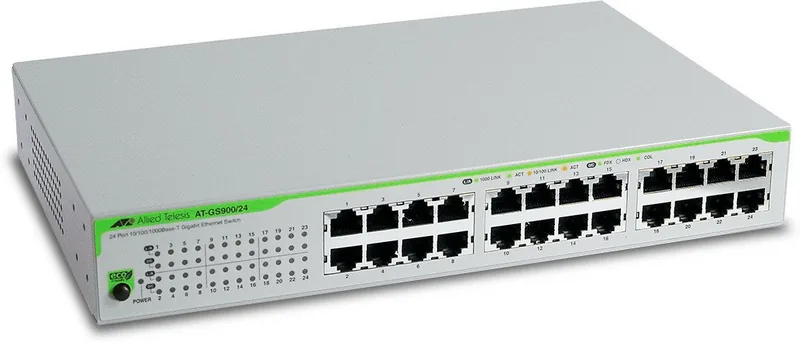
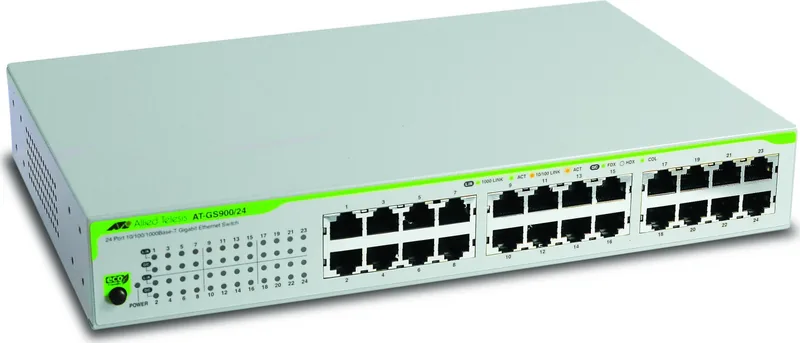
The Allied Telesis GS900 Desktop Gigabit Switch (24x RJ-45) is a compact, fanless Layer 2 unmanaged switch designed for small offices, classrooms, and edge network deployments. With 24 auto-sensing 10/100/1000 Mbps RJ-45 ports, the GS900 delivers wire-speed switching in a quiet 1U chassis and supports energy-saving features that reduce power draw without sacrificing connectivity.
Built for simple, reliable Ethernet connectivity, the GS900 emphasizes low operational power and straightforward installation. It offers auto-negotiation for speed and duplex, auto MDI/MDI-X to accept straight-through or crossover cables, and store-and-forward switching to ensure frame integrity. The switch maintains MAC address tables (up to 16K entries on the 24-port model) and supports jumbo frames up to 9216 bytes, enabling smoother transfers for large payloads.
Eco-friendly design is a highlight: per-port power reductions occur when links are down or when cable lengths are short, and an eco-friendly front switch can disable port LEDs to conserve additional power. Silent fanless operation makes the GS900 suitable for noise-sensitive environments. The integrated AC power supply works across 100–240 VAC, and the unit can be mounted on a desktop, wall, or in a 19-inch rack using the included brackets.
Operational robustness includes IEEE 802.3x flow control for full-duplex links, backpressure handling for half-duplex, and compatibility with standard twisted-pair cabling (Cat3 for 10 Mbps; Cat5/Cat5e for 100/1000 Mbps) with a 100 m maximum distance per port. System and port LEDs indicate power, link speed/activity, and duplex/collision status (LEDs may be disabled via eco mode). Safety and compliance certifications include FCC, CISPR/EN emissions, UL/CSA safety approvals, CE/RoHS, and international markings.
Installation is straightforward: attach rubber feet for desktop use, mount brackets for rack or wall installation (AC connector must face down for wall mounting), connect RJ-45 cables, apply AC power, and verify LED indicators. The switch runs a self-test on power-up and typically establishes gigabit links within a few seconds.
Notes:
- Silent, fanless design ideal for offices and home labs.
- Per-port and LED power-saving features lower operational energy consumption.
- Unmanaged operation means no CLI or GUI — plug-and-play simplicity.
Search for 67,732 Manuals online


Type-in Brand or Model