
Allied Telesis AT-FS716L Manual
PDF manual · 41 Pages
English



Quick check
Incorrect answer, please try again.
Chat with your Allied Telesis AT-FS716L manual using AI
Get instant AI answers from your Allied Telesis AT-FS716L manual
Ask anything about the Allied Telesis AT-FS716L. Answers come from this manual, with the pages they are based on.
Ask a Question
Do you recommend AT-FS716L?
Yes NoFrequently Asked Questions
The FS700 provides 16 RJ-45 10/100Base-TX ports that auto-negotiate between 10 Mbps and 100 Mbps and support half- and full-duplex operation according to connected devices.
Is this answer helpful?
No. The FS700 is an unmanaged switch designed for plug-and-play use. It requires no configuration, management interface, or software to operate, making it simple to deploy and maintain.
Is this answer helpful?
Energy features include per-port cable-length power adjustments, automatic link-down power savings that put ports into low-power monitoring mode, and an LED low-power mode toggled by the ecoFriendly push button to disable port LEDs.
Is this answer helpful?
Yes. The FS700 supports desktop placement, horizontal wall-mounting using included brackets and anchors, or 19-inch rack installation using the supplied rack-mount brackets and screws.
Is this answer helpful?
Use Category 5 or Category 5e (100-ohm) shielded or unshielded twisted-pair cable for 100 Mbps operation. Maximum cable length per port is 100 meters (328 feet).
Is this answer helpful?
Yes. The FS700 supports IEEE 802.3x flow control for full-duplex operation using PAUSE frames, and backpressure behavior in half-duplex to manage congestion and avoid packet loss.
Is this answer helpful?
The switch meets regulatory standards including FCC Class A, EN55022/CISPR emissions, EN55024 immunity, UL/EN60950 safety approvals (TUV), CSA, CE marking, and RoHS compliance.
Is this answer helpful?
Advantages and Disadvantages
Advantages

- 16x RJ-45 10/100Base-TX ports with Auto MDI/MDI-X — simple plug-and-play connectivity.
- ecoFriendly power-saving features (cable-length power, link-down savings, LED low-power mode).
- Fanless, low-power internal PSU supports 100–240 VAC and quiet operation.
- Store-and-forward switching with up to 8K MAC addresses and IEEE 802.3x flow control.
- Flexible deployment: desktop, wall-mount, or 19" rack with included accessories.
Disadvantages

- Unmanaged design — lacks VLANs, QoS configuration, SNMP or advanced layer-2 features.
- Limited to 10/100 Mbps per port — not suitable where Gigabit uplinks or ports are required.
- Class A emissions — may require corrective measures if used in sensitive residential environments.
- No PoE capability — cannot power IP phones, cameras, or wireless access points via Ethernet.
- Fixed MAC capacity (8K) may be limited in very large or complex switched environments.
Product Specification
Function
Switch
Type
Standalone, Rackmount (via mounting brackets), Wall mount (via mounting brackets)
Network ports
16x RJ-45
Speeds
16x RJ-45 (10/100Base-T)
PoE
N/A
Backplane
3.2Gb/s, 2.38Mp/s, 20KB packet buffer, 8K Mac addresses
Officially supported standards
802.3, 802.3u, 802.3x
Configuration
unmanaged
Cooling
passive
Dimensions (WxHxD)
7.24x1.73x4.88in, 1U
Weight
1.76lb
Color
light gray
Special features
Metal housing, removable mounting brackets
Note
Various revisions available.
Product Description
Allied Telesis FS700 Desktop Switch, 16x RJ-45 Manual
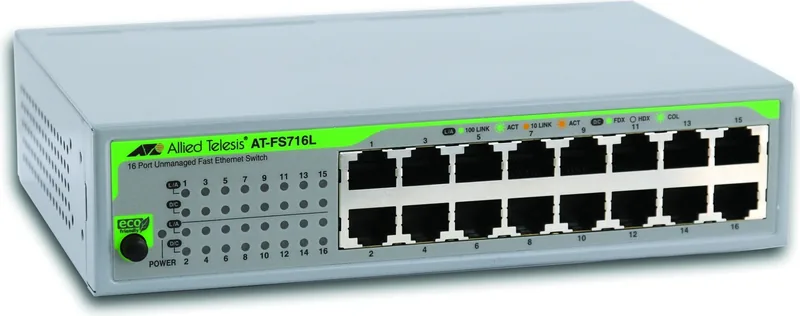
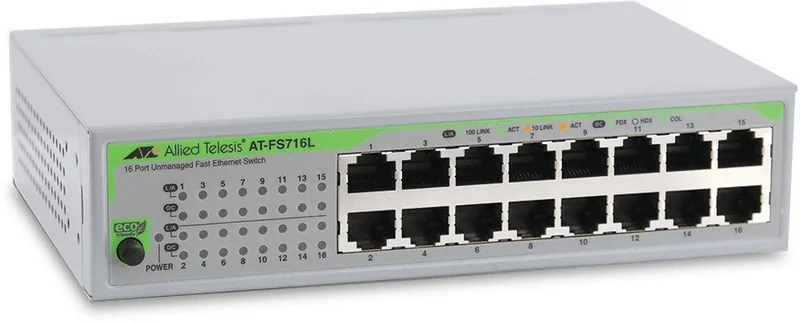
The Allied Telesis FS700 Desktop Switch is a compact, energy-efficient unmanaged switch designed for small offices and workgroups that need reliable 10/100 Mbps connectivity. With 16 RJ-45 10/100Base-TX ports, the FS700 provides straightforward plug-and-play networking without requiring configuration, making it ideal for fast deployments and low-maintenance environments.
This switch emphasizes low power consumption through ecoFriendly features: per-port cable-length power adjustment, link-down power savings, and an LED low-power mode accessible via a front-panel ecoFriendly push button. That push button disables port LEDs to save energy without affecting network operation. The FS700 uses a high-efficiency internal power supply that supports universal AC input (100–240 VAC, 50/60 Hz) and fanless operation for silent use in offices or near workstations.
Hardware highlights include Auto MDI/MDI-X on all ports, Auto-Negotiation for speed and duplex (IEEE 802.3u), store-and-forward switching, IEEE 802.3x flow control, and support for up to 8K MAC addresses. Port LEDs indicate link/activity, speed, and duplex status, while the system POWER LED shows overall power state. The switch supports desktop placement, wall-mounting, or rack installation with included brackets and accessories.
Under the hood, the FS700 uses standard Ethernet behaviors such as MAC address learning and aging, collision handling in half-duplex, and PAUSE-frame flow control in full-duplex. Maximum twisted-pair distance is 100 meters per port, and it accepts Cat3+ for 10 Mbps or Cat5/Cat5e for 100 Mbps. Safety and regulatory compliance include FCC Class A, EN/CISPR emissions, EN60950/TUV, UL, CSA, CE, and RoHS. Typical maximum power consumption is very low (measured examples: ~4.6 W for 16-port load at 100 Mbps with eco features active).
The included manual covers installation steps (desktop, rack, wall), cabling guidance, LED descriptions, basic troubleshooting, and technical specifications — making the FS700 a practical choice when simple, dependable Ethernet switching is required.
Notes
- Ports support Auto-Negotiation: use Auto-Neg on connected devices to avoid duplex mismatch.
- Use Cat5/Cat5e cabling for reliable 100 Mbps links and keep cable runs under 100 m.
- The ecoFriendly LED mode conserves power but hides per-port LED status.
Search for 67,732 Manuals online


Type-in Brand or Model