
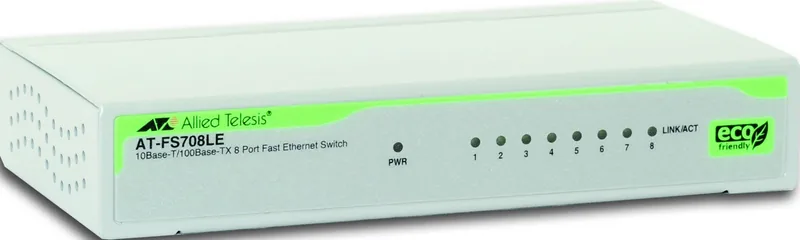
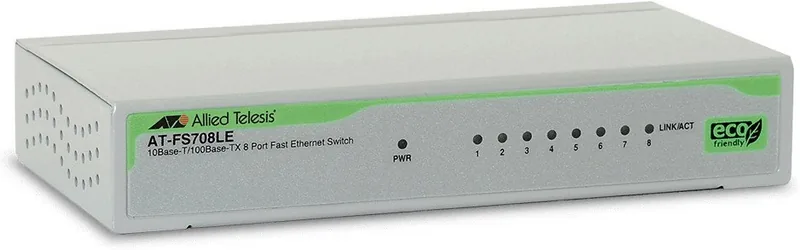
Allied Telesis AT-FS708LE Manual
PDF manual · 50 Pages
English



Quick check
Incorrect answer, please try again.
Chat with your Allied Telesis AT-FS708LE manual using AI
Get instant AI answers from your Allied Telesis AT-FS708LE manual
Ask anything about the Allied Telesis AT-FS708LE. Answers come from this manual, with the pages they are based on.
Ask a Question
Do you recommend AT-FS708LE?
Yes NoFrequently Asked Questions
It is used to connect multiple wired Ethernet devices in small networks. It suits workstations, servers, and other 10/100 Mbps equipment that need stable and easy-to-manage connections.
Is this answer helpful?
It provides eight RJ-45 twisted-pair ports. Each port supports 10Base-T and 100Base-TX connections, making it a practical choice for compact network setups.
Is this answer helpful?
Yes. The switch supports auto-negotiation, so each port can automatically select 10 or 100 Mbps depending on the connected device and link conditions.
Is this answer helpful?
Yes. Thanks to Auto MDI/MDI-X, the switch can work with either straight-through or crossover cables, which makes installation much easier.
Is this answer helpful?
You can place it on a desktop using the included rubber feet or mount it on a wall with suitable screws and anchors supplied by the installer.
Is this answer helpful?
Check power, cable condition, cable category, device power status, and the 100-meter distance limit. Also confirm that both devices are set for auto-negotiation when required.
Is this answer helpful?
Advantages and Disadvantages
Advantages

- Eight RJ-45 ports provide simple expansion for small wired networks.
- Auto MDI/MDI-X reduces cable confusion and speeds up installation.
- Auto-negotiation supports both 10 and 100 Mbps devices.
- Desktop or wall-mount options make placement flexible.
- LED indicators help with quick status checks and troubleshooting.
Disadvantages

- Limited to Fast Ethernet, so it is not ideal for gigabit networks.
- Uses an external power adapter, adding one more component to manage.
- Maximum cable distance is 100 meters per port.
- Connected devices should support auto-negotiation to avoid duplex issues.
Product Specification
Function
Switch
Type
Standalone, Wall mount (via mounting bracket)
Network ports
8x RJ-45
Speeds
8x RJ-45 (10/100Base-T)
PoE
N/A
Backplane
1.6Gb/s, 1.19Mp/s, 32KB packet buffer, 4K Mac addresses
Officially supported standards
802.3, 802.3u, 802.3x
Configuration
unmanaged
Cooling
passive
Dimensions (WxHxD)
5.12x0.98x2.76in
Weight
0.60lb
Color
light gray
Special features
removable mounting brackets, external power supply
Note
Various revisions available.
Product Description
Allied Telesis FS700 Desktop Switch, 8x RJ-45, DC Version
The Allied Telesis FS700 Desktop Switch, 8x RJ-45, DC Version is a compact Fast Ethernet switch designed for straightforward network expansion in small offices, home labs, and legacy 10/100 Mbps environments. It focuses on practical connectivity rather than complexity, offering eight auto-negotiating RJ-45 ports that make it easy to connect PCs, printers, servers, and other Ethernet devices with minimal setup.
One of the strongest advantages of this switch is its simplicity. The ports automatically adjust to 10 or 100 Mbps and support Auto MDI/MDI-X, which means you can use either straight-through or crossover cables without worrying about port type. That makes the Allied Telesis FS700 Desktop Switch, 8x RJ-45, DC Version Manual especially useful for users who want reliable networking without spending time on manual configuration.
Performance is built around store-and-forward switching, a method that helps the device inspect frames before passing them along. This improves network stability by reducing the chance that damaged packets are forwarded. Combined with flow control and status LEDs for power, link/activity, speed, and duplex mode, the switch gives you a clear view of what is happening on each port.
The DC-powered design also adds flexibility. It can be installed on a desktop using the included rubber feet or mounted on a wall when space is limited. With support for both 10Base-T and 100Base-TX cabling, it fits well into environments where dependable wired connections are still important. The maximum cabling distance of 100 meters per port keeps it suitable for typical office layouts and distributed workstation setups.
For small networks, the FS700 style switch is a practical fit because it balances low cost, easy deployment, and solid everyday switching behavior. It is not built for modern gigabit-heavy workloads, but within its intended role it delivers dependable access and clean cable management. If you need a simple access switch for mixed-speed devices, this Allied Telesis model remains a sensible choice.
Notes
- Best suited for 10/100 Mbps Ethernet environments.
- Use auto-negotiation on connected devices for the best results.
- Keep ventilation clear and follow the recommended cable limits.
Search for 67,732 Manuals online


Type-in Brand or Model