
Allied Telesis AT-FS705LE Manual
PDF manual · 60 Pages
English



Quick check
Incorrect answer, please try again.
Chat with your Allied Telesis AT-FS705LE manual using AI
Get instant AI answers from your Allied Telesis AT-FS705LE manual
Ask anything about the Allied Telesis AT-FS705LE. Answers come from this manual, with the pages they are based on.
Ask a Question
Do you recommend AT-FS705LE?
Yes NoFrequently Asked Questions
The switch features five RJ-45 ports. These ports are split into four standard ports and one uplink port, all supporting 10Base-T and 100Base-TX speeds with auto-negotiation capabilities.
Is this answer helpful?
Yes, the switch can be wall mounted vertically or horizontally using keyholes on the bottom. However, necessary screws and anchors must be sourced separately before installation.
Is this answer helpful?
The unit uses an external AC/DC power adapter. The electrical rating requires a 7.5V DC input with a maximum current of 1A for proper operation.
Is this answer helpful?
Yes, all twisted pair ports are IEEE 802.3u Auto-Negotiation compliant, automatically configuring speed and duplex mode to match connected end nodes.
Is this answer helpful?
Category 5 cable is recommended for connecting to the RJ-45 ports. The maximum operating distance for these connections is 100 meters or 328 feet.
Is this answer helpful?
The MAC address table in this switch has a capacity of 2,000 addresses, allowing it to track connected devices efficiently without manual intervention.
Is this answer helpful?
Yes, the device complies with FCC Part 15 Class B, UL 60950, and CE EN60950 standards to ensure safety and minimal radio frequency interference.
Is this answer helpful?
Advantages and Disadvantages
Advantages

- Auto-MDI-X technology simplifies cabling connections without requiring crossover cables for most setups.
- Non-blocking architecture allows simultaneous data transfer across all five ports for maximum throughput.
- Compact design fits easily on a desktop or allows wall-mounting for flexible installation options.
- MAC address table capacity of 2,000 ensures efficient traffic management for local network segments.
- Compliant with IEEE 802.3 and 802.3u standards for reliable 10Base-T and 100Base-TX performance.
Disadvantages

- Unmanaged configuration limits advanced network control and monitoring features for IT administrators.
- External power adapter is required which adds cable clutter compared to internal power solutions.
- No PoE support available on ports so devices must have their own independent power supply.
- Wall mount installation requires purchasing separate anchors and screws not included in package.
- Limited to 100 meter cable distance which restricts placement options for large network layouts.
Product Specification
Function
Switch
Type
Standalone, Wall Mount (via Mounting Bracket)
Network Ports
5x RJ-45
Speeds
5x RJ-45 (10/100Base-T)
PoE
N/A
Backplane
1 Gb/s, 744 kpps, 16 KB packet buffer, 2K MAC addresses
Officially Supported Standards
802.3, 802.3u, 802.3x
Configuration
unmanaged
Cooling
passive
Dimensions (WxHxD)
4.57 x 2.76 x 2.76 in
Weight
0.49 lbs
Color
light gray
Features
removable mounting brackets, external power supply
Note
Multiple revisions available.
Product Description
Allied Telesis FS700 Desktop Switch Overview
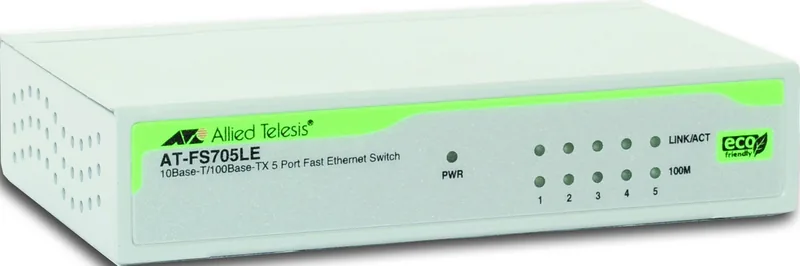
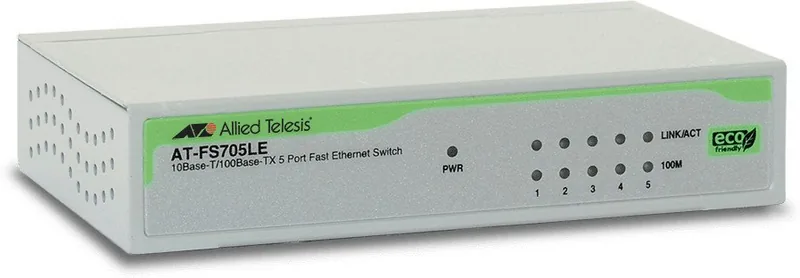
The Allied Telesis FS700 Desktop Switch, 5x RJ-45, DC-Version, offers a robust and cost-effective networking solution for small office or home environments. Designed with simplicity in mind, this unmanaged switch handles Ethernet traffic between end nodes operating at either 10 Mbps or 100 Mbps without complex configuration. It features five RJ-45 ports that support auto-negotiation for speed and duplex modes, ensuring optimal performance when connecting workstations or servers. This device is engineered to provide seamless integration into existing network infrastructures with minimal setup effort.
Key Features and Performance
Each of the five ports supports both 10Base-T and 100Base-TX standards. The device includes four standard ports and one uplink port, allowing for flexible network topologies. The uplink port facilitates connection without requiring crossover cables due to auto-mdi-x technology. This simplifies setup significantly for non-technical users. The switch also boasts a MAC address table capacity of 2,000 addresses, ensuring efficient data traffic management within the local network segment. The non-blocking architecture allows simultaneous data transfer across all ports, maximizing throughput for connected devices.
Physical Design and Installation
Compact and versatile, the FS700 fits easily on a desktop or can be wall-mounted. It comes with an external power adapter for flexibility in power sourcing. Safety guidelines are crucial during installation to ensure operational longevity and safety. Proper ventilation is required, so placing the device in a dust-free environment away from sources of electrical noise is recommended. The unit operates within specific temperature ranges to guarantee stability. Installation involves attaching rubber feet or mounting brackets depending on your preference. The power adapter delivers the necessary DC voltage to operate the system reliably.
Reliability and Support
This switch is compliant with various international safety and emission standards, including FCC Class B and UL certifications. Troubleshooting steps involve checking power connections and cable integrity. Continuous support is available through official channels for warranty registration and technical inquiries. This makes it a reliable choice for expanding network capabilities without the need for expensive managed switches. Users can easily verify connectivity through the status lights located on the front panel, which indicate power supply and data transmission activity.
Summary and Conclusion
The Allied Telesis FS700 Desktop Switch provides essential connectivity for Ethernet networks requiring straightforward configuration. Its auto-negotiating ports and compact design make it an ideal choice for small setups looking to improve bandwidth distribution. By adhering to strict safety and performance standards, this equipment ensures a stable network connection for all connected end-nodes. It is a practical addition to any environment needing basic network switching solutions.
Technical Specifications
The unit measures approximately 100 x 78.5 x 26 mm, fitting discreetly on desks. Maximum power consumption is 8 watts, ensuring energy efficiency. Operating humidity ranges from 5% to 90%, providing environmental resilience. With a maximum altitude of 3,048 meters, it supports diverse geographic locations. The RJ-45 connectors support Category 5 cables up to a distance of 100 meters.
Search for 67,732 Manuals online


Type-in Brand or Model