
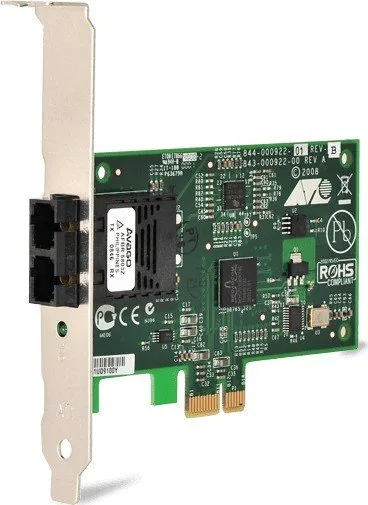
Allied Telesis AT-2712FX/SC Manual
PDF manual · 92 Pages
English



Quick check
Incorrect answer, please try again.
Chat with your Allied Telesis AT-2712FX/SC manual using AI
Get instant AI answers from your Allied Telesis AT-2712FX/SC manual
Ask anything about the Allied Telesis AT-2712FX/SC. Answers come from this manual, with the pages they are based on.
Ask a Question
Do you recommend AT-2712FX/SC?
Yes NoFrequently Asked Questions
The series offers two primary models including AT-2712FX/SC which uses fiber optics and AT-2912T which uses standard twisted-pair connectors. Each model targets specific network infrastructure needs ranging from long-distance reliability to standard office wiring setups.
Is this answer helpful?
Yes, the driver software is compatible with various Linux variants including versions starting from 2.4.24. Users can build the driver from source tar files or install RPM packages depending on their distribution requirements for kernel compatibility.
Is this answer helpful?
Security is handled through onboard cryptographic processors that perform encryption tasks. This offloads security protocols from the main system CPU allowing it to focus on other critical functions while maintaining network integrity without performance bottlenecks.
Is this answer helpful?
The adapter requires a standard PCIe 2.0 x1 slot for installation. It fits into most modern server and workstation motherboards that support this interface standard and can be secured with a Phillips-head screw into the chassis.
Is this answer helpful?
The adapter operates at 3.3 Volts and consumes approximately 3.22 Watts. This low power consumption aligns with energy efficiency goals for enterprise environments and helps reduce heat generation within the server or workstation chassis.
Is this answer helpful?
Yes, Wake on LAN capabilities are included. Administrators can configure the system to wake from sleep states when a specific wake-up frame is received allowing for efficient remote management and troubleshooting across the network segments.
Is this answer helpful?
Yes, warranty coverage applies provided an authorization number is obtained before returning the product. Users must pack the item in original packaging and follow specific return procedures to ensure their coverage remains valid during repair processes.
Is this answer helpful?
Advantages and Disadvantages
Advantages

- Hardware encryption offloads CPU for better performance
- Supports PCIe 2.0 x1 interface for modern systems
- Dual models offer fiber or copper connectivity options
- Low power consumption aids green technology goals
- Integrated security protects network traffic from eavesdropping
Disadvantages

- Limited to PCIe x1 bandwidth compared to x4 slots
- Fiber model requires specific SC connector and cable type
- Driver installation requires specific OS administrative privileges
- No included software media requires manual driver download
- Configuration tools may vary across different operating systems
Product Specification
Type
LAN Adapter
Form Factor
1x PCIe Card (replaceable bracket: full height and low profile bracket included)
Interface
1x PCIe 2.0 x1
Connection
1x SC-Duplex
Transmission
1x SC-Duplex (100Base-FX 1310nm)
Power
Power supply only via interface
Dimensions
4.21x2.20 inches (WxH, without bracket)
Weight
0.09 lbs
Compatibility
Universal
Features
Wake on LAN, SNMP Management
Product Description
Allied Telesis 2712 Series LAN-Adapter Overview
The Allied Telesis 2712 Series LAN-Adapter brings secure connectivity to modern server and workstation environments. Designed for high-performance networking, these adapters integrate seamlessly into PCIe 2.0 x1 slots. Users benefit from robust encryption capabilities that offload processing from the main CPU. This ensures system resources remain available for critical tasks while maintaining network security. The hardware accelerates cryptographic operations so that host processing power is not consumed by security protocols. This architecture is vital for maintaining high throughput during heavy data loads without compromising integrity.
Key Features and Performance
The series offers flexibility with models like the AT-2712FX/SC and AT-2912T. The FX model utilizes fiber optic connections for long-distance reliability, while the T model uses standard twisted-pair wiring for convenience. Both support full-duplex operation at speeds up to Gigabit Ethernet speeds. Advanced power management features reduce energy consumption during idle periods, aligning with green technology initiatives. The PCIe interface ensures fast data transfer rates compatible with current motherboard standards. Flow control mechanisms prevent packet loss during high traffic conditions.
Installation and Configuration
Installing the hardware requires attention to safety precautions and electrostatic discharge protocols. Once seated in the appropriate slot, driver software must be applied carefully. Drivers are not shipped on disc so users must navigate the web. This keeps the package lightweight but requires internet access. Support spans multiple platforms including Windows Server, Windows XP, and Linux variants. Administrators can modify configuration properties through the operating system tools to optimize performance parameters. Wake on Lan allows remote wake up which saves time.
Security Integration
Security is paramount in this design. The onboard cryptographic processors handle data encryption and decryption tasks directly. This hardware-level assistance prevents bottlenecks often seen with software-only solutions. Users can configure IPSec settings to protect local and wide area network traffic from unauthorized access. The integration with Vista Next Generation TCP/IP stacks allows for granular traffic filtering. This ensures sensitive information remains safe from eavesdropping on the network segments.
Maintenance and Support
Regular updates ensure compatibility with evolving operating systems. Support resources allow users to retrieve specific driver versions for different kernel requirements. Diagnostic tools exist for verifying physical link integrity in case of connectivity issues. Maintenance involves simple software updates rather than physical component replacement unless hardware failure occurs. Return procedures require an authorization number to protect warranty coverage during repair processes.
Conclusion
Selecting the right network adapter impacts overall infrastructure stability. This series provides a balanced approach between security, speed, and manageability. Whether connecting via fiber or copper, the design prioritizes consistent data integrity. Organizations seeking reliable secure network interfaces will find these solutions suitable for enterprise deployment. Proper configuration maximizes the benefits of the security features.
Search for 67,732 Manuals online


Type-in Brand or Model