
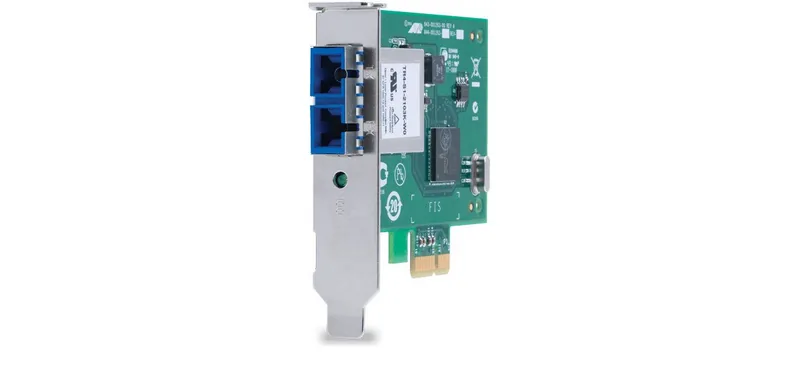
Allied Telesis AT-2711FX/ST Manual
PDF manual · 136 Pages
English



Quick check
Incorrect answer, please try again.
Chat with your Allied Telesis AT-2711FX/ST manual using AI
Get instant AI answers from your Allied Telesis AT-2711FX/ST manual
Ask anything about the Allied Telesis AT-2711FX/ST. Answers come from this manual, with the pages they are based on.
AT-2711FX/ST Maintenance Schedule
Rub the ferrule tip on the cleaning surface in one direction only. Pick up the tip at the end to avoid static damage. Inspect with a scope if available.
Insert a specially treated lint-free or alcohol-free swab into the adapter and rub the ferrule tip. Do not use household cotton swabs or alcohol.
Ask a Question
Do you recommend AT-2711FX/ST?
Yes NoDo you recommend AT-2711FX/ST?
Yes NoFrequently Asked Questions
The adapter supports Microsoft Windows versions including XP, Vista, 7, 8, Server 2003, 2008, and 2012. It also works with Linux operating systems including Ubuntu and Red Hat.
Is this answer helpful?
Drivers must be downloaded from the Allied Telesis website. You can install them using Device Manager on Windows or configure the network interface using ethtool on Linux systems.
Is this answer helpful?
Yes, the hardware is covered under limited warranties. Users are advised to register their product online to maintain warranty eligibility.
Is this answer helpful?
The card operates at Fast Ethernet speeds of 100 Mbps. It supports both full-duplex and half-duplex modes using fiber optic cabling.
Is this answer helpful?
Yes, the series offers SC, LC, ST, and MT fiber adapter options to suit different network infrastructure requirements.
Is this answer helpful?
Yes, the adapter supports Wake on LAN features including Wake on Magic Packet and Wake on Pattern Match for remote power management.
Is this answer helpful?
Do not look at fiber optic cable ends or stare into laser beams. Ensure the system power is off and unplugged during installation to avoid electrical hazards.
Is this answer helpful?
Advantages and Disadvantages
Advantages

- PCIe x1 v1.1 interface supports wide compatibility with older and modern PCIe slots.
- Operates at 100 Mbps Full/Half duplex for stable fiber optic connectivity.
- Broad operating system support including Windows XP to Server 2012 and Linux.
- Advanced properties like Receive Side Scaling and Wake on LAN reduce CPU load.
- Supports Energy Efficient Ethernet to optimize power consumption effectively.
Disadvantages

- Driver software must be downloaded from website; no driver CD included.
- Manual configuration required for Linux systems regarding speed and duplex settings.
- Fiber optic interface limits use to networks with optical cabling capability.
- Low-profile bracket shipped but may need replacement for standard chassis.
- Installation requires following safety precautions for electrical and laser hazards.
Product Specification
Type
LAN Adapter
Form Factor
1x PCIe Card (interchangeable bracket: full height and low profile bracket included)
Interface
1x PCIe 1.1 x1
Connector
1x ST-Duplex
Transmission
1x ST-Duplex (100Base-FX)
Power Supply
Power supply via interface only
Chipset
Broadcom BCM57762 (LAN Adapter, ST-Duplex)
Weight
0.11 lbs
Compatibility
universal
Features
PXE Bootrom 2.1, Wake on LAN, SNMP Management, VLAN, Audio-Video Bridging (AVB)
Product Description
Enhancing Network Connectivity with High-Performance Fiber Adapters
In modern data centers, maintaining robust network connections is essential for operational efficiency. The Allied Telesis 2711 Series LAN-Adapter offers a reliable pathway for connecting PCIe compliant servers to fast Ethernet networks utilizing fiber optic cabling. This hardware solution operates at 100 Mbps in both full-duplex and half-duplex modes, ensuring stable throughput for bandwidth-intensive applications.
A standout feature of this adapter series is the versatility in optical connector options. Users can select from SC, LC, ST, or MT fiber adapters depending on their existing infrastructure. Specifically, the ST-Duplex variant is popular for legacy systems requiring the ST connector interface. When technical teams search for the Allied Telesis 2711 Series LAN-Adapter, ST-Duplex, PCIe x1 Manual, they discover comprehensive installation and configuration instructions. The device is built on the Broadcom BCM57762 chipset, providing high reliability and performance standards.
Deployment involves replacing a low-profile bracket with a standard one if necessary to fit the server chassis. Safety precautions are critical during installation due to Class 1 laser safety concerns and electrical hazards. The adapter hardware includes a single LED to indicate valid links, no link status, or active packet transmission at 100 Mbps. Once installed, the driver software must be downloaded from the manufacturer website since no physical media is included in the shipping package. Each card includes a standard-profile bracket and an antistatic bag for storage.
Operating system compatibility is extensive, covering Windows versions from XP through Server 2012 and Linux distributions. On Windows systems, the driver integrates with Device Manager for updates. Linux systems require manual configuration of the network interface using ethtool to disable auto-negotiation. Advanced properties allow administrators to tweak settings such as Receive Side Scaling, Wake on LAN, and Jumbo Frames. These features reduce CPU utilization and improve overall packet handling efficiency.
Energy efficiency is another major consideration. The adapter supports Energy Efficient Ethernet standards to optimize power consumption. For troubleshooting, users can check port LEDs, test network connectivity via ping commands, and review driver properties. The product comes with a limited warranty valid upon registration. Whether upgrading legacy hardware or deploying new fiber nodes, this PCIe x1 network adapter provides a solid foundation for fast Ethernet connectivity.
Additional capabilities include support for VLAN tagging and Quality of Service policies. This integration ensures prioritized traffic handling across the network backbone. The 802.1p QOS feature allows packet prioritization, while VLAN ID settings facilitate network segmentation. Large Send Offload functionality further reduces CPU load by segmenting packets before transmission. Administrators can also configure Wake on Magic Packet features for remote server management.
Installation guides emphasize the need for static-free environments and proper grounding. Users should verify system BIOS versions before beginning the physical installation process. Compliance with FCC Class B and RoHS standards makes this unit safe for commercial use. The PCIe x1 v1.1 interface ensures backward compatibility with older servers while supporting modern performance requirements. Total system memory requirements are minimal at 128 MB RAM. Proper driver installation is key to unlocking all features. Administrators should update drivers regularly using Device Manager to ensure security patches are applied promptly. With its blend of legacy support and modern features, this series remains a valuable asset for network upgrades requiring optical media.
Search for 67,732 Manuals online


Type-in Brand or Model