
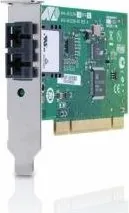
Allied Telesis AT-2701FXa/ST Manual
PDF manual · 94 Pages
English



Quick check
Incorrect answer, please try again.
Chat with your Allied Telesis AT-2701FXa/ST manual using AI
Get instant AI answers from your Allied Telesis AT-2701FXa/ST manual
Ask anything about the Allied Telesis AT-2701FXa/ST. Answers come from this manual, with the pages they are based on.
AT-2701FXa/ST Maintenance Schedule
Always keep a dust cap on a fiber optic cable when it is not in use to prevent dirt and smudges from disrupting light transmission.
Use a cartridge-type cleaner or lint-free swab to clean the ferrule tip if dirty. Inspect with a scope if available.
Ask a Question
Do you recommend AT-2701FXa/ST?
Yes NoFrequently Asked Questions
The adapter supports Windows 7, Windows XP, and Linux operating systems. Driver software must be downloaded manually from the manufacturer website for installation.
Is this answer helpful?
Insert the card into an open PCI slot, secure it, and connect the network cables. Ensure the system is powered off before installation and follow safety precautions regarding electrical grounding.
Is this answer helpful?
Yes, the Network Address (LAA) property allows replacing the original MAC address with a user-defined locally administered address for unique identification on the network.
Is this answer helpful?
The device consumes 2.5 Watts at 3.3V and 3.3 / 5V signaling voltage. Environmental specifications include operating temperatures from 0°C to 40°C.
Is this answer helpful?
Use approved cartridge-type cleaners or lint-free swabs. Do not use cotton swabs or alcohol. Clean in one direction and inspect with a scope if possible.
Is this answer helpful?
LED indicators show link status and activity. On indicates a valid link, off means no link, and flashing signifies transmission or reception of network packets at 100 Mbps.
Is this answer helpful?
Yes, the product conforms to the European Union Restriction of the Use of Certain Hazardous Substances in Electrical and Electronic Equipment regulations.
Is this answer helpful?
Advantages and Disadvantages
Advantages

- Supports 100 Mbps full-duplex and half-duplex transmission modes for flexible network speeds across different segments.
- Compatible with Windows 7, Windows XP, and Linux operating systems for broad software support and integration.
- Includes Wake-on-LAN features to allow computers to wake from low-power modes remotely for easier management.
- Compliant with FCC Class B and RoHS standards ensuring regulatory and environmental safety for offices.
- Features LED indicators for visual status updates on link availability and data transmission activity levels.
Disadvantages

- Auto-negotiation must be manually disabled on fiber ports for Linux systems to function correctly at full speed.
- Requires administrative privileges to install or update the driver software on Windows systems without issues.
- No software driver CD is provided with the shipment requiring manual download from the website for setup.
- Must use specific approved cleaning tools for fiber optic connectors to prevent permanent damage to the tips.
- Supports only Fast Ethernet speeds and does not offer Gigabit Ethernet capabilities for high speed needs.
Product Specification
Type
LAN Adapter
Form Factor
1x PCI Card (interchangeable faceplate: full height and low profile faceplate included)
Interface
1x PCI 2.2
Connection
1x ST Duplex
Transmission
1x ST Duplex (100Base-FX)
Power
Power only via Interface
Chipset
Realtek RTL8139 (LAN Adapter, SC Duplex)
Dimensions
4.92 x 2.52 in (W x H, without faceplate)
Compatibility
universal
Features
VLAN, Wake on LAN, PXE Boot ROM 2.1
Product Description
Overview
The Allied Telesis 2701 Series LAN-Adapter offers robust connectivity solutions for enterprises requiring high-speed fiber optic integration into their existing network infrastructure. This hardware leverages the Realtek RTL8139D Ethernet controller to deliver Fast Ethernet capabilities over 100BASE-FX standards consistently. Users can choose between SC or ST fiber optic connectors depending on their specific infrastructure needs. The PCI 2.2 interface ensures compatibility with standard motherboards, providing a reliable bridge between legacy systems and modern networking requirements for stable operation and high performance data transfer.
Key Models
One of the key models features an ST-Duplex connector suitable for demanding environments. When evaluating performance specifications within the Allied Telesis 2701 Series LAN-Adapter, ST-Duplex, PCI 2.2 Manual context, the device supports full-duplex transmission at 100 Mbps efficiently. This ensures optimal data throughput for critical network segments. Additionally, the dual-port series includes a twisted pair copper port, allowing flexibility for mixed media connections alongside fiber links for broader coverage and adaptability and adversity.
Installation
Installation procedures are straightforward for system administrators managing complex environments. The hardware requires an open PCI slot and adheres to strict safety precautions regarding laser emissions and electrostatic discharge. Once installed, configuring the network interface involves selecting appropriate speed and duplex settings. For Linux users, manual configuration of interface parameters is necessary since auto-negotiation must be disabled on fiber ports. Windows 7 and Windows XP systems benefit from driver software that integrates seamlessly via Device Manager and tools.
Features
Advanced properties allow for deep customization of networking behavior and security. Administrators can manage Wake-on-LAN functionality, VLAN IDs, and local administration addresses. These features ensure network stability and security. Features include Early Tx Threshold adjustment and PCI PME power management. Safety features include compliance with RoHS standards and FCC Class B emissions limits, ensuring environmental safety. Regular maintenance of fiber optic connectors is crucial to prevent signal degradation. Cleaning using approved swabs maintains performance integrity without damaging the delicate ferrule tips.
Monitoring
LED indicators provide immediate visual feedback on link status and network activity levels. A steady light confirms a valid connection while flashing indicates active data transfer. Troubleshooting steps involve checking physical cabling, verifying BIOS updates, and inspecting the adapter. The system requirements specify at least 128 MB of RAM. This adapter series stands out for its reliability and flexibility in mixed networking topologies. Organizations seeking scalable Ethernet solutions will find these network adapters suitable for expanding bandwidth significantly and reliably.
Search for 67,732 Manuals online


Type-in Brand or Model