
Allied Telesis 2973 Series Manual
PDF manual · 178 Pages
English



Quick check
Incorrect answer, please try again.
Chat with your Allied Telesis 2973 Series manual using AI
Get instant AI answers from your Allied Telesis 2973 Series manual
Ask anything about the Allied Telesis 2973 Series. Answers come from this manual, with the pages they are based on.
2973 Series Maintenance Schedule
Clean all fiber optic connectors before use using a cartridge cleaner or swab to remove smudges or dirt that can disrupt light transmission.
Always keep the dust cap on a fiber optic cable or cover the port with the provided plug when not connected to prevent dust contamination.
Ask a Question
Do you recommend 2973 Series?
Yes NoDo you recommend 2973 Series?
Yes NoFrequently Asked Questions
The series supports Microsoft Windows Server 2003, 2008, and 2008 R2, as well as Windows Vista and 7. Linux distributions are supported including Red Hat Enterprise Linux and SUSE Linux. Virtualization platforms like ESX Server and Citrix XenServer are also compatible. Older systems like MS-DOS have driver support available for specific use cases.
Is this answer helpful?
You can install the Linux drivers using an RPM package or by building from the source TAR file. For RPM installation, use the rpm install command with the source package. If building from source, extract the TAR file, run make in the bnx2 folder, and install using make install. Ensure your kernel version is 2.4.x or higher for compatibility.
Is this answer helpful?
The adapters offer speeds ranging from 10 Mbps to 10 Gbps depending on the model. The AT-2973SX supports 1 Gigabit over fiber. The AT-VNC10S supports 10 Gigabit speeds. The copper variants like AT-2973T support 10, 100, or 1000 Mbps. Speed depends on the bus connector and cabling type used.
Is this answer helpful?
Yes, the adapters feature an iSCSI controller that allows iSCSI offload. This reduces CPU utilization by handling storage protocols in hardware. Linux environments can use the bnx2i driver for iSCSI offload on kernels 2.6.16 and newer. It maintains system flexibility and supports current and future OS convergence.
Is this answer helpful?
Wake on LAN is supported on the AT-2973T and AT-2973T/4 adapters only. It is not supported on the AT-2973SX and AT-VNC10S models. For supported models, this feature enables the network adapter to connect at a specific speed while waiting for a wake signal. Ensure your switch supports both 1000 and 10/100 Mbps speeds.
Is this answer helpful?
Observe electrical safety standards to prevent lethal voltage risks. Fiber optic ports contain Class 1 lasers so do not stare into exposed connectors. Always cover ports when disconnected to prevent skin or eye damage. Ground yourself to prevent electrostatic discharge damage to the card. Remove metallic objects and use insulated tools during installation.
Is this answer helpful?
For copper ports, use Standard TIA/EIA 568-B-compliant Category 3 or higher. For 1000 Mbps speeds, Category 5 or higher is required. Use shielded or unshielded cabling with 100 ohm impedance. Maximum distance is 100 meters for Gigabit speeds. Copper ports support auto-negotiation for duplex and speed settings.
Is this answer helpful?
Advantages and Disadvantages
Advantages

- TCP Offload Engine reduces CPU usage and boosts performance significantly.
- iSCSI controller allows efficient storage networking over Ethernet.
- Supports Windows, Linux, and Virtualization platforms widely.
- Power management features reduce energy consumption during idle times.
- PCIe interface delivers high bandwidth speeds for server applications.
Disadvantages

- Fiber optic ports require Class 1 laser safety precautions always.
- WOL feature not supported on AT-2973SX and AT-VNC10S adapters.
- Driver compilation for older Linux kernels may require manual changes.
- Specific cable types needed for copper ports to achieve Gigabit speeds.
- Bracket replacement required for low-profile cases on some models.
Product Specification
Type
LAN Adapter
Form Factor
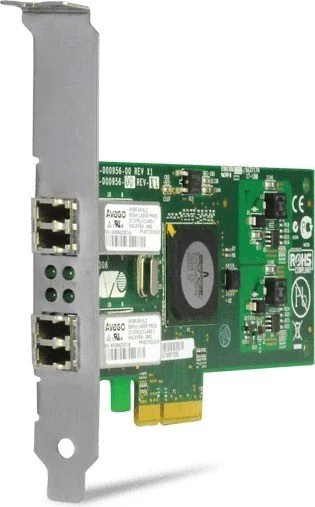
1x PCIe Card (interchangeable bracket: full height and low profile bracket included)
Interface
1x PCIe 2.0 x4
Connection
2x LC-Duplex
Transmission
2x LC-Duplex (1000Base-SX 850nm 62.5/125um MM 721.78ft, 1000Base-SX 850nm 50/125um MM OM2 1804.46ft)
Power
Powered via Interface only
Chipset
Broadcom BCM5709S (LAN Adapter, LC-Duplex)
Dimensions
5.71x2.20 inches (WxH, without bracket)
Weight
2.40 oz
Compatibility
universal
Features
iSCSI, LACP, PXE Boot ROM 2.1, VLAN, SNMP Management
Product Description
Upgrade Your Server Infrastructure with High Speed Networking
Modern business operations demand reliable and fast connectivity solutions that scale. When selecting network interface cards, performance and compatibility remain top priorities for IT managers. The Allied Telesis 2973 Series LAN Adapter provides robust solutions for these specific requirements. Specifically, the model featuring 2x LC-Duplex ports and a PCIe 2.0 x4 interface stands out for fiber optic applications. This hardware ensures stable data transmission over long distances without signal degradation or loss.
To get the most out of this equipment, referring to the Allied Telesis 2973 Series LAN Adapter, 2x LC-Duplex, PCIe 2.0 x4 Manual is highly recommended for initial setup. This comprehensive resource contains detailed installation instructions for various environments and configurations. It covers advanced driver settings that maximize throughput and system stability. By utilizing these guides, system administrators can avoid common pitfalls during deployment and ensure seamless integration with existing infrastructure.
Powerful Features for Enterprise Environments
These adapters integrate TCP Offload Engine technology directly into the hardware components. This functionality frees up critical system resources for applications rather than network management tasks. The iSCSI support allows for efficient storage networking integration without straining the CPU. You can manage heavy database workloads with reduced latency and improved overall processing speeds. Power management features automatically lower consumption during idle periods, reducing operational costs and physical heat output significantly.
The series supports multiple operating systems including Microsoft Windows Server and Linux distributions. Linux users benefit from source packages and RPM tools for easy updates on enterprise kernels. Windows environments receive dedicated drivers for seamless integration and management tools. Remote boot capabilities via PXE are enabled for efficient deployment across large network clusters. Virtualization support ensures compatibility with major hypervisors like VMware and Microsoft Hyper-V for modern data centers.
Installing these cards requires adherence to strict electrical safety standards and protocols. Care must be taken to prevent damage during physical installation procedures. Fiber optic ports contain Class 1 lasers, so users should never stare into exposed connectors under any condition. Protective covers must be used when cables are disconnected to prevent potential eye damage risks. Replacing brackets allows for flexibility in standard or low-profile server chassis cases.
Proper cabling selection is also essential for optimal data transmission performance. Fiber connections require specific multimode cables depending on distance requirements for the network layout. Copper ports support Category 5 or higher cables for reliable Gigabit Ethernet speeds. Regular driver updates keep the adapter compatible with new security protocols released by vendors. Investing in this hardware leads to a resilient network foundation that scales with your organizational needs.
Search for 67,732 Manuals online


Type-in Brand or Model