
Allied Telesis 2916 Series Manual
PDF manual · 142 Pages
English



Quick check
Incorrect answer, please try again.
Chat with your Allied Telesis 2916 Series manual using AI
Get instant AI answers from your Allied Telesis 2916 Series manual
Ask anything about the Allied Telesis 2916 Series. Answers come from this manual, with the pages they are based on.
Ask a Question
Do you recommend 2916 Series?
Yes NoFrequently Asked Questions
It supports Windows Server 2003, XP, 2008 R2, Vista, 7, Linux, Novell NetWare, and MS-DOS for broad compatibility.
Is this answer helpful?
Connect fiber optic cables to the LC or SC ports ensuring proper alignment and safety cover usage for protection.
Is this answer helpful?
No, IPSec Offload applies only to Windows Vista and Windows 7 operating systems running the specific driver.
Is this answer helpful?
It pairs multiple adapters for redundancy, redirecting traffic if the primary adapter fails without user impact.
Is this answer helpful?
Yes, it contains Class 1 lasers so do not stare into beams or inspect cable ends with lenses.
Is this answer helpful?
Yes, it supports frames up to 9 KB but requires a compatible switch to process large frames.
Is this answer helpful?
It is covered under limited warranties provided by Allied Telesis listed on their support website.
Is this answer helpful?
Advantages and Disadvantages
Advantages

- High speed transfer rates up to 2Gbps improve network performance significantly over legacy systems without bottlenecking data.
- Failover teaming ensures business continuity by maintaining sessions during primary link failures without impacting users.
- Jumbo frame support allows larger data packets reducing processing overhead for large file transfers and backups.
- Supports multiple operating systems including Windows, Linux, and Novell NetWare for versatile use cases.
Disadvantages

- Wake On Lan is only supported on copper variants due to power limitations on the PCI bus regarding fiber.
- Laser safety warnings require careful handling when connecting fiber optic cables to ports to avoid eye injury.
- Driver updates may require system reboots to properly load new configurations for all devices in the environment.
Product Specification
Type
LAN Adapter
Form Factor
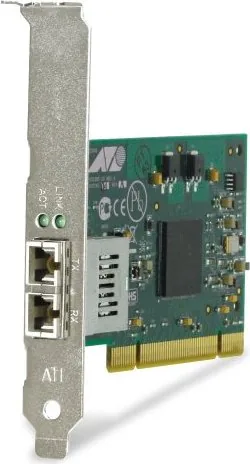
1x PCI Card (replaceable faceplate: full height and low profile faceplate included)
Interface
1x PCI 2.2
Connection
1x LC-Duplex
Transmission
1x LC-Duplex (1000Base-SX 850nm 62.5/125um MM OM1 902.23ft, 1000Base-SX 850nm 50/125um MM OM2 1804.46ft)
Power Supply
Power Supply via Interface only
Chipset
Broadcom BCM5703S (LAN Adapter, LC-Duplex)
Dimensions
4.72x2.52in (WxH, without faceplate)
Weight
0.15 lbs
Compatibility
universal
Features
VLAN, LACP, PXE Boot ROM 2.1, SNMP Management
Product Description
Enhancing Network Performance with Allied Telesis Adapters
Managing network congestion in modern enterprise environments requires robust hardware. The Allied Telesis 2916 Series LAN Adapter, LC Duplex, PCI 2.2 Manual provides comprehensive guidance on integrating this robust network interface into servers and workstations effectively. These Gigabit Ethernet adapters deliver data transfer rates up to 2Gbps, representing a twenty-fold increase over standard Fast Ethernet solutions found in older setups. This speed boost is critical for high-bandwidth applications and backbone connectivity where latency must be minimized for peak performance.
Installation requires adherence to strict safety protocols, particularly regarding fiber optic usage and electrical grounding. The hardware supports multiple operating systems including Windows Server versions, Linux, and Novell NetWare. Configuration options allow administrators to adjust Quality of Service settings, Flow Control, and Jumbo Frame sizes for optimal traffic management. Failover teaming capabilities ensure redundancy by pairing multiple adapters within the same chassis, maintaining sessions even if a primary link fails. Security features like IPSec offload relieve pressure on the host CPU by handling encryption at the network controller level.
Users should be aware of laser safety guidelines when handling fiber ports. The LEDs indicate link status and data activity, aiding quick diagnostics during setup. Wake On Lan functionality is supported on copper variants to enable remote system powering. Extensive driver support ensures compatibility across various legacy and modern platforms. Proper cabling selection based on distance and fiber type is crucial for establishing stable connections. Technical support resources remain available online for further assistance with complex deployments.
Important Notes
Note: Verify BIOS versions before installation. Note: Ensure static precautions are taken during handling. Note: Check compatibility of switch port speed modes.
Detailed troubleshooting is provided for both hardware and software issues. Diagnostics cover port LED verification and network connectivity testing using standard utilities. Modifying configuration properties unlocks advanced performance tuning available within the adapter driver software. Administrators can enable or disable specific offloads and interrupt moderation settings to balance CPU usage against throughput needs. The driver installer allows for easy updates via the manufacturer website or automatic system detection. Removing software drivers prepares the system for hardware replacement without leaving residual configuration conflicts.
Environmental specifications ensure the equipment operates safely within defined temperature limits. Radiation exposure complies with international safety standards for electronic devices. Warranty registration protects the investment against defects under limited coverage terms. Network installation procedures include creating driver diskettes for remote setup scenarios. Module parameters in Linux environments allow fine-grained control over descriptor counts and coalesce intervals. DOS platforms offer basic diagnostic capabilities for legacy system maintenance. All procedures emphasize caution to prevent equipment damage or personal injury during the upgrade process.
Search for 67,732 Manuals online


Type-in Brand or Model