
Allied Telesis 2914 Series Manual
PDF manual · 114 Pages
English



Quick check
Incorrect answer, please try again.
Chat with your Allied Telesis 2914 Series manual using AI
Get instant AI answers from your Allied Telesis 2914 Series manual
Ask anything about the Allied Telesis 2914 Series. Answers come from this manual, with the pages they are based on.
Ask a Question
Do you recommend 2914 Series?
Yes NoFrequently Asked Questions
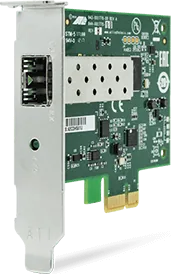
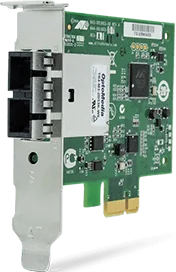
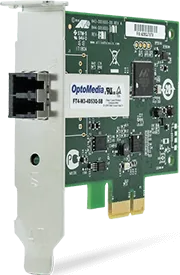
The series includes the AT-2914SX/SC, AT-2914SX/LC, AT-2914SP, and AT-2914GP/SP. The first two use fixed Gigabit multimode fiber connectors, while the SP models use SFP slots. The GP/SP model also adds a PoE-capable copper port.
Is this answer helpful?
Yes. The adapters support Wake-on-LAN, allowing a compatible system in a low-power mode to wake after receiving a valid magic packet directed to its MAC address.
Is this answer helpful?
The listed supported platforms are 64-bit Windows 10 and Linux 2.6/3.x. Windows systems require the appropriate adapter driver. Linux systems use the operating system's inbox driver for these adapters.
Is this answer helpful?
The AT-2914GP/SP combines an SFP fiber slot with a 10/100/1000BASE-T PoE+ copper port. It can bridge PC and powered-device traffic to one fiber network and supports VLAN and QoS settings through its console interface.
Is this answer helpful?
With the optional AT-2914GP-PSU connected, it can provide up to 25.5 W to a powered device. Without that power supply, available power depends on the host PCIe 12 V rail and is typically about 10 to 15 W before planning derating.
Is this answer helpful?
Yes. The Jumbo MTU setting supports frame sizes from 1,500 to 9,000 bytes. All devices and network paths handling the traffic must support the selected oversized frame size.
Is this answer helpful?
Advantages and Disadvantages
Advantages

- Supports 100 Mbps and Gigabit fiber networking through fixed SX ports or flexible SFP-based models.
- Wake-on-LAN support enables remote wake-up for compatible computers in low-power states.
- AT-2914GP/SP combines fiber connectivity, PoE+ copper output, bridging, VLAN, and QoS options.
- Windows advanced settings include jumbo frames, RSS, checksum offload, flow control, and interrupt moderation.
- LED indicators provide quick visibility into link availability and network activity.
Disadvantages

- Windows installations require a separate Allied Telesis driver, while Linux support depends on inbox drivers.
- SFP transceivers are purchased separately for AT-2914SP and AT-2914GP/SP models.
- Full 25.5 W PoE+ output requires the optional AT-2914GP-PSU power supply.
- VLAN configuration on the AT-2914GP/SP requires console access and careful coordination with driver settings.
- Fiber installation requires compatible connectors, cable types, wavelengths, and appropriate laser safety practices.
Product Specification
Type
LAN adapter
Form factor
1x PCIe card (interchangeable bracket: full-height and low-profile bracket included)
Interface
1x PCIe 2.0 x1
Power supply
Power supplied via interface only
Dimensions
3.46 x 2.72 in (W x H, without bracket)
Weight
2.4 oz
Compatibility
universal
Features
PXE Boot ROM 2.1, 9.6 KB jumbo frames, SNMP management, VLAN, Wake on LAN, LACP
Manufacturer warranty
two years
Product Description
Allied Telesis 2914 Series LAN Adapter - Read, Download & Print Free
The Allied Telesis 2914 Series LAN Adapter is designed for organizations and professionals that need dependable fiber Ethernet connectivity in PCI Express-equipped computers. This family of network adapters supports 100 Mbps and Gigabit Ethernet connections, giving workstations, servers, and specialized systems a practical way to join fiber-based networks with stable, high-speed performance.
Fiber Connectivity for Flexible Network Designs
The series includes models with fixed 1000BASE-SX fiber connections using SC or LC connectors, along with models that use an SFP slot. The SFP-based options provide added flexibility because network teams can select compatible 100 Mbps or 1000 Mbps transceivers to suit their fiber infrastructure. Fixed-port models support multimode fiber runs up to 500 meters with 50/125 micrometer cable or up to 220 meters with 62.5/125 micrometer cable.
Each adapter is built around a PCIe interface and includes link and activity LEDs to help users quickly confirm network status. The LEDs show whether a valid connection is present and flash during traffic activity, making basic diagnostics easier during installation or everyday maintenance.
Wake-on-LAN and System Efficiency
A major feature of the Allied Telesis 2914 Series LAN Adapter is Wake-on-LAN support. This capability lets an authorized network message wake a compatible computer from a low-power state. It can simplify remote administration, scheduled maintenance, and power-management practices in business environments.
The adapters also offer configurable performance properties for Windows systems, including flow control, jumbo frames, checksum offload, receive-side scaling, interrupt moderation, and large-send offload. These settings allow administrators to tune network behavior for their systems and workloads. Linux environments use inbox drivers, while Windows systems require the appropriate Allied Telesis driver.
PoE+ and VLAN Features on the AT-2914GP/SP
The AT-2914GP/SP expands the series with an SFP fiber slot and a 10/100/1000BASE-T copper port capable of Power over Ethernet Plus. It can power compatible devices such as VoIP phones, wireless access points, or security cameras while bridging device and PC traffic through the fiber connection.
With the optional AT-2914GP-PSU, the AT-2914GP/SP can deliver up to 25.5 watts to a connected powered device and maintain communications when the host system is off. Its console interface also supports VLAN IDs and QoS priority settings for segregating voice and data traffic.
Notes
- Confirm SFP compatibility before choosing an SFP-based model.
- Use proper fiber safety practices around optical ports and cable ends.
- Check host PCIe power capacity when using PoE without the optional power supply.
Search for 67,732 Manuals online


Type-in Brand or Model