
Allied Telesis 2911 Series Manual
PDF manual · 122 Pages
English



Quick check
Incorrect answer, please try again.
Chat with your Allied Telesis 2911 Series manual using AI
Get instant AI answers from your Allied Telesis 2911 Series manual
Ask anything about the Allied Telesis 2911 Series. Answers come from this manual, with the pages they are based on.
Ask a Question
Do you recommend 2911 Series?
Yes NoFrequently Asked Questions
Supported systems include Windows XP through Server 2008 R2 32-bit and 64-bit, plus Linux versions 2.6 and 3.x for stable network performance.
Is this answer helpful?
The series offers ST, SC, LC fiber optic connectors and Twisted Pair copper ports depending on the specific model selected for your environment.
Is this answer helpful?
Yes, the adapter supports Wake on LAN features including Magic Packet and Wake Up Frame detection for remote power state management.
Is this answer helpful?
No, the product does not ship with a software driver CD and users must download the latest driver from the manufacturer support portal.
Is this answer helpful?
You can configure Energy-Efficient Ethernet and Interrupt Moderation properties within the advanced driver settings to optimize energy usage.
Is this answer helpful?
No, the SFP slot is not hot-swappable and requires a system shutdown to insert or remove the transceiver safely.
Is this answer helpful?
The adapter supports Jumbo Frames up to 9000 bytes through the Jumbo Mtu advanced property settings.
Is this answer helpful?
Advantages and Disadvantages
Advantages

- Widespread compatibility across Windows and Linux operating systems allows flexible deployment in heterogeneous environments.
- Supports multiple connector types including fiber LC, ST, SC and copper ports for versatile network setup options.
- Features energy-efficient standards and Wake on LAN capabilities to reduce power consumption in data centers.
Disadvantages

- SFP slots on some models are not hot-swappable requiring a system shutdown for hardware changes.
- Driver installation requires manual download from website as no software driver CD is supplied with product.
- Virtual Machine Queue features are limited to specific Windows versions and virtualized environments.
Product Specification
Type
LAN Adapter
Form Factor
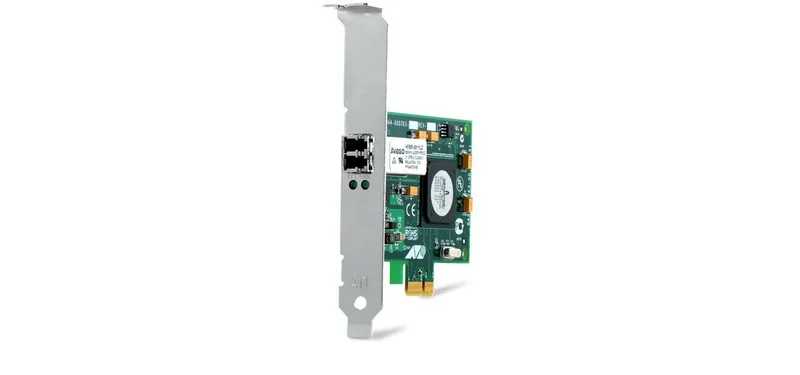
1x PCIe Card (interchangeable bracket: full height and low profile bracket included)
Host Interface
1x PCIe 2.0 x1
Connector
1x LC Duplex
Transmission
1x LC Duplex (1000Base-SX 850nm 62.5/125um MM OM1 902.23ft, 1000Base-SX 850nm 50/125um MM OM2 1804.46ft)
Power Supply
Power supplied via host interface only
Chipset
Broadcom BCM5718 (LAN Adapter, LC Duplex)
Weight
0.15 lb
Compatibility
universal
Features
PXE Bootrom 2.1, SNMP Management, VLAN, Wake on LAN, LACP
Manufacturer Warranty
2 years
Product Description
Expanding Network Capabilities with Advanced Connectivity
In the modern enterprise infrastructure, maintaining robust and high-speed network connections is essential for operational efficiency and data integrity. The Allied Telesis 2911 Series LAN-Adapter represents a significant step forward in gigabit Ethernet technology designed for demanding server environments. This PCIe x1 solution offers versatile connectivity options that adapt to various cabling standards, ensuring seamless integration into existing network architectures without replacing the entire system.
One of the primary advantages of this hardware is its extensive support for multiple media types. Users can select models equipped with LC-Duplex fiber optic connections or Twisted Pair copper ports depending on distance and signal requirements. This flexibility allows administrators to choose the best physical medium for their specific network segment. The PCIe x1 interface ensures broad compatibility with modern motherboards while providing sufficient bandwidth for sustained gigabit throughput. Advanced features such as TCP checksum offload and receive side scaling significantly reduce CPU utilization during high traffic periods. This computational efficiency is crucial for servers handling heavy data loads or complex virtualized workloads where every processor cycle counts.
Power management is another critical area where this adapter excels in energy conscious data centers. It supports Energy-Efficient Ethernet protocols that lower power consumption when the link is idle without sacrificing performance or latency. Wake on LAN capabilities ensure servers remain accessible even during low-power modes, facilitating necessary remote management tasks. For environments requiring network redundancy and stability, the teaming feature allows multiple network adapters to function as a single logical interface, balancing incoming traffic and providing failover protection against hardware failure.
Installing this adapter is generally a straightforward process requiring only a standard PCIe slot and specific driver software installation. Unlike older generations, this product does not ship with a software driver CD. Instead, users must download the latest software from the manufacturer support portal to ensure full functionality and access to advanced configuration options via the utility suite. Once installed, the driver software enables deep customization of network properties including VLAN tagging, jumbo frames, and interrupt moderation settings.
Compliance standards are strictly maintained to ensure safety and environmental friendliness. The hardware conforms to RoHS directives and various EMC regulations, guaranteeing safe operation in professional settings. Integrated LED indicators provide immediate visual feedback on link status and data activity, aiding in quick physical troubleshooting steps. Whether upgrading an existing legacy system or building a new powerful server, this networking card delivers consistent reliability and high performance for mission critical applications.
Search for 67,732 Manuals online


Type-in Brand or Model