
Alecto WS-5500 Manual
PDF manual · 52 Pages
English



Quick check
Incorrect answer, please try again.
Chat with your Alecto WS-5500 manual using AI
Get instant AI answers from your Alecto WS-5500 manual
Ask anything about the Alecto WS-5500. Answers come from this manual, with the pages they are based on.
WS-5500 Maintenance Schedule
Lithium batteries with 2900mAh capacity have a life span of at least one year. Replace them as backup power for the outdoor unit sensors.
Unscrew the black collector tray counter-clockwise. Use a soft long-haired brush to clean the interior and remove leaves. Replace tray and rotate clockwise until it clicks.
Detach lower weather vanes. Blow into the sensor holder and use a soft long-haired brush to clean wind guides. Do not use water. Reattach and tighten vanes.
Free maintenance reminders
Timed to your purchase date. Always free, unsubscribe anytime.
Ask a Question
Do you recommend WS-5500?
Yes NoFrequently Asked Questions
Visit WS5500.hesdo.com in your browser. Ensure your router uses 2.4GHz and WPA2-AES encryption. Follow the on-screen instructions to link the station.
Is this answer helpful?
Lithium batteries are highly recommended, especially for temperatures below 0°C. Standard alkaline batteries may fail in cold weather.
Is this answer helpful?
Yes, it predicts snow when the forecast indicates rain and the outdoor temperature drops below 0°C (32°F).
Is this answer helpful?
The outdoor unit transmits measurement data to the indoor unit every 16 seconds.
Is this answer helpful?
Yes, you can unscrew the black collector tray counter-clockwise to clean the interior with a soft brush.
Is this answer helpful?
The effective range is approximately 100 meters, though obstacles may reduce this distance.
Is this answer helpful?
Advantages and Disadvantages
Advantages

- Solar-powered outdoor unit with supercapacitor reduces battery dependency
- Connects to Weather Underground for global data sharing
- Large 6.9-inch color LCD screen displays extensive metrics clearly
- Measures eight different weather parameters including UV and light
- Customizable alarms for extreme weather conditions
Disadvantages

- Outdoor unit requires careful leveling and North alignment for accuracy
- Initial data synchronization may take several hours after setup
- Standard alkaline batteries perform poorly in freezing temperatures outdoors
- Rain gauge requires manual cleaning to prevent blockage from leaves
- Wind vane and anemometer require precise assembly during installation
Product Specification
Type
digital
Temperature
indoor and outdoor
Humidity
indoor and outdoor
Weather Forecast
icons
Forecasting Technology
barometer, internet
Other Displays
time, date, day of week, moon phases, rainfall amount, wind speed, wind direction, battery replacement indicator, stored min/max temperature
Alarms
weather warnings (temperature, humidity, rain), alarm time, snooze function
Connectable Outdoor Sensors
range max. 98 ft
Placement
desktop device, wall mounting possible
Power Supply
3x AAA batteries, mains operation
Color
black, white
Package Contents
1 outdoor sensor, wind sensor, rain sensor
Product Description
Experience Precision with the Alecto WS-5500 8-in-1 WLAN Weather Station
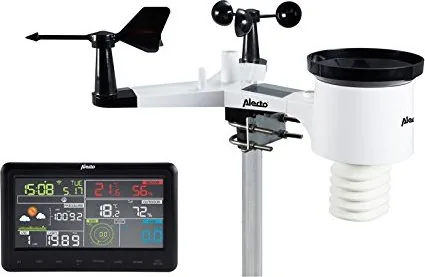
The Alecto WS-5500 is a sophisticated digital weather station designed for enthusiasts who demand accurate data and modern connectivity. This comprehensive system combines an indoor display unit with a robust outdoor sensor array to deliver real-time meteorological insights directly to your home or office. The outdoor unit is equipped with advanced sensors capable of measuring rainfall, wind speed, wind direction, temperature, humidity, light intensity, and UV levels. It features a built-in solar panel that charges an internal supercapacitor, ensuring sustainable operation even in varying weather conditions. For extreme cold, lithium backup batteries are recommended to maintain functionality.
Inside, the large 6.9-inch color LCD screen provides a clear view of all collected data. Beyond simple local monitoring, the WS-5500 integrates seamlessly with the internet via Wi-Fi, allowing users to share their personal weather data with platforms like Weather Underground. This feature transforms a standard home device into a node within a global weather network. The station also offers detailed forecasting based on atmospheric pressure trends, providing predictions for the next six hours including conditions like rain, snow, and storms.
Customization and Control
Users have full control over how data is presented through an intuitive menu system. You can customize units for temperature, wind speed, pressure, and precipitation to match your preferences. The device supports both metric and imperial measurements. Additional features include a wake-up alarm, customizable weather alerts for extreme conditions such as high winds or heavy rain, and trend indicators that show whether temperature, humidity, or pressure is rising or falling. Calibration options allow for fine-tuning readings against other trusted sources.
Key Maintenance Tips
To ensure long-term accuracy, regular maintenance is essential. The rain gauge should be cleaned periodically by removing the collector tray and brushing away debris. The wind guides on the outdoor unit must also be kept clean using a soft brush without water. Proper installation is critical; the outdoor unit should be mounted at least 1.5 meters above ground, level, and facing North for accurate wind direction detection.
Important Notes
- Always use lithium batteries in the outdoor unit for temperatures below zero degrees Celsius.
- Ensure the Wi-Fi router uses 2.4GHz frequency, not 5GHz, for optimal connection.
- Reset the outdoor unit using a paperclip if communication issues arise.
Search for 67,732 Manuals online


Type-in Brand or Model