Manual.ly Logo

Alecto DBX-84 Eco Manual

0.0 · 0 Ratings

PDF manual · 4 Pages

English

M: OA-GPT-54-NAN
page

/ 4

Loading...
5df2e188f6927d3dbc1d1e6ff7b5e549a83c page 4
1 INTRODUCTION
1.1 INTENDED USE:
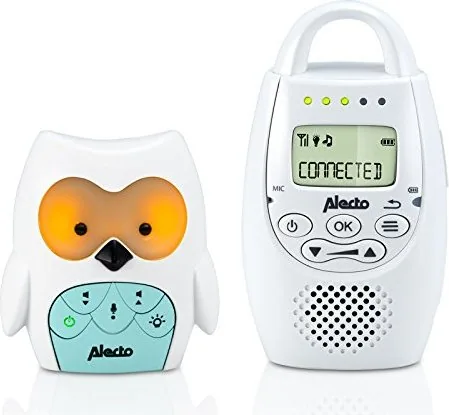
The Alecto DBX-84 is a wireless baby
monitor that allows you to remotely
listen to sounds from the baby room.
Attention:
• Only use the baby monitor as an
aid and never as a replacement
for an adult and human (baby)
sitter.
• The baby monitor has a range of
up to 300 meters in an open field
and up to 50 meters indoors; this
range depends on local condi-
tions (concrete walls, other baby
monitors or wireless phones,
etc.).
• Before each use, check whether
the baby monitor is working prop-
erly. In addition to its own range
and connection check, during
ease use it’s recommended to
regularly listen and check wheth-
er the connection with the baby
monitor is still in order.
• The DBX-84 may not be used
for anything else other than for
detecting sounds within your own
private environment; any persons
present or that could be present
in the space you’re listening to
must be informed of the installed
baby monitor.
• When the DBX-84 is not in use,
always switch it off by pressing
the power push-button.
USER’S MANUAL
2.2 BABY UNIT OVERVIEW:
1. Built-in night light. Attention: the
2 black eyes are no lights and
therefore provide no light!
2. - button: press and hold for
5 seconds to switch the bay
unit on or o󰀨, the green power
indicator is located behind this
button
- button: to switch the night
light on or o󰀨
- button & button: to
increase/decrease the volume
of the lullabies and talk-back
function
- : not a button, but the loca-
tion of the built-in microphone
3. power adaptor input
4. temperature sensor (rear)
5. button: to send an alert tone to
the parent unit
3 INSTALLATION
ATTENTION: ONLY INSTALL
THE SUPPLIED BATTERY
PACK! INSTALLING
DIFFERENT MODELS CAN CAUSE
DAMAGE OR EVEN EXPLOSION.
• Do not expose the baby-unit or
parent-unit to direct sunlight or
humid areas. This baby intercom
is not water-proof, penetrating
moisture can cause damage to
the electronics.
4 USE
Don’t forget that this baby intercom
is merely an extra piece of mind. The
device can never replace the physical
and monitoring presence of a parent
or babysitter.
4.1 TURNING ON/OFF:
Press and hold the button for at
least 5 seconds to switch on the unit
concerned.
On the baby unit the light behind the
button illuminates and on the par-
ent unit the display switches on.
Press and hold the button for
5 seconds again to switch the unit off.
4.2 CONNECTION CHECK:
As soon as you switch on the par-
ent-unit, it will start searching for the
baby-unit.
1. while searching for the baby unit,
the antenna icon flashes in the
display of the baby unit.
2. as soon as the parent unit has
located the baby unit, the anten-
na icon in the display remains lit
and the temperature measured
by the baby unit appears in the
display of the parent unit.
3. If the parent-unit still hasn’t locat-
ed the baby-unit after 10 seconds
this indicator stays lit as long as
the adapter is connected; this
indicator does not turn off when
the batteries are full).
The display shows the charging prog-
ress of the batteries.
3.2 BABY-UNIT:
The baby-unit is powered by the sup-
plied power adaptor.
1. Connect the power adaptor with
the 6 VDC connection of the par-
ent unit and plug the power adap-
tor in a 230 Volt mains socket.
as soon as the adaptor is
connected to the baby unit
and plugged into a wall socket, the
baby unit switches on automatically.
3.3 PLACEMENT TIPS:
>
1,5 / 2m
• Do NOT place the baby unit in
the bed with the baby, but main-
tain a minimal distance of 1.5 to
2 meter between the baby and
the baby unit.
• MAKE SURE THE BABY
CANNOT TOUCH THE
ADAPTOR CABLE.
ONLY USE THE SUPPLIED
BATTERY PACK WITH THE
FOLLOWING
SPECIFICATIONS:
TYPE: NIMH
SPANNING: 2.4V
CAPACITY: 750 mAh
SIZE: 2X AAA
ONLY CONNECT THE
SUPPLIED ADAPTORS
WITH THE FOLLOWING
SPECIFICATIONS:
INPUT: 100-240VAC 150MA
OUTPUT: 6VDC 450MA
3.1 PARENT UNIT:
The parent unit is powered by the
included rechargeable batteries.
These batteries are charged through
the included power adaptor.
1. slide down the battery cover at
the rear of the parent unit and
remove it from the parent unit
2. install the supplied battery pack
in the parent unit and connect the
small plug with the parent unit.
Attention: the plug fits in one way
only. Never force the connection.
3. Slide the battery cover back onto
the parent unit.
4. Connect the power adaptor with
the 6 VDC connection of the
parent unit and plug in the power
adaptor in a 230 Volt mains sock-
et.
5. The battery indicator on the
parent unit illuminates, and the
batteries are charged (attention,
1. sound indicators, ashing when
the baby unit is picking up sound
2. built-in microphone (for the talk-
back function)
3. - button: press and hold for
5 seconds to switch the parent
unit on or o󰀨
- button: to open the menu
-
OK
button: to open the selected
option or to switch functions on
or o󰀨
- button & button: to in-
crease/decrease the volume +
buttons for scrolling the menu
options
4. built-in speaker
5. battery indicator:
- remains lit when the battery is
being charged
- starts ashing when the battery
is nearly exhausted
6. display, see below
7. TALK button, talk-back button
towards the baby unit
8. power adaptor input
9. battery compartment
10. belt clip, to carry the unit with you
Display:
connection indicator (ashes
when there’s no connection)
illuminates when the sound alert
is set; ashes upon a sound alert
speaker volume set to 0
night light enabled
lullabies enabled
battery indicator
• You’re not required to obtain a
license for using this wireless
baby monitor. The system may be
freely used in domestic situations.
However, an uninterrupted and
interference-free signal transmis-
sion cannot be guaranteed.
2 OVERVIEWS
2.1 PARENT UNIT OVERVIEW:
(because it’s still turned off or out
of range), a short warning tone
will be emitted every 10 seconds
while the text [ NOT LINKED ]
appears in the display.
4.3 LISTENING:
Reception volume:
The set level is indicated by illuminat-
ing indicator lights, as well as on the
display (5 levels + sound off).
• Upon reaching the maximum or
minimum volume, an extra beep
tone will sound when you press
the + or - button.
• The symbol appears on the
display when the volume is set to
0 (no sound)
Sound indicators:
The lights on the parent unit
illuminate when the
baby unit is transmitting
sounds. The louder the
sound picked up by the baby
unit, the more lights illumi-
nate on the parent unit.
4.4 DISPLAY LANGUAGE:
The various notications on the
display can be displayed in various
languages. Upon leaving the factory
the default language is set to Dutch.
You may change the language as
follows:
1. press the button
2. use the and buttons to
search for the option [ LAN-
GUAGE ]
3. press the OK button
4. use the and button to select
the desired language
5. press the OK button to save your
selection
6. briey press the button to
leave the settings
4.5 SOUND-CONTROLLED ACTIVA-
TION:
You may set the sound level at which
the baby unit must start transmitting.
- level 1: the baby must cry loudly be-
fore the baby unit starts transmitting
...
- level 4: the baby unit already starts
transmitting when soft sounds are
detected
- level 5: the baby unit is switched
on continuously (all sounds are
transmitted)
1. press the button
2. use the and button to search
for the option [ SENSITIVITY ]
3. press the OK button
4. use the and buttons to select
the desired activation level
5. press the OK button to save your
selection
4.6 SOUND ALERT:
If you’ve switched off the sound on
the parent unit, you may have it emit
an alert tone when the baby unit is
picking up loud sounds.
1. press the button
2. use the and buttons to
search for the option [ SOUND
ALERT ]
3. press 2x the OK button to enable
this function if it was switched o󰀨
or to disable the function if it was
switched on
4. briey press the button to
leave the settings
Sound alert indication:
The display indicates that the sound
alert is enabled by illuminating the
symbol.
4.7 NIGHT LIGHT:
The night light on the baby unit may
be switched on and off both via the
baby unit itself and remotely via the
parent unit.
On the baby unit:
Briefly press the button on the
baby unit to switch the night lighting
on or off.
Via the parent unit:
1. press the button
2. use the and buttons to
search for the option [ NIGHT-
LIGHT ]
3. press the OK button
4. use the and buttons to select
ON? or OFF?
5. press the OK button to save your
selection
Light enabled indication:
The display indicates that the night
light alert is enabled by illuminating
the symbol.
4.8 LULLABIES:
There are 5 lullabies programmed in
the baby unit. You may play them as
follows:
Via the parent unit:
1. press the button
2. use the and buttons to
search for the option [ LULLABY ]
3. press the OK button
4. use the and buttons to select
the desired lullaby
5. press 2x the OK button to start
playback
Use the and buttons on the baby
unit to adjust the playback volume of
the lullabies
Playback is ended after 15 minutes of
you may repeat the instructions 1-5 to
stop playback before that.
Music indication:
The display indicates that the lullabies
are being played by illuminating the
symbol.
4.9 TALK-BACK FUNCTION:
Press the Talk button on the parent
unit to talk back to the baby unit and
release this button to listen again.
Use the and buttons on the baby
unit to adjust the volume of the talk-
back function.
4.10 RESET SETTINGS:
If you have lost the overview concern-
ing the settings, then you can restore
the factory settings in a simple way.
1. Press on the key .
2. Search the option [RESET] with
the keys and .
3. Press twice on the key OK
Factory settings:
Volume: level 3
Sound-operated
activation: level 5
Display language: Dutch.
Sound alert: o
Sound alarm: o.
5 GENERAL (SAFETY)
INSTRUCTIONS AND TIPS
5.1 USING MULTIPLE BABY
INTERCOMS:
The technology of the DBX-84 allows
for the simultaneous and strings-free
use of multiple complete baby inter-
com sets (baby-unit and parent-unit)
next to each other, to monitor mul-
tiple baby rooms at the same time;
each parent/baby-unit combination is
provided with its own unique code,
making it impossible to receive DBX-
84 signals from other baby intercoms
or for other baby intercoms to receive
the sound from your baby.
It is not possible to expand your
DBX-84 with individual baby-units or
parent-units.
5.2 BATTERY USAGE:
With fully charged NiMH batteries
with a capacity of 750mAh, you can
use the parent unit more than 24
hours without the power adaptor. This
time depends on the use (the setting
of the volume level, the condition of
the rechargeable batteries, etc.).
You may check the battery status in
the display of the parent unit:
: The battery is full.
: The battery is still full for 2/3.
: The battery is full for 1/3,
charging is advised.
: The battery is low; the parent
unit will switch of soon; connect the
adapter immediately to charge the
batteries.
As soon as the battery low indicator
illuminates, also a alert beep sounds
every 60 seconds, and [LOW BATT]
will flash on the display.
Connect the power adaptor to
recharge the battery. It takes approx-
imately 24 hours to fully recharge an
exhausted battery.
5.3 MAINTENANCE:
Only clean the baby monitor with a
moist cloth; never use chemical clean-
ers. Before any cleaning, you must
disconnect the adapters.
Before cleaning, any connected power
adaptors must be disconnected.
5.4 ENVIRONMENT:
The packaging of this baby
video monitor can be discarded
as waste paper. At the end of
the product’s life span, it must not be
disposed of as normal domestic
waste. You must bring it to a collec-
tion point for the recycling of electric
and electronic equipment.
You must bring exhausted or defec-
tive batteries to your local depot for
small chemical waste or to dedicated
battery collection points. Never dis-
card batteries as normal domestic
waste.
6 DECLARATION OF
CONFORMITY
Hereby, Hesdo declares that the radio
equipment type Alecto DBX-84 is in
compliance with directive 2014/53/
EU. The full text of the EU declaration
of conformity is available at the fol-
lowing internet address: http://DOC.
hesdo.com/DBX-84-DOC.pdf
7 TECHNICAL SPECIFICATIONS
Frequency: 1880-1900 MHz.
Parent unit & baby unit power supply:
power adaptor 6V / 450mA /
(incl.), model: Ten Pao -
S004LV0600045.
Parent unit battery pack: NiMH, 2.4V
750mAh, rechargeable, size 2x AAA
(incl.).
Transmission power: < 24 dBm max.
Recommended ambient temperature:
10°C to 40°C
Storage temperature: 0°C to 60°C
8 WARRANTY
For the Alecto DBX-84 you have a
warranty of 24 months from the date
of purchase. During this period, we
guarantee the free repair of defects
caused by material and workmanship
errors. All this subjected to the final
assessment of the importer.
If you notice any defect, first refer
to the user’s manual. If the manual
provides no definite answer, please
contact the supplier of this baby video
monitor or contact customer service
of Alecto.
THE WARRANTY BECOMES NULL
AND VOID:
In case of improper use, incorrect
connections, leaking and/or incorrect-
ly installed batteries, use of unoriginal
parts or accessories, negligence
and in case of defects caused by
moisture, fire, flooding, lightning and
natural disasters. In case of unau-
thorised modifications and/or repairs
performed by third parties. In case of
incorrect transportation of the device
without adequate packaging and
when the device is not accompanied
by this warranty card and proof of
purchase. The warranty does not
cover connecting cables, plugs and
batteries.
All further liability, especially concern-
ing any consequential damages, is
excluded.
DBX-84
OK
450
7
1
4
2
3
6
5
10
9
8
TALK
1
2
5
4
3
OK
v1.1
Service
Help
Service Help
WWW.ALECTO.NL
Hesdo, Australiëlaan 1
5232 BB, ‘s-Hertogenbosch
The Netherlands
WWW.ALECTO.NL
SERVICE@ALECTO.NL
Hesdo, Australiëlaan 1, 5232 BB,
‘s-Hertogenbosch,
The Netherlands

Chat with your Alecto DBX-84 Eco manual using AI

Get instant AI answers from your Alecto DBX-84 Eco manual

Ask anything about the Alecto DBX-84 Eco. Answers come from this manual, with the pages they are based on.

Ask a Question

0/1000

Do you recommend DBX-84 Eco?

Yes No

Frequently Asked Questions

A

The manufacturer specifies up to 300 meters in open field and up to 50 meters indoors. Real performance depends on local conditions such as concrete walls, other wireless devices, and even other baby monitors. It is recommended to check the connection before use and periodically during use.

Is this answer helpful?

A

When you switch on the parent unit, it searches for the baby unit. The parent display shows a connection indicator and, once linked, keeps the antenna icon lit. If the baby unit is still not found after about 10 seconds, the system issues a warning tone every 10 seconds and shows a no-connection message.

Is this answer helpful?

A

With a fully charged NiMH battery pack (750 mAh), the parent unit can be used for more than 24 hours away from the adapter. Actual runtime depends on volume level, battery condition, and general use. Battery status is shown on the display, and a low-battery warning appears along with beeps.

Is this answer helpful?

A

Yes. The night light can be controlled directly on the baby unit and also remotely from the parent unit through the menu. When enabled, an icon appears on the parent display to confirm the night light status.

Is this answer helpful?

A

Yes. Press and hold the TALK button on the parent unit to speak to your baby through the baby unit. Release the button to return to listening mode. The talk-back playback volume is adjustable using the volume controls on the baby unit.

Is this answer helpful?

A

Sound-controlled activation lets you set the sound level threshold at which the baby unit starts transmitting, from only very loud crying up to continuous transmission. Sound alert adds an attention tone from the parent unit when loud sounds are detected, useful if reception sound is switched off.

Is this answer helpful?

A

Yes. The system supports multiple complete sets running side by side using unique codes per pair, so other sets should not pick up your baby audio and vice versa. You cannot expand a DBX-84 with single separate units; you need complete compatible sets.

Is this answer helpful?

M: OA-GPT-54-NAN

Advantages and Disadvantages

Advantages

  • Up to 300 m range in open field and up to 50 m indoors, depending on surroundings.
  • Two-way communication: talk-back from the parent unit to the baby unit.
  • Remote night light control and integrated temperature sensing with on-screen readout.
  • 5 lullabies plus adjustable playback volume and automatic stop after 15 minutes.
  • Sound-controlled activation and optional sound alert for important loud noises.
VS

Disadvantages

  • Interference-free transmission cannot be guaranteed, and real range varies with walls, devices, and conditions.
  • Not a replacement for adult supervision; it is only an aid.
  • Baby unit is not water-proof and must be kept away from moisture.
  • Requires the supplied rechargeable NiMH battery pack and compatible specified adapters.
M: OA-GPT-54-NAN

Product Specification

Operating mode

Battery/Mains operation, Battery operation (2x AAA battery)

Transmission

digital, DECT

Frequency band

1,880-1,900 MHz

Range

984.25 ft

Display

LCD

Features

Charging indicator light, Volume indicator, Lullaby function, Intercom function, Alarm function, Noise sensor, Volume control, Range control, Night light, Eco mode, Automatic channel selection

Package contents

2x power adapter, Battery, 1x transmitter, 1x receiver

M: GO-GEM-FL-25

Product Description

Alecto DBX-84 Eco DECT Babyphone Digital

A wireless baby monitor made for everyday reassurance

The Alecto DBX-84 Eco DECT Babyphone Digital is a practical wireless baby monitor designed to let you listen to your child from another room with clear status feedback on the parent unit display. With a range up to 300 meters in open space and up to 50 meters indoors, it helps you stay close to what matters without constant checking. It also includes sound-controlled activation, so the baby unit transmits more efficiently when it detects the level you set.

Designed for hands-on comfort

On the baby unit, you get an integrated night light and a built-in temperature sensor, while the parent unit provides a speaker for sound reception plus a microphone for talk-back. Press and hold the TALK button to respond to your baby, then release to listen again. To help soothe bedtime routines, the baby unit offers 5 programmed lullabies, which you can start and adjust directly from the parent unit.

Smart monitoring controls

You can choose how sensitive the baby unit is before it starts sending audio (from the baby needing to cry loudly up to continuous transmission for all sounds). There is also a sound alert feature that can play an attention tone from the parent unit when loud sounds are detected, even if sound is muted. The display language can be changed from the factory default Dutch, and the system can be reset to factory settings if you want to return to default behavior.

Power and setup that matters

The parent unit uses the supplied rechargeable NiMH battery pack (2x AAA) and can run for more than 24 hours away from the adapter, depending on usage such as volume. When the battery gets low, the display shows a warning and you are prompted to connect the power adaptor for charging. For safe placement, keep a minimum distance of about 1.5 to 2 meters between baby and unit, avoid direct sunlight and moisture, and remember the baby unit is not water-proof.

Key takeaways

  • DECT-style wireless monitoring with up to 300 m open-field and up to 50 m indoors.
  • Two-way talk-back and adjustable volume with sound-level indication lights.
  • Night light and 5 lullabies, both controllable from the parent unit.
  • Sound-controlled activation plus an optional sound alert for missed loud noises.
  • Battery-powered parent unit with charging status on the display.

Most important benefits

  • Strong day-to-day features: talk-back, night light, and lullabies with remote control.
  • Flexible monitoring: sensitivity levels and a sound alert for when audio is muted.
  • Better clarity of status: connection indicator, temperature on the parent display, and sound indication lights.
  • Multi-room capability: unique codes allow multiple sets side by side.

Most important drawbacks

  • Range depends on local conditions, and a completely interference-free link is not guaranteed.
  • Not a safety replacement: it is only an aid and does not replace adult supervision.
  • The baby unit is not water-proof, so moisture exposure can damage electronics.
  • Uses only the supplied battery pack and specified adapters.

Notes

  • For best performance, test connection before use and check it regularly while monitoring.
  • People who may be in the listening area should be informed that the baby monitor is installed.
  • If you want step-by-step operation details, the Alecto DBX-84 Eco DECT Babyphone Digital Manual helps you configure the options quickly.
M: OA-GPT-54-NAN

© Copyright 2026 Manual.ly