
AG Neovo LH-24 Manual
PDF manual · 35 Pages
English



Quick check
Incorrect answer, please try again.
Chat with your AG Neovo LH-24 manual using AI
Get instant AI answers from your AG Neovo LH-24 manual
Ask anything about the AG Neovo LH-24. Answers come from this manual, with the pages they are based on.
Ask a Question
Do you recommend LH-24?
Yes NoFrequently Asked Questions
Press the arrow buttons to select input bar then press the menu button to confirm the desired channel.
Is this answer helpful?
Yes, using VESA 100x100mm bracket compatible with recommended kits sold separately for secure vertical installation.
Is this answer helpful?
Turn off display for hours or use screen saver with moving graphics to heal pixels effectively.
Is this answer helpful?
Supports HDMI DisplayPort and VGA connections for video signal transmission to computer systems easily.
Is this answer helpful?
Check power cord connection and ensure computer is turned ON and cable is seated firmly.
Is this answer helpful?
Yes via Other Menu setting Anti Blue Light to reduce eyestrain during night use comfortably.
Is this answer helpful?
Contact local waste authority in European Union countries for specialized e-waste collection sites nearby.
Is this answer helpful?
Advantages and Disadvantages
Advantages

- Supports multiple connectivity standards like HDMI DisplayPort VGA for broad compatibility with various devices
- Includes fully adjustable stand enabling tilt swivel pivot and height customization for ergonomic comfort
- Features built-in speaker system and audio outputs simplifying setup without needing external sound systems
- Offers VESA mount compatibility allowing secure installation on walls or arms for space saving solutions
- Incorporates anti burn-in technology to protect screen integrity from static images displayed over time
Disadvantages

- Response time may impact fast moving game scenes compared to higher refresh rate dedicated gaming monitors available
- Brightness output differs across LH model series potentially causing inconsistency if mixing screens together
- Some advanced picture settings are disabled when using certain digital input sources like HDMI or DP
- Warranty validity depends on keeping manufacturer stickers intact which complicates returns for some consumers
- Ceiling mounting is explicitly discouraged due to potential safety hazards and structural damage risks involved
Product Specification
Feature
Monitor (Stationary)
Diagonal
23.8" (23.82 inches)
Resolution
1920x1080 (FHD), 16:9, 93 ppi
Panel
IPS
Backlight
LED, Blue Light Filter, Flicker-Free
Brightness
270 cd/m2 (Typical)
Contrast Ratio
1,000:1 (Static), 20,000,000:1 (Dynamic)
Response Time
5ms (GtG)
Refresh Rate
60 Hz (1920x1080)
Signal Frequency
30-83 kHz (H) / 56-75 Hz (V)
Ports
1x VGA (60Hz@1920x1080), 1x HDMI 1.3, 1x DisplayPort, 1x 3.5mm Jack (Line-Out), 1x 3.5mm Jack (Line-In), 1x AC-In C13 (AC Power)
Shape
Straight (Flat)
Viewing Angle
178 deg / 178 deg
Coating
Non-Glare (Matte)
FRC
Unknown
Speakers
Speakers (2x 2W)
Controls
Mechanical Buttons
Ergonomics
With stand, height adjustable (3.94 inches), Pivot (+90 deg), rotatable (+/- 170 deg), tiltable (+20 deg / -5 deg)
VESA Mount
100x100 (Included)
Power Consumption
18W (Typical), 0.5W (Standby)
Special Features
Security Lock (Kensington Security Slot)
Screen-to-Body Ratio
82.99% (Calculated)
Dimensions
21.85x20.16x8.03 inches (WxHxD) with stand compressed, 21.85x13.35x1.81 inches (WxHxD) without stand
Color
Black (Bezel) / Black (Lower Bezel) / Black (Stand) / Black (Rear)
Weight
10.80 lbs (With Stand), 6.83 lbs (Without Stand)
Power Supply
Internal
USB Port
Link
Product Description
Upgrade Your Setup with the AG neovo LH-24 Monitor
Welcome to our comprehensive guide discussing the features and capabilities of the AG neovo LH-24 monitor. This display is part of a robust lineup that also includes the LH-22 and LH-27 models, each catering to different screen size preferences. When you download or read the AG neovo LH-24, 23.8 Manual, you gain access to essential instructions regarding safe usage and configuration. Understanding these steps ensures optimal performance and extends the lifespan of your device significantly over time. The twenty three point eight inch screen provides ample workspace for multitasking applications comfortably.
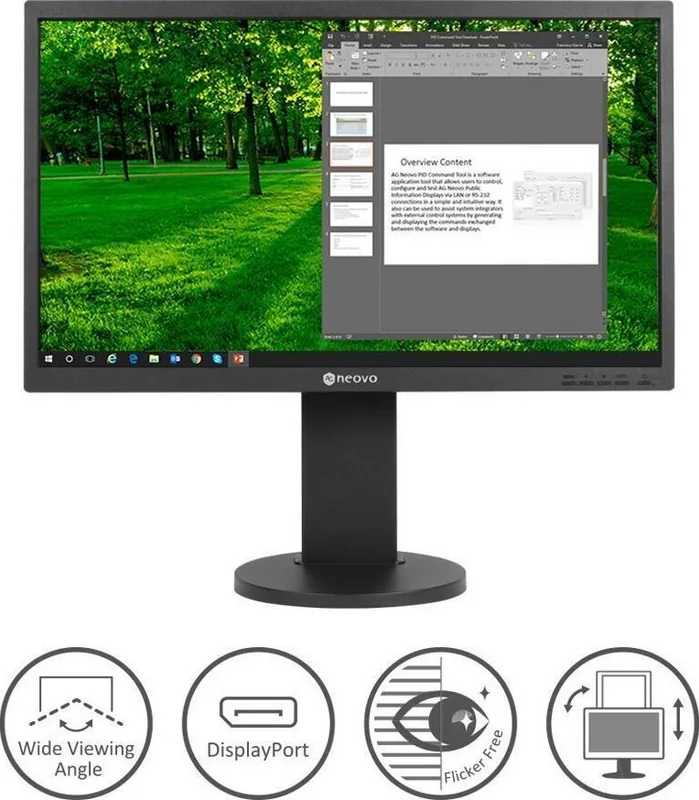
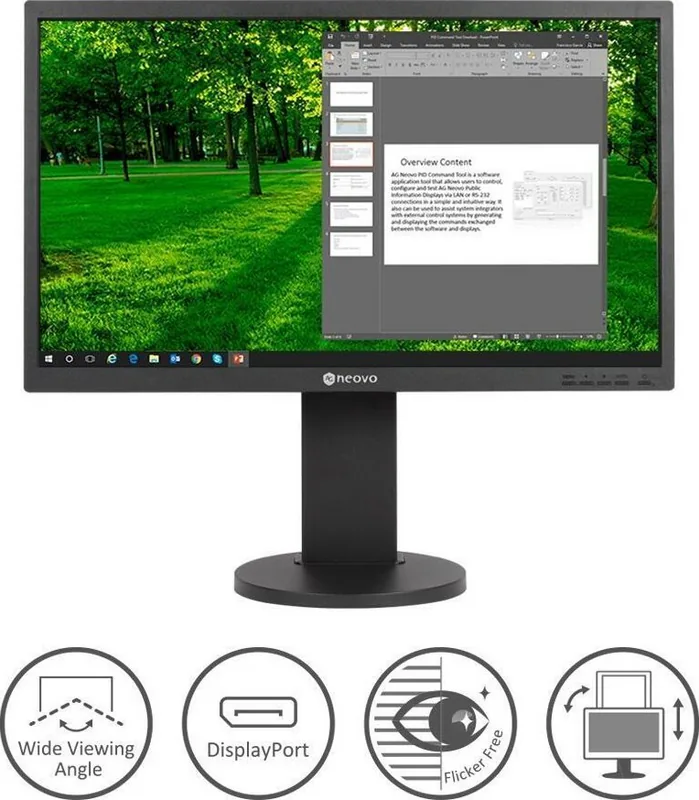
Connectivity options are abundant, featuring one DisplayPort connector, one HDMI port, and a standard VGA input for analog signals. Audio capabilities are integrated with stereo speakers and headphone jacks for convenient sound output. Security is enhanced via a Kensington lock socket preventing unauthorized theft in public spaces. The physical design allows for extensive movement through tilt, swivel, pivot, and vertical height adjustments. These mechanisms allow workers to achieve neutral posture which reduces neck strain during long sessions at their desks throughout the workday.
Configuration takes place via the On Screen Display menu accessible by pressing buttons located on the front bezel. Settings include color temperature, contrast, brightness, and various picture enhancements. An anti-burn-in tool actively protects the panel from static image retention issues common in professional environments. To ensure image stability, low brightness settings are recommended for extended usage periods according to maintenance guidelines provided. If transport is necessary, original packaging materials are suggested to protect the glass panel from cracks during shipping processes involving fragile components like liquid crystal displays.
Specifications highlight Full HD resolution with thirty milliseconds response time suitable for dynamic visuals. Operating conditions require temperatures between five degrees Celsius to thirty-five degrees Celsius generally. Storing units outside zero degrees negative Fahrenheit could damage internal electronics permanently so keep them indoors. WEEE regulations apply in Europe requiring proper recycling at designated centers rather than trash disposal. These notes underscore the importance of responsible ownership practices for electronic goods globally. Always adhere to FCC compliance notices when operating in residential zones to prevent interference with radio communications. The power requirements accommodate wide voltage ranges making it suitable for international deployment scenarios easily. Proper ventilation prevents overheating risks associated with high ambient temperatures inside enclosed server rooms. By following these protocols outlined in the official documentation, users ensure reliable operation year after year without unexpected interruptions or costly repairs required down the line. Experience clarity and ease of management with this reliable monitor choice.
Search for 67,706 Manuals online


Type-in Brand or Model