

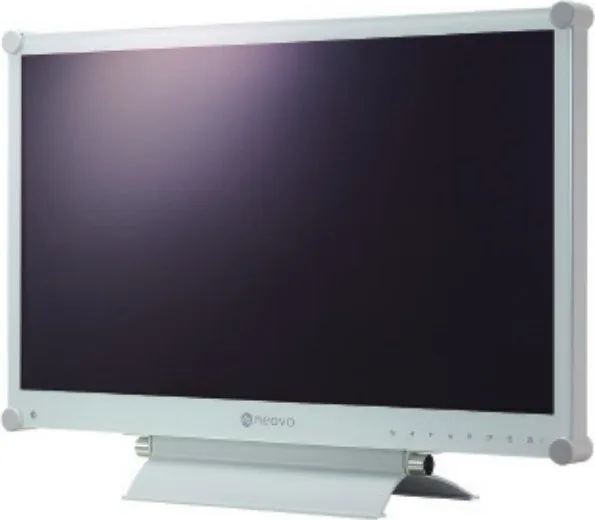
AG Neovo DR-22G Manual
PDF manual · 58 Pages
English



Quick check
Incorrect answer, please try again.
Chat with your AG Neovo DR-22G manual using AI
Get instant AI answers from your AG Neovo DR-22G manual
Ask anything about the AG Neovo DR-22G. Answers come from this manual, with the pages they are based on.
Ask a Question
Do you recommend DR-22G?
Yes NoFrequently Asked Questions
It supports Full HD resolution at 1920 by 1080 pixels for clear and sharp images on the 21.5 inch screen.
Is this answer helpful?
Yes, it supports Picture-in-Picture modes to view different signals like VGA and HDMI simultaneously.
Is this answer helpful?
Use VESA 75x75 mm or 100x100 mm brackets after removing the base stand from the rear.
Is this answer helpful?
Yes, it comes with integrated 2 Watt speakers for basic audio output without external connections.
Is this answer helpful?
It automatically adjusts screen brightness based on ambient light to optimize energy consumption and viewing comfort.
Is this answer helpful?
Enable the Anti-Burn-In feature in the OSD menu which cycles images to prevent permanent damage.
Is this answer helpful?
Inputs include DisplayPort, HDMI, DVI, VGA, Composite, S-Video, and an RS232 control port.
Is this answer helpful?
Advantages and Disadvantages
Advantages

- Extensive connectivity options including DisplayPort, HDMI, DVI, VGA, S-Video and Composite.
- EcoSmart Sensor adjusts brightness automatically to save energy and reduce eye strain.
- Anti-Burn-In function protects the panel from static image retention issues effectively.
- Supports Picture-in-Picture and Picture-by-Picture modes for multi-source monitoring.
- VESA mounting compatibility allows flexible wall or stand installation options.
Disadvantages

- TN panel technology may have narrower viewing angles compared to IPS alternatives.
- Speakers are modest at 2 Watts, limiting loud audio output for large rooms.
- External power adapter adds extra clutter and requires additional space near the unit.
- No dedicated USB hub for peripheral connectivity beyond the service port function.
- OSD menu navigation requires practice to utilize all advanced system settings correctly.
Product Specification
Feature
Monitor (Fixed)
Diagonal
21.5\" (54.6 cm)
Resolution
1920x1080 (FHD), 16:9, 102ppi
Panel
TN
Backlight
LED, flicker-free
Brightness
250 cd/m^2 (typical)
Contrast
20,000,000:1 (dynamic)
Response Time
3ms (GtG)
Refresh Rate
60Hz (1920x1080)
Signal Frequency
24-83kHz (H) / 50-75Hz (V)
Ports
1x VGA (60Hz@1920x1080), 1x S-Video, 1x HDMI 1.4, 1x DisplayPort, 1x DVI, 2x BNC-Out, 2x BNC-In, 1x USB-A (Service Port), 1x RCA Stereo L+R Line-Out, 1x RCA Stereo L+R Line-In, 1x 3.5mm Jack (Line-In), 1x Serial 2.5mm Jack (RS-232), 1x DC-In Barrel Jack (Power)
Shape
Straight (Flat)
Viewing Angle
170deg/160deg
Coating
Glossy, Hardness 9H, Protective Glass
Color Depth
8bit (16.7M colors)
FRC
Unknown
Certifications/Standards
DICOM
Speakers
Speakers (2x 2W)
Ergonomics
With Stand, Height Adjustable N/A, Pivot N/A, Rotate N/A
VESA Mount
100x100/75x75 (Free)
Power Consumption
16W (typical), 0.5W (Standby)
Energy Efficiency SDR (A-G)
16kWh/1000h (E)
Features
Security Lock (Kensington Security Slot)
Screen-to-Body Ratio
76.67% (Calculated)
Dimensions
20.20" x 14.53" x 6.10" (WxHxD) with Stand, 20.20" x 12.76" x 2.20" (WxHxD) without Stand
Color
White (Display Bezel) / White (Lower Bezel) / White (Stand) / White (Rear)
Weight
14.99 lbs (6.80 kg), 13.67 lbs (6.20 kg)
Power Supply
External
USB Labeling
Link
Product Description
Discover the AG Neovo DR-22G LCD Monitor Experience
When searching for a reliable display solution for professional or commercial use, the AG Neovo DR-22G stands out as a versatile option. This 21.5-inch monitor brings exceptional clarity to your workspace with a Full HD resolution of 1920 by 1080 pixels. Whether working in digital signage or standard offices, this device handles various needs. The keyword AG Neovo DR-22G, 21.5 Manual often leads users to understand the comprehensive features available within this hardware package. It is designed to handle various input signals seamlessly while maintaining image integrity over long usage periods.
Connectivity and Versatility
The rear of the unit is packed with inputs to ensure compatibility with virtually any device. You will find DisplayPort, HDMI, DVI, and VGA ports, making it easy to connect computers. Additionally, video devices like players can connect via Composite or S-Video inputs. Audio connectivity is supported through 3.5mm and RCA jacks, allowing integrated sound usage with the built-in 2W speakers. For advanced installations, an RS232 port enables centralized management across multiple units. An external USB service port assists technicians with firmware updates. This level of connectivity ensures that whether you are routing video loops or connecting audio feeds, the display handles the load.
Advanced Features and Safety
One standout feature is the EcoSmart Sensor. This technology adjusts screen brightness automatically based on ambient light levels to reduce eye strain and save energy. Safety is also a priority with an Anti-Burn-In function that activates when static images persist for too long. The monitor also supports Picture-in-Picture and Picture-by-Picture modes, allowing you to view multiple sources simultaneously on the screen. The LED panel offers a 20,000,000:1 contrast ratio and a response time of 3 milliseconds. Users are advised to keep the device in a ventilated area away from direct sunlight or excessive heat to maintain performance. The OSD menu allows manual tweaking of brightness, contrast, and color temperature.
Installation and Configuration
The On Screen Display menu is intuitive and supports multiple languages. Users can configure input selection, system settings, and audio preferences easily through the OSD keys. The monitor also features a screen freeze function which helps in analysis while the video continues playing in the background. Installation involves removing the base stand for wall mounting using the provided VESA holes. It is critical to follow safety warnings regarding grounding and avoiding moisture exposure. The device includes a built-in speaker system for audio output when needed. This unit offers reliable performance for demanding environments.
Important Notes
To ensure longevity, keep the glass surface clean with a soft cloth and never use spray detergents. Do not block ventilation holes or place the unit in humid environments. Always unplug the power before cleaning to prevent electrical shock. Warranty stickers should remain intact to validate your purchase date and coverage terms.
Search for 67,706 Manuals online


Type-in Brand or Model