1. Per garantire la sicurezza, leggere attentamente questo
manuale prima di effettuare l’installazione e seguire le
istruzioni qui contenute. Conservare questo manuale in un
luogo sicuro per riferimenti futuri.
2. Il produttore non deve essere ritenuto responsabile
legalmente per qualsiasi danno all’apparecchio o lesione
alla persona provocati da installazione non corretta o
funzionamento diverso da quello riportato nel seguente
manuale.
3. Il prodotto è stato ideato per una facile installazione e
rimozione. Il produttore non sarà responsabile per danni
all’apparecchio o per lesioni alla persona derivanti da
fattori umani o eventi naturali, come tifoni e terremoti.
4. Si consiglia di fare installare la staffa per il prodotto solo
da personale qualificato.
5. Per installare o rimuovere il prodotto sono necessarie
almeno due persone per evitare rischi o la caduta di
oggetti.
6. Installare solo su tavola orizzontale, evitare superfici
inclinate.
7. Per garantire la sicurezza e per prevenire incidenti, è
necessario, prima di eseguire l’installazione, controllare la
struttura della tavola e scegliere un posizionamento
sicuro.
8. La tavola deve essere abbastanza forte per sostenere
almeno quattro volte il peso del monitor e della staffa per
il montaggio insieme. Il punto di montaggio deve essere in
grado di sopportare terremoti o urti forti.
9. Non modificare gli accessori o utilizzare parti rotte.
Contattare il rivenditore per qualsiasi domanda.
10. Stringere tutte le viti (non applicare forza eccessiva per
evitare la rottura delle viti o il danneggiamento della
filettatura).
11. Dato che il produttore non ha alcun modo di controllare il
tipo di tavola e l’installazione, la garanzia del prodotto
coprirà esclusivamente il corpo della struttura per il
prodotto. Il periodo di garanzia del prodotto è di 3 anni.
12. Consultare il manuale in lingua inglese per eventuali
controversie sulle condizioni.
13. Si consiglia di installare un monitor con le stesse
dimensioni e lo stesso peso.
Attenzione
1. För säkerhets skull bör du läsa igenom den här
manualen noggrant innan installation och följa
anvisningarna häri. Förvara den här manualen på
ett säkert ställe för framtida användning.
2. Tillverkaren kan inte hållas juridiskt ansvarig för
skada på utrustningen eller personskada som har
orsakats av en inkorrekt installation eller
användning, annan än den som beskrivs i den här
manualen.
3. Den här produkten är utformad för enkel installation
och borttagande. Tillverkaren kan inte hållas
ansvarig för skada på utrustning eller personskada
som kommer sig av den mänskliga faktorn eller
naturkrafter, som jordbävning eller tornado.
4. Det rekommenderas att den här produkten
installeras endast av kvalificerad personal.
5. Minst två personer krävs för att installera eller ta
bort produkten för att undvika fara med fallande
objekt.
6. Installera endast på vågrätt skrivbord och undvik
sluttande ytor.
7. För att tillförsäkra säkerhet och förebygga olyckor
måste strukturen av skrivbordet kontrolleras och ett
säkert ställe väljas ut för installation.
8. Skrivbordet ska vara tillräckligt starkt för att hålla en
vikt som är minst fyra gånger skärmens och den här
produkten kombinerat. Monteringsstället måste
kunna motstå jordbävning och andra kraftiga stötar.
9. Ändra inte på tillbehör eller använd trasiga delar.
Kontakta din återförsäljare om du har några frågor.
10. Dra åt alla skruvar (använd inte överdriven styrka för
att undvika att bryta av skruven eller skada dess
huvud).
11. Då tillverkaren inte kan kontrollera skrivbordtypen
och installationen täcker produktgarantin endast
själva produkten. Produktens garantiperiod är 3 år.
12. Titta i manualen på engelska om frågor om villkor
uppstår.
13. Det rekommenderas att installera en bildskärm
med samma storlek och vikt.
Fara
Additional Enclosed Parts (for DMS-01Q only)
Common Parts (for DMS-01D and DMS-01Q)
包裝零件 / Enclosed Parts /
Mitgelieferte Teile
/ Pièces incluses
Componentes suministrados / Parti incluse / Peças incluídas
Załączane Częście / Enclosed части / Medföljande delar
Installation Manual
安裝說明書
Manuel d’installation
Installationsanleitung
Manual de instalación
Manual da instalação
Instalacja ręczny
Руководствоустановки
Manuale di installazione
Installationsmanual
8 kg(17.6 lbs)
8 kg(17.6 lbs)
/per hinge
/per hinge
12 kg(26.5 lbs)
12 kg(26.5 lbs)
/per hinge
/per hinge
/2
%
Quick check
I'm not a robot
Incorrect answer, please try again.
Chat with your AG Neovo DMS-01D manual using AI
Get instant AI answers from your AG Neovo DMS-01D manual
Ask anything about the AG Neovo DMS-01D. Answers come from this manual, with the pages they are based on.
Ask a Question
0/1000
Do you recommend DMS-01D?
YesNo
Frequently Asked
Questions
A
The AG neovo DMS-01D supports up to eight kilograms. The heavier DMS-01Q variant handles up to twelve kilograms. Always verify desk strength before mounting to ensure safety.
Is this answer helpful?
A
Safety guidelines recommend at least two individuals for installation. This prevents hazards related to heavy object falling.
Is this answer helpful?
A
The product comes with a three-year warranty. This covers the body of the product only.
Is this answer helpful?
A
No, you should only mount on horizontal desks. Slanted surfaces are not supported for safety.
Is this answer helpful?
A
Yes, different displays have different screw hole specifications. Please verify compatibility.
Is this answer helpful?
A
No, the warranty does not cover the desk structure itself. It covers the product.
Is this answer helpful?
A
Screws must fit the display specifications. Contact your dealer if questions arise.
Is this answer helpful?
M: QW-35-FL
Advantagesand
Disadvantages
Advantages
Strong desk compatibility ensures safety during installation
Three-year warranty covers the product body against defects
Adjustable tilt and swivel improves ergonomic viewing angles
Cable management reduces clutter on the workspace surface
Supports multiple monitor weights for heavy duty needs
VS
Disadvantages
Installation requires a sturdy desk with four times weight capacity
At least two people are needed for safe setup procedures
Screw specifications must match the specific display model used
Warranty excludes desk damage caused by environmental factors
Manufacturer does not control installation quality of the desk
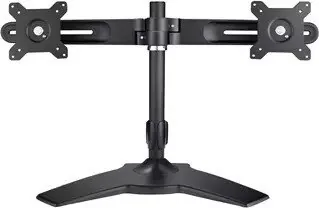
Modern workspaces demand flexibility and organization for optimal productivity. The AG neovo DMS-01D provides a reliable foundation for such improvements within any office setting. By utilizing this mounting solution, users can transform their desktop environment into a more efficient area. The design focuses on reducing clutter and enhancing visibility for everyone. Proper screen placement reduces strain on the neck and shoulders, promoting better health over long hours of operation.
Installation Requirements
Installation processes require a careful approach to ensure stability and safety for all parties involved. Referencing the AG neovo DMS-01D Manual is a recommended step for those who wish to understand the detailed requirements before beginning any physical tasks. The kit is designed for easy setup but demands that the desk surface remains horizontal and sturdy enough to handle the load. Safety guidelines emphasize that at least two individuals should handle the installation to prevent accidental drops during the lifting phase. Securing the mount to a desk capable of supporting four times the combined weight of the screen and bracket is essential for long term durability and peace of mind.
Features
Once installed, the unit offers impressive adjustability features for various user preferences. Users can swivel the monitor to view from different angles while maintaining a central position on the desk. The ability to tilt up or down allows for personalized ergonomic settings that fit the user height accurately. Pivot capabilities are particularly useful for viewing portrait-oriented content or documents without straining. Cable management systems keep wires hidden, contributing to a sleek and professional look around the workstation area.
Warranty and Support
Reliability is another key aspect of this hardware provided by the brand. The manufacturer offers a three-year warranty that covers the product body against defects. This coverage provides peace of mind regarding the construction quality and material strength. However, the warranty does not extend to the desk structure itself, as manufacturers cannot control installation environments or external forces. Environmental factors like earthquakes are also excluded from liability claims during the period. Maintenance involves checking screw tightness periodically to ensure nothing loosens over time due to constant adjustments. For any disputes or technical questions, standard support channels remain available to assist owners. This combination of adjustability, safety, and support makes it a standout choice for office upgrades today.