
AeroCool Visor Manual
PDF manual · 2 Pages
English



Quick check
Incorrect answer, please try again.
Chat with your AeroCool Visor manual using AI
Get instant AI answers from your AeroCool Visor manual
Ask anything about the AeroCool Visor. Answers come from this manual, with the pages they are based on.
Ask a Question
Do you recommend Visor?
Yes No
Julia Weber
7 months ago
Does this product come with a warranty if it arrives damaged?
Frequently Asked Questions
The case supports up to three 3.5-inch HDDs and two 2.5-inch SSDs, providing flexible storage options for various needs.
Is this answer helpful?
Yes, the manual guides you on installing front and top radiators, making it suitable for custom liquid cooling loops.
Is this answer helpful?
Yes, the Visor features a tempered glass side panel that offers durability while showcasing your hardware beautifully.
Is this answer helpful?
Yes, the AeroCool Visor includes an H66C RGB fan hub to help manage and synchronize LED lighting effects easily.
Is this answer helpful?
You can install up to three front fans, two top fans, and one rear fan, depending on your specific cooling requirements.
Is this answer helpful?
Advantages and Disadvantages
Advantages

- Clear glass window allows for stunning display of internal components
- Supports up to three 3.5-inch HDDs and two 2.5-inch SSDs
- Flexible cooling options with support for multiple fans and radiators
Disadvantages

- Glass panels may require frequent cleaning to maintain clarity
- Installation requires careful handling to avoid damaging tempered glass
- RGB hub configuration might be complex for absolute beginners
Product Specification
External
N/A
Internal
2x 2.5"/3.5" (horizontal, drive rails), 1x 2.5"/3.5", 4x 2.5"
Ports
2x USB-A 3.0 (5Gb/s), 1x 3.5mm jack (Line-Out), 1x 3.5mm jack (Line-In)
PCI Slots
10 (3x Riser Card)
Fans (front)
1x 140mm (RGB lit) or 3x 140mm (optional)
Fans (rear)
1x 140mm (RGB lit)
Fans (left)
N/A
Fans (right)
N/A
Fans (top)
2x 140mm (optional)
Fans (bottom)
N/A
Fans (other)
N/A
Radiator sizes
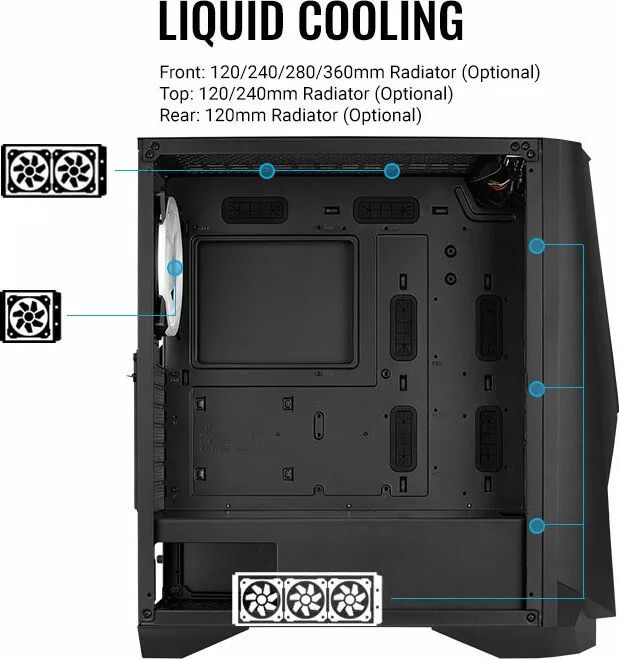
120/240/280/360mm front, 120/240mm top, 120mm rear
Motherboard
up to ATX (E-ATX with unknown dimensions possible)
Supported Motherboards
Mini-ITX (6.7"x6.7")/µATX (9.6"x9.6")/ATX (12"x9.6")/E-ATX (unknown dimensions)
Power Supply
ATX (max. 9.17" deep)
Power Supply Position
bottom
CPU Cooler
max. 7.09" height
Graphics Cards
max. 15.24" (without radiator)
Color
black, interior black
Lighting
RGB header 3-pin ARGB (+5V/DATA/GND), integrated LED controller, integrated RGB LED lighting, lit fans
Dimensions (WxDxH)
9.06x19.76x19.33in
Volume
3.46 cu ft
Case Type
Midi Tower
Front
partially closed, partially mesh
Top
partially closed, mostly fan grille, dust filter outside
Bottom
partially closed, fan grille at back, dust filter outside
Left
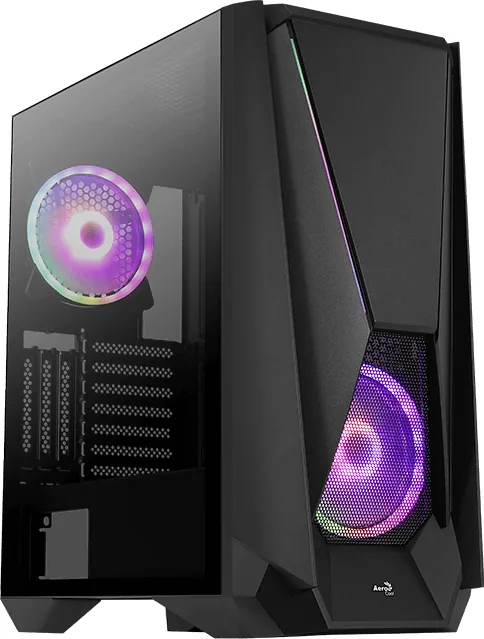
closed, glass
Right
closed
Rear
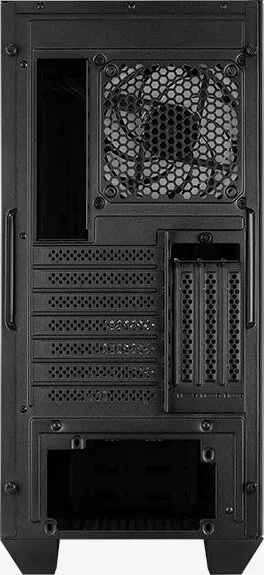
partially closed, fan grille right top, PCI slots (7x horizontal, 3x vertical)
Front I/O Position
Case side: top, Height: Front, Position: center
Features
includes fan controller, cable management, dust filters, graphics card vertically mountable, graphics card holder, glass viewing window
Note on E-ATX
Motherboard and case manufacturers designate different dimensions as E-ATX. This manufacturer provides no information on supported E-ATX dimensions. Motherboards with E-ATX/SSI EEB dimensions of 305x330mm or 12"x13" may not be supported.
USB Spelling
Link
Product Description
Discover the AeroCool Visor Glass Window Manual
The AeroCool Visor Glass Window Manual serves as an essential guide for enthusiasts looking to build a high-performance PC with style and precision. This mid-tower case is designed for users who value both aesthetics and functionality, offering a clear glass side panel that showcases your internal components while providing ample airflow for cooling. The manual simplifies the installation process, ensuring that even first-time builders can assemble their systems with confidence.
One of the standout features highlighted in this guide is the versatile storage capacity. The case supports multiple drive configurations, including up to two 2.5-inch SSDs and three 3.5-inch HDDs. Whether you need fast boot speeds or massive storage space, the Visor accommodates your needs without cluttering your workspace. The layout is intuitive, with clearly marked mounting points that prevent confusion during assembly.
Cooling options are equally impressive. The manual details how to install front fans, top fans, and rear fans to create an optimal airflow path. Additionally, it provides instructions for mounting radiators for liquid cooling setups, allowing you to maintain low temperatures even under heavy loads. The inclusion of an RGB fan hub further enhances the visual appeal, letting you sync lighting effects across your entire system.
Building with the AeroCool Visor is not just about putting parts together; it is about creating a personalized gaming or workstation experience. The guide covers everything from motherboard installation to PSU placement, ensuring every component fits perfectly. With its focus on user-friendly design and comprehensive instructions, this case stands out as a reliable choice for modern computer builds.
Search for 67,706 Manuals online


Type-in Brand or Model
Emmy Ernser
4 months ago
Are the RGB fans really quiet and is the build quality good for the price?
Manual.ly
4 months ago
Yes, the RGB fans are designed to be very quiet while providing excellent lighting effects. The overall build quality is highly rated for the price point, offering great value and durability.