
AeroCool Talon Manual
PDF manual · 2 Pages
English



Quick check
Incorrect answer, please try again.
Chat with your AeroCool Talon manual using AI
Get instant AI answers from your AeroCool Talon manual
Ask anything about the AeroCool Talon. Answers come from this manual, with the pages they are based on.
Ask a Question
Do you recommend Talon?
Yes NoFrequently Asked Questions
Yes, the AeroCool Talon supports both 2.5 inch SSD drives and 3.5 inch hard drives. The manual confirms the availability of specialized screws and mounting options for both drive sizes to accommodate various storage configurations.
Is this answer helpful?
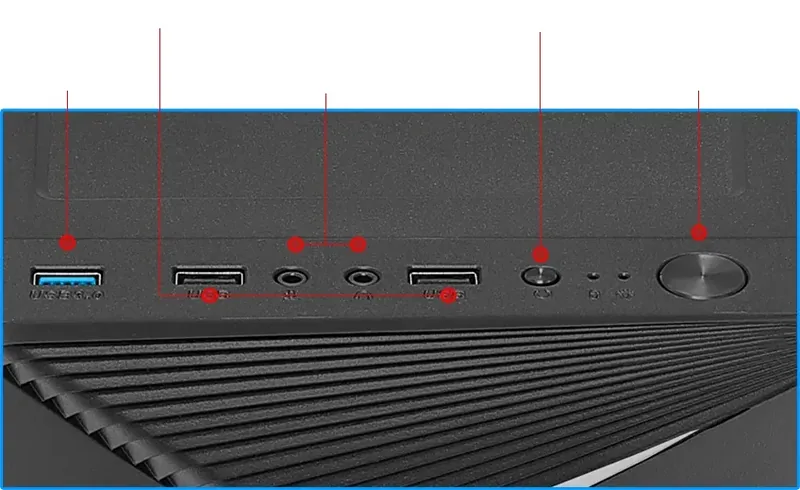
The Front I/O panel provides USB 3.0 ports, USB 2.0 ports, HD Audio inputs, microphone inputs, and Power LED control. These provide essential connectivity for modern peripherals and system management.
Is this answer helpful?
Installation guides are provided for Front Fans and a Rear Fan. While the kit supplies the necessary mounting hardware, users should verify if fans are pre-installed or included in the box based on the specific regional retailer package.
Is this answer helpful?
The manual supports multiple languages including English, Spanish, Chinese, Russian, Turkish, Polish, and Italian. This multilingual support ensures users worldwide can assemble their systems correctly regardless of language preference.
Is this answer helpful?
The accessory bag contains PSU screws, PCI screws, motherboard stands, HDD screws, and SS D thumb screws. This comprehensive kit reduces the need for external hardware purchases during assembly.
Is this answer helpful?
Yes, the manual outlines steps for installing add-on cards. The chassis accommodates expansion cards within the designated slot area, providing compatibility with standard PC component sizes.
Is this answer helpful?
Advantages and Disadvantages
Advantages

- Comprehensive accessory bag includes specific mounting screws for all drive types and PSU.
- RGB lighting feature included for customizable system aesthetics without extra cost.
- Multi-language I/O guide supports international users with diverse documentation needs.
- Clear Front I/O panel design makes USB and audio connections user-friendly.
Disadvantages

- Limited fan mounting positions restrict airflow customization options for advanced users.
- Mixed language manual text might cause confusion for monolingual builders.
- Screw management during assembly requires careful tracking of small hardware parts.
- No detailed cable tie management instructions included in the installation guide.
Product Specification
External
N/A
Internal drive bays
2x 2.5", 2x 3.5"
Ports
1x USB-A 3.0 (5Gb/s), 2x USB-A 2.0 (480Mb/s), 1x 3.5mm Jack (Line-Out), 1x 3.5mm Jack (Line-In)
PCI Slots
7
Fan (Front)
2x 4.72 in
Fan (Left)
N/A
Fan (Right)
N/A
Fan (Top)
N/A
Fan (Bottom)
N/A
Fan (Other)
N/A
Motherboard
Up to ATX
Supported Motherboards
Mini-ITX (6.7"x6.7")/micro-ATX (9.6"x9.6")/ATX (12"x9.6")
PSU
ATX
PSU Position
Top
CPU Cooler
max. 6.10 in height
Graphics Cards
max. 12.80 in
Color
Black, Black Interior
Dimensions (WxHxD)
7.80"x16.22"x15.55"
Volume
1,966.19 cu in
Chassis Type
Midi-Tower
Front
Closed, Partial ventilation slots, Ventilation slots above, Ventilation slots below, Ventilation slots side
Top
Closed
Bottom
Closed
Left
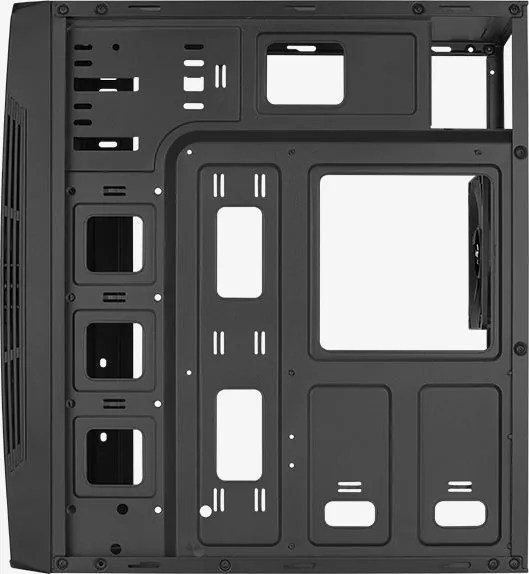
Closed, Acrylic window
Right
Closed
Back
Partially closed, Fan grill right center, PCI slots bottom (7x horizontal)
Front I/O Position
Case side: top, Height: Front, Position: center
USB Layout
Left
Product Description
AeroCool Talon PC Case Overview
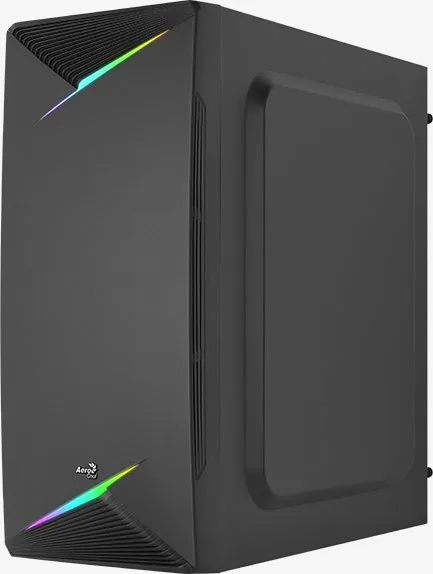
Building a custom personal computer requires careful planning and precision for success. The AeroCool Talon offers a robust solution for enthusiasts. This overview analyzes the core features highlighted in the AeroCool Talon Manual. The case itself is a Mid Tower solution with extensive RGB capabilities. It is designed for users who want a balanced build experience.
Installation is detailed in clear and comprehensive documentation. Multi-language sections exist for Motherboard and PSU installs for international users. Proper standoffs must align for system stability to prevent electrical shorts. The accessory bag has specific screw sets like PSU and PCI mounting hardware. Specific 3.5 and 2.5 inch HDD thumb screws are noted for storage drives. This reduces external hardware purchases significantly and saves money. You also get a Motherboard Standoff set and a USB 3.0 ribbon cable. The Front I/O cable connection is clearly labeled in sequential steps for users.
Prioritized Front I/O connectivity exists at the front of the case. The I/O panel features USB 3.0 ports alongside legacy USB 2.0 ports. HD Audio inputs and microphone connections are available for high quality peripherals. Power LED indicators and controls are easily accessible. The case accommodates several Front and Rear Fans for optimal airflow. Thermal management is key for component longevity and performance. You can install add-on cards easily within the expansion slot area.
One highlight is the pre-installed RGB Lighting feature available for customization. Users can customize aesthetics with various color modes. The manual mentions supporting 2.5 inch SSD drives and 3.5 inch hard drives. There are special screws for HDD installation included in the kit. Specifications vary by region and retailer. Contact local retailers for specific regional compatibility details. The manual supports many languages including Spanish, Chinese and Russian.
Overall, the AeroCool Talon delivers significant value to buyers. It focuses on essential features for a stable build at a competitive price point. The slogan Save Money Build Better reflects the product value. The guide emphasizes safety during installation. Follow the user manual closely for success. This provides a solid foundation for your computing needs and satisfaction.
Important Notes for Builders
Always check drive sizes. Ensure cables are secured with the provided screws. Track accessory bag contents during the assembly process. Refer to manual for I/O cable connection diagrams. Verify fan orientation for correct airflow direction. Power LED switch is accessible from the case exterior. Ensure proper grounding and static discharge. Use anti-static wrist straps.
Search for 67,706 Manuals online


Type-in Brand or Model