
AeroCool Mecha Manual
PDF manual · 2 Pages
English



Quick check
Incorrect answer, please try again.
Chat with your AeroCool Mecha manual using AI
Get instant AI answers from your AeroCool Mecha manual
Ask anything about the AeroCool Mecha. Answers come from this manual, with the pages they are based on.
Ask a Question
Do you recommend Mecha?
Yes NoFrequently Asked Questions
Press and hold the LED Control Button for 3 seconds to switch to MB control. Click the button once to revert back to Button Control.
Is this answer helpful?
It supports installing 3.5 inch hard drives and 2.5 inch solid-state drives efficiently within the dedicated bays.
Is this answer helpful?
Yes, you can install 120mm or 140mm radiators on the front and rear panels for enhanced thermal performance.
Is this answer helpful?
The I/O section includes Power, USB 3.0, Reset, and Audio connectivity for easy access near the motherboard area.
Is this answer helpful?
You can use the onboard LED Control Button to cycle modes or switch to motherboard control depending on preference.
Is this answer helpful?
Yes, it supports add-on cards and has excellent cooling options for high performance gaming rigs or workstations.
Is this answer helpful?
Cycle through the modes until you reach the off setting using the LED Control Button logic explained in the guide.
Is this answer helpful?
Advantages and Disadvantages
Advantages

- Supports multiple storage bays including 3.5 and 2.5 inch drives for high capacity.
- Extensive cooling options with support for front and rear radiator installation.
- Integrated LED button allows direct control without software dependency.
- Logical assembly steps guide users through motherboard and power supply installation.
- Convenient I/O panel placement includes audio and reset functionality.
Disadvantages

- Manual assembly requires understanding fan and radiator mounting locations clearly.
- LED control instructions require specific button hold times to avoid mode errors.
- No specific cable management clips are explicitly detailed in the summary.
- Users must visit external site for ARGB compatibility details rather than on the case.
- Fan installation limits might vary depending on specific radiator size choices made.
Product Specification
External
N/A
Internal
1x 2.5"/3.5" (horizontal, HDD cage), 1x 3.5" (horizontal, HDD cage), 2x 2.5"
PCI Slots
7
Fan (Front)
2x 5.51 inches (optional)
Fan (Left)
N/A
Fan (Right)
N/A
Fan (Top)
1x 4.72 inches (optional)
Fan (Bottom)
N/A
Fan (Extra)
N/A
Radiator Sizes
4.72/9.45 inches front, N/A top, 4.72 inches back
Motherboard Fit
up to ATX
Supported Motherboards
Mini-ITX (6.7"x6.7")/µATX (9.6"x9.6")/ATX (12"x9.6")
Power Supply
ATX (max. 6.30 inches deep)
Power Supply Position
bottom
CPU Cooler Clearance
max. 6.26 inches height
Graphics Cards
max. 11.89 inches (without radiator)
Color
black, black interior
Dimensions (WxHxD)
8.07x17.40x14.57 inches
Volume
1.18 cu ft
Case Type
Midi Tower
Front
closed, ventilation slots at bottom
Top
partially closed, fan grill at back, dust filter outside
Bottom
partially closed, fan grill at back, dust filter outside
Left
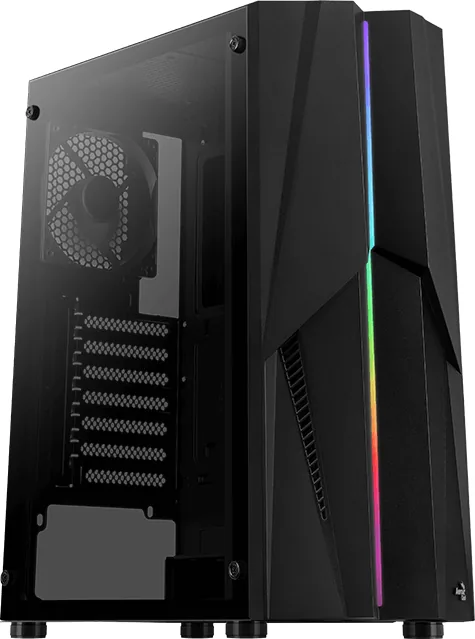
closed, glass
Right
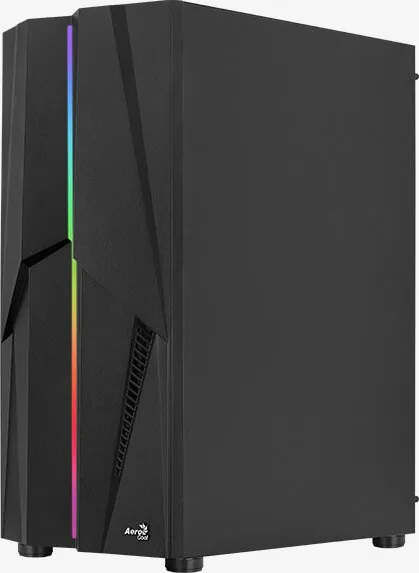
closed
Back
partially closed, fan grill on right top, PCI Slots (7x horizontal)
Front I/O Position
Case Side: Top, Height: Front, Position: Center
Features
Cable management, dust filter, glass window
USB Labeling
Left
Product Description
AeroCool Mecha Build Experience
The AeroCool Mecha case represents a robust platform for custom PC enthusiasts seeking a balance between performance and aesthetics. This comprehensive build guide highlights the versatility of the chassis, designed to accommodate various hardware configurations seamlessly. Whether you are assembling a high-performance gaming rig or a professional workstation, the AeroCool Mecha provides ample space and intelligent cable management solutions. The attention to detail in the internal layout makes every component installation feel intuitive and streamlined.
Storage Flexibility
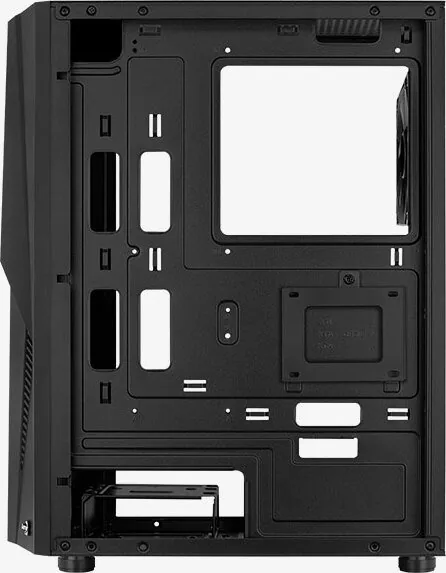
Storage flexibility stands out as a key feature. The case supports multiple 3.5 inch hard drives, ensuring plenty of room for extensive media libraries or system backups. This is crucial for users who prioritize archival data without sacrificing processing power. Additionally, dedicated bays for 2.5 inch solid-state drives allow for fast boot times without cluttering the interior. You can install multiple 2.5 inch drives total, maximizing storage density for modern applications. Power supply installation is straightforward, offering ample clearance for even the largest units, which simplifies the cable routing process significantly.
Cooling Performance
Cooling performance remains a priority for the AeroCool Mecha build. The chassis supports extensive fan configurations, including front, top, and rear mounting options. Liquid cooling enthusiasts can install radiators up to 140mm or 120mm sizes on the front and rear panels, ensuring thermal efficiency even under heavy loads. Airflow is directed effectively through the optimized interior layout, helping to maintain stable temperatures during intense gaming or rendering sessions. The inclusion of multiple fan mounts ensures heat sinks do not bottleneck airflow, keeping the system silent and cool during operation.
Lighting and Controls
Lighting control adds a personalized touch to the final assembly. The case features an integrated LED button that offers direct control over lighting modes. Users can switch between motherboard control and direct button control with a simple press and hold action. Reverting to LED button control is as easy as clicking once, offering flexibility depending on your system setup. Cycling through modes allows for dynamic visualization of the system interior. For those seeking detailed information on ARGB connectivity, the manufacturer provides additional resources on their official product page.
Final Thoughts
Building with the AeroCool Mecha Manual ensures that every step is covered, from motherboard installation to add-on card fitting. The layout encourages organization, making it accessible for beginners while providing enough depth for experienced builders. Each step follows a logical sequence, minimizing the risk of hardware damage during the build process. The focus on accessibility and cooling capability makes this chassis a standout choice for those looking to construct a reliable and visually appealing computer system. Specific controls for power and reset buttons are conveniently located on the I/O panel. The audio connectivity supports standard headsets and microphones, ensuring clear communication during calls. Understanding these nuances is part of mastering the AeroCool Mecha setup. Ultimately, this case empowers users to create a system that performs as well as it looks.
Search for 67,706 Manuals online


Type-in Brand or Model