
AeroCool Interstellar Manual
PDF manual · 2 Pages
English



Quick check
Incorrect answer, please try again.
Chat with your AeroCool Interstellar manual using AI
Get instant AI answers from your AeroCool Interstellar manual
Ask anything about the AeroCool Interstellar. Answers come from this manual, with the pages they are based on.
Ask a Question
Do you recommend Interstellar?
Yes NoFrequently Asked Questions
Yes, the front mounting points can accommodate large radiators for liquid cooling loops. You can install 360mm radiators at the front for advanced thermal management.
Is this answer helpful?
The hub supports ASUS Aura Sync, MSI Mystic Light Sync, and GIGABYTE RGB Fusion boards. Non-addressable RGB boards also work with specific connectors for the hub.
Is this answer helpful?
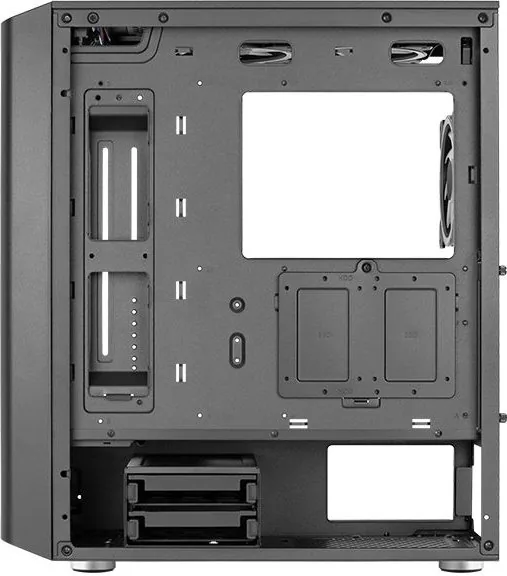
The chassis accommodates two 3.5-inch hard drives and two 2.5-inch SSD mounts. Screw kits are included for secure installation of both drive types.
Is this answer helpful?
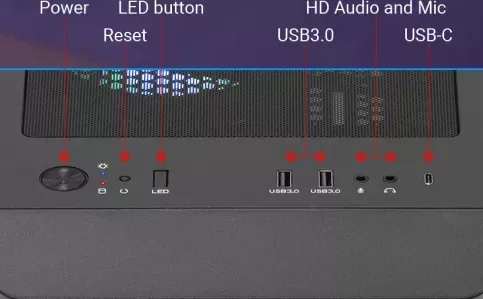
No, an LED control button is included. You can hold it to switch modes or turn off lights instantly without using motherboard software.
Is this answer helpful?
The front I/O includes USB 3.0 ports for fast data transfer. Audio jacks for headphones and microphones are also available for connectivity.
Is this answer helpful?
Contact your local retailer for more information as local models may differ. Contact support for inquiries regarding compatibility with new hardware versions.
Is this answer helpful?
Advantages and Disadvantages
Advantages

- Supports 120mm and 140mm fan configurations for flexible cooling options
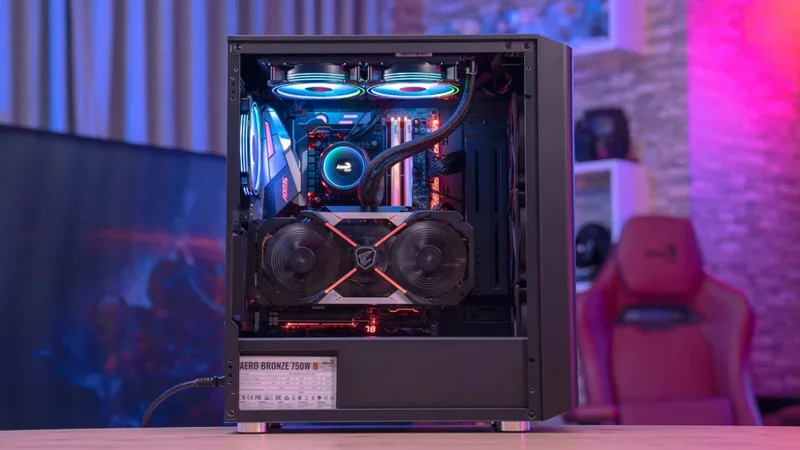
- Tempered glass panel allows clear visibility of internal hardware
- Includes ARGB hub compatible with ASUS Aura and MSI Mystic Light
Disadvantages

- Radiators are not included with the base unit in the package
- Motherboard standoffs are few and may require additional purchase
- Complex wiring for RGB hub requires technical knowledge to connect
Product Specification
External
N/A
Internal
2x 2.5"/3.5" (transverse, drive rails), 2x 2.5"
Connections
1x USB-C 3.1 (10Gb/s, 20-Pin Key-A Header), 2x USB-A 3.0 (5Gb/s), 1x 3.5mm Jack (Line-Out), 1x 3.5mm Jack (Line-In)
PCI Slots
7
Fan (Front)
2x 4.72" or 3x 4.72" (optional) or 2x 5.51" (optional)
Fan (Rear)
1x 4.72" (RGB lit)
Fan (Left)
N/A
Fan (Right)
N/A
Fan (Top)
2x 4.72" (RGB lit) or 2x 5.51" (optional)
Fan (Bottom)
N/A
Fan (Other)
N/A
Radiator Sizes
4.72"/9.45"/11.02"/14.17" front, 4.72"/9.45"/11.02" top, 4.72" rear
Motherboard
up to ATX
Supported Motherboards
Mini-ITX (6.7"x6.7")/mATX (9.6"x9.6")/ATX (12"x9.6")
Power Supply
ATX (max. 7.32" deep)
Power Supply Position
bottom
CPU Cooler
max. 6.42" height
Graphics Cards
max. 14.25" (without front fan)
Color
black, interior black
Lighting
RGB Header 3-Pin ARGB (+5V/DATA/GND), integrated LED controller, integrated RGB LED lighting, lit fans
Dimensions (WxHxD)
8.27"x19.02"x16.89"
Volume
1.54 cu ft
Case Type
Mid-Tower
Front
partially closed, mostly Mesh, dust filter inside
Top
partially closed, mostly Fan Grille, dust filter outside
Bottom
partially closed, Fan Grille rear, dust filter outside
Left
closed, Glass
Right
closed
Rear
partially closed, Fan Grille right top, PCI Slots (7x horizontal)
Front I/O Position
Case Side: Top, Height: Front, Position: Center
Motherboard Orientation
Left
Features
Cable management, dust filter, graphics card support bracket, PCI slots vertically mountable, glass window
USB Labeling
Left
Product Description
Introduction to the System
Building a custom PC requires careful selection of components to ensure optimal performance and style. The AeroCool Interstellar Glass Window Manual provides essential insights into assembling a high-performance machine quickly. This case is designed for enthusiasts who value visibility and airflow efficiency above all else. The tempered glass side panel showcases internal hardware beautifully from multiple angles clearly. You can see every light strip and cable management solution clearly through the transparent panel.
Cooling and Expansion
Thermal management is absolutely critical for system longevity during heavy gaming sessions. This unit supports multiple fan configurations to meet diverse cooling needs effectively. You may install 120mm or 140mm fans on the top panel for intake or exhaust. Front mounts accommodate large radiators for advanced liquid cooling loops. Rear and front panel airflow is optimized to push heat away from components effectively. The dedicated GPU bracket helps prevent sagging on heavy graphics cards significantly. Expansion slots are plentiful for future upgrades as your needs change over time.
Storage Solutions
Data storage capacity matters greatly for gamers and content creators alike. The chassis accommodates two 3.5-inch hard drives for bulk data storage easily. Additionally, there are mounting points available for two 2.5-inch SSDs for speed. Cable ties are included in the bag to keep wiring tidy behind the tray. Hard drive screws are provided in the accessory bag for secure mounting. Installation is straightforward with proper planning and reference to the steps provided.
RGB Lighting Integration
Synchronization creates a cohesive visual theme across all connected peripherals effectively. The RGB hub connects directly to the motherboard PWM socket for full control. It supports ASUS Aura Sync and MSI Mystic Light Sync standards widely. GIGABYTE RGB Fusion boards also connect seamlessly for unified color patterns. Addressable RGB fans can be powered through the hub for advanced effects. Power comes from the PSU SATA connector for stable operation. The connection setup ensures unified color patterns for a professional look.
Connectivity and Assembly
Front I/O includes USB 3.0 ports and audio jacks for convenience. A reset button and power LED are easily accessible on the top. An LED control button allows on-the-fly adjustments without software intervention. Hold the button to switch modes or turn off lights instantly. Motherboard standoffs are included for structural stability during mounting phases. Follow the manual during installation for best results and safety always.
Final Thoughts
This case delivers excellent value for budget builders seeking quality components. The focus on airflow and aesthetics sets it apart from competitors in the market. Cable management features reduce clutter inside the chassis significantly for clean builds. Users can build better with this affordable tower for years of use. Enjoy a quiet system that looks great on your desk always.
Important Notes
Specifications vary by region depending on local models and regulations. Radiators are not included with the base unit package typically. Check local retailer for availability and specific configurations in stock. Contact support for inquiries regarding compatibility with new hardware versions.
Search for 67,706 Manuals online


Type-in Brand or Model