
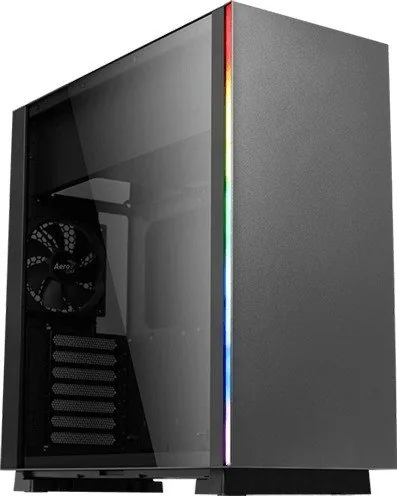
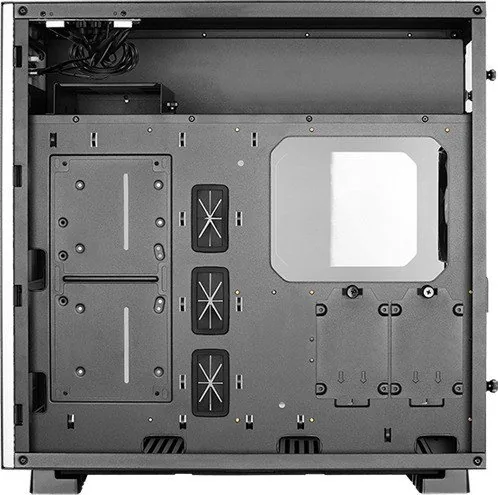
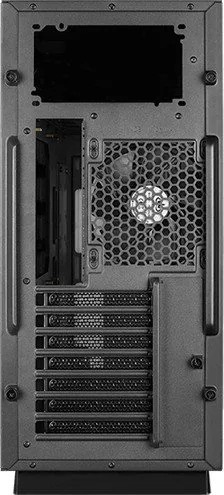
AeroCool GLO Manual
PDF manual · 10 Pages
English



Quick check
Incorrect answer, please try again.
Chat with your AeroCool GLO manual using AI
Get instant AI answers from your AeroCool GLO manual
Ask anything about the AeroCool GLO. Answers come from this manual, with the pages they are based on.
Ask a Question
Do you recommend GLO?
Yes NoFrequently Asked Questions
Yes, this chassis supports SSI-CEB, ATX, micro ATX, and mini-ITX motherboard form factors to accommodate various build sizes.
Is this answer helpful?
The graphic card clearance reaches 425mm ensuring most high-end GPUs will fit comfortably without obstruction.
Is this answer helpful?
Yes, you can mount a 360mm radiator at the front or rear of the case for advanced liquid cooling setups.
Is this answer helpful?
The case supports a maximum of three 3.5 inch HDD bays and five 2.5 inch SSD slots for extensive storage options.
Is this answer helpful?
Yes, the chassis comes with a tempered glass window edition that allows you to view your internal components.
Is this answer helpful?
It is designed for ATX power supply units with a maximum length of 225mm for optimal compatibility.
Is this answer helpful?
Simply loosen the screws on the side panel rather than removing all hardware allowing for easy access.
Is this answer helpful?
Advantages and Disadvantages
Advantages

- Supports up to seven expansion slots for maximum connectivity and customization options for users.
- Large GPU clearance of 425mm ensures compatibility with high-performance graphics cards.
- Flexible cooling support including 360mm radiator mounting for effective liquid cooling systems.
- Tempered glass side panel offers clear visibility of internal hardware and aesthetics.
- Comprehensive RGB control with multiple color modes including purple, cyan, yellow, white, blue, green, and red.
Disadvantages

- Steel thickness of 0.7mm may feel less rigid compared to heavier gauge cases in the market.
- Limited to two USB 3.0 ports on the front I/O panel which might be restrictive for some users.
- Optional power supply fan may not be included in the base package requiring separate purchase.
- Drive cages require careful handling during SSD installation to avoid stripping screws.
- Dust filters are not explicitly detailed for every fan location so cleaning might vary in complexity.
Product Specification
External
N/A
Internal
2x 3.5", 1x 2.5"/3.5", 4x 2.5"
Ports
2x USB-A 3.0 (5 Gbps), 1x 3.5mm Jack (Line-Out), 1x 3.5mm Jack (Line-In)
PCIe Slots
7
Front Fan
2x 4.72" (optional)
Rear Fan
1x 4.72"
Left Fan
N/A
Right Fan
N/A
Top Fan
N/A
Bottom Fan
3x 4.72" (optional)
Other Fan
2x 4.72" (optional)
Radiator Sizes
14.17" bottom, 9.45" other
Motherboard
Up to ATX (10.51" wide)
Supported Motherboards
Mini-ITX (6.7"x6.7")/Micro ATX (9.6"x9.6")/ATX (12"x9.6")/E-ATX (SSI CEB, 12"x10.5")
Power Supply
ATX (max. 8.86" deep)
Power Supply Position
Top
CPU Cooler
max. 6.30" height
Graphics Cards
max. 16.73"
Color
black/white, black inside
Lighting
integrated LED controller, integrated RGB LED lighting
Dimensions (WxHxD)
8.27"x18.70"x18.82"
Volume
1.68 cu ft
Weight
17.64 lbs
Case Type
Midi-Tower
Front Panel
Closed
Top Panel
Closed
Bottom Panel
Partially closed, mostly fan grille, outside dust filter
Left Panel
Closed, Glass
Right Panel
Partially closed, fan grille front, dust filter
Rear Panel
Partially closed, fan grille right center, PCI slots bottom (7x horizontal)
Front I/O Position
Case Side: Top, Height: Front, Position: Right
Features
Cable management, dust filter, glass window
Note on E-ATX
Motherboard and case manufacturers designate different dimensions as E-ATX. Motherboards with E-ATX/SSI EEB dimensions of 12.01"x13.00" or 12"x13" may not be supported.
USB Notation
Left
Product Description
Discovering the AeroCool GLO Glass Window Experience
When building a custom PC, aesthetics and performance must go hand in hand. The AeroCool GLO Glass Window is a mid tower chassis designed to showcase your internal components while maintaining robust airflow. This tempered glass edition allows you to view the intricate details of your hardware without sacrificing structural integrity. The case supports various motherboard form factors including SSI-CEB, ATX, micro ATX, and mini-ITX. This versatility makes it suitable for both budget builds and high-end workstations where space is at a premium.
Build Capabilities and Expansion
One of the standout features is the expansion capability provided by the seven expansion slots. Users can install up to seven add-on cards which ensures compatibility with a wide range of graphics cards and capture boards. The graphic card clearance reaches 425mm meaning most high-end GPUs will fit without issues. Additionally, CPU cooler clearance supports air coolers up to 157mm in height. For storage enthusiasts, there are specific options for three drive bays for 3.5 inch drives and five slots for 2.5 inch SSDs. This mix ensures you can keep your operating system fast while storing large media libraries on traditional mechanical drives.
Cooling and Lighting Features
Thermal management is critical for high performance and longevity. This chassis offers significant flexibility with liquid cooling options. You can mount a 240mm or even a 360mm radiator at the front or rear respectively depending on your preference for noise or cooling efficiency. There are also optional 120mm fans included or added to the front inner side, bottom, and rear areas for comprehensive airflow circulation. RGB enthusiasts will appreciate the dedicated LED switch functionality found on the case. You can control modes including purple, cyan, yellow, white, blue, green, and red for a vibrant personalized look that matches your peripherals perfectly.
Installation and Connectivity
Getting started is straightforward thanks to the clear instructions provided with the kit. The I/O panel provides two USB 3.0 ports along with HD audio and mic inputs for easy connection of devices. Power supply installation is designed for ATX units up to 225mm in length allowing for a good selection of power units. The side panel removal process is simple requiring only loosening of screws rather than complete removal of hardware. Proper dust filtration is integrated to keep internal components clean during long gaming sessions. The steel thickness is 0.7mm providing a balance between rigidity and weight. The internal dimensions measure 210 by 450 by 455mm which accommodates most standard components comfortably.
Important Assembly Note: Always verify drive compatibility and cable management space before final assembly to ensure a clean build. Ensure screws are not fully removed when swapping side panels to avoid loss. Double check water pump clearance against motherboard standoffs to prevent damage during installation phases.
Search for 67,706 Manuals online


Type-in Brand or Model
Lisa M.
6 months ago
Are there dust filters for front intake fans and how does adding fans affect drive space?
Manual.ly
6 months ago
Dust filters are included at the bottom only. Front fan mounts lack filters. Adding fans here may reduce space for storage drives. RGB lighting works via case buttons or 5V 3-pin motherboard headers.