
AeroCool Gladiator Duo Manual
PDF manual · 2 Pages
English



Quick check
Incorrect answer, please try again.
Chat with your AeroCool Gladiator Duo manual using AI
Get instant AI answers from your AeroCool Gladiator Duo manual
Ask anything about the AeroCool Gladiator Duo. Answers come from this manual, with the pages they are based on.
Ask a Question
Do you recommend Gladiator Duo?
Yes NoFrequently Asked Questions
This mid-tower case supports ATX, Micro-ATX, and Mini-ITX motherboards. It provides a versatile platform suitable for various build sizes and component configurations.
Is this answer helpful?
You can install up to six 120mm fans or four 140mm fans depending on the configuration. Additional mounts allow for front, top, and rear fan placements.
Is this answer helpful?
Yes, the AeroCool Gladiator Duo includes an addressable RGB hub (H66C) to manage lighting effects. It connects to compatible fans and LEDs for synchronized patterns.
Is this answer helpful?
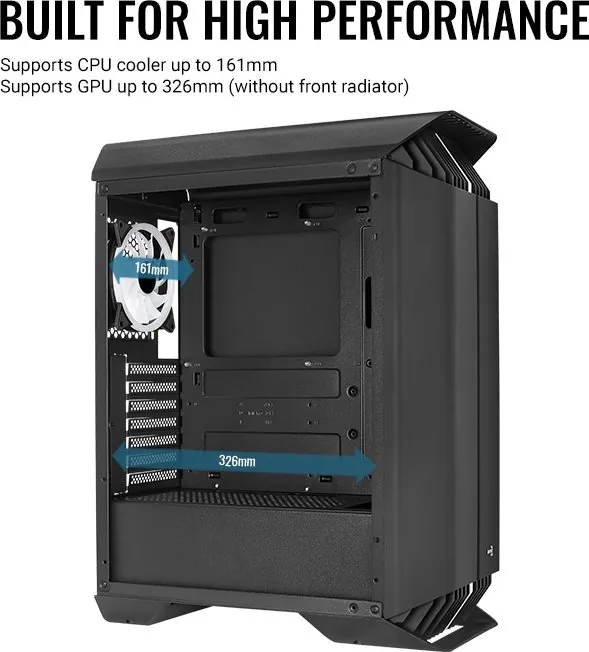
The case offers generous clearance for long graphics cards. Most standard and high-end GPUs will fit comfortably without obstructing other components.
Is this answer helpful?
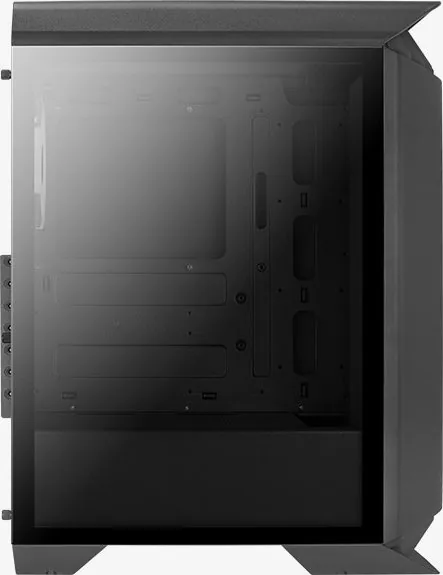
Yes, the side panel features tempered glass to provide a clear view of your build. It is designed to be durable while maintaining a sleek aesthetic appearance.
Is this answer helpful?
The case supports multiple 3.5-inch HDDs and 2.5-inch SSDs. There are dedicated bays and mounting points for flexible storage configurations.
Is this answer helpful?
Advantages and Disadvantages
Advantages

- Large tempered glass window showcases internal hardware beautifully
- Extensive fan and radiator support enables superior cooling solutions
- Integrated ARGB hub simplifies lighting control and synchronization
- Spacious interior allows for easy cable management and component fitting
Disadvantages

- Glass panels may require careful handling to prevent accidental cracks
- RGB customization relies on external software or manual button presses
- Limited pre-installed fans might require additional purchases for full effect
- Top I/O panel placement could be less accessible on some desk setups
Product Specification
Extern
N/A
Intern
1x 3.5" (horizontal, drive rails), 1x 2.5"/3.5", 2x 2.5"
Connections
2x USB-A 3.0 (5Gb/s), 1x 3.5mm jack (Line-Out), 1x 3.5mm jack (Line-In)
PCI Slots
7
Fan (front)
3x 120mm (optional) or 2x 140mm (optional)
Fan (rear)
1x 120mm (RGB illuminated)
Fan (left)
N/A
Fan (right)
N/A
Fan (top)
2x 120mm (RGB illuminated)
Fan (bottom)
N/A
Fan (other)
2x 120mm (optional)
Radiator Sizes
120/240/360mm front, 120/240mm top, 120mm rear
Motherboard
up to ATX
Supported Motherboards
Mini-ITX (6.7"x6.7")/µATX (9.6"x9.6")/ATX (12"x9.6")
Power Supply
ATX (max. 6.3" deep)
Power Supply Position
bottom
CPU Cooler
max. 6.34" height
Graphics Cards
max. 12.83" (without front fan)
Color
black, black interior
Lighting
RGB Header 3-Pin ARGB (+5V/DATA/GND), integrated LED controller, integrated RGB LED lighting, illuminated fans
Dimensions (WxDxH)
8.27x20.43x15.91 inches
Volume
2.69 cu ft
Case Type
Midi Tower
Front
closed, ventilation slots top, ventilation slots bottom
Top
partially closed, mostly fan grille, dust filter outside
Bottom
partially closed, fan grille rear, dust filter outside
Left
closed, glass
Right
closed
Rear
partially closed, fan grille right top, PCI slots (7x horizontal)
Front I/O Position
Case side: top, Height: middle, Position: middle
Features
includes fan controller, cable management, dust filter, glass window
USB Spelling
Link
Product Description
Discover the AeroCool Gladiator Duo with Glass Window
The AeroCool Gladiator Duo with Glass Window is a premier mid-tower case designed for enthusiasts who demand both style and performance. This chassis stands out with its tempered glass side panel, offering a crystal-clear view of your internal components while housing powerful hardware. The design philosophy centers on creating a spacious and efficient environment for custom PC builds, ensuring that airflow and aesthetics work in harmony.
One of the standout features of this case is its support for extensive cooling options. Users can install multiple fans and radiators at various positions, including front, top, and rear mounts. This flexibility allows for effective liquid cooling setups or high-performance air cooling configurations. The case accommodates 120mm, 140mm, 240mm, and 360mm radiators, giving builders the freedom to tailor their thermal management strategy to specific needs.
The interior layout is engineered for ease of assembly. Clear instructions guide users through installing motherboards, power supplies, storage drives, and expansion cards. The case supports both 3.5-inch hard drives and 2.5-inch SSDs, providing ample room for data storage. Cable management is simplified with dedicated tie points and ample space behind the motherboard tray, helping maintain a clean look inside the chassis.
AeroCool has integrated an addressable RGB hub into the design, allowing for synchronized lighting effects across compatible fans and LEDs. The front panel includes controls for resetting LED modes, enabling users to switch between motherboard control and direct button operation. Holding the reset button for specific durations offers quick adjustments to lighting states without entering software menus.
The I/O panel is conveniently located at the top, featuring USB 3.0 ports and audio jacks for easy access during daily use. The inclusion of a sturdy frame ensures durability, while the glass window adds a premium touch to any desktop setup. Whether you are building a gaming rig or a workstation, the AeroCool Gladiator Duo delivers reliability and visual appeal.
Key Notes
- Supports ARGB synchronization via included hub.
- Versatile radiator mounting options for advanced cooling.
- Spacious interior simplifies component installation.
- Includes necessary screws and standoffs for common hardware.
Search for 67,706 Manuals online


Type-in Brand or Model