
AeroCool Delta Manual
PDF manual · 2 Pages
English



Quick check
Incorrect answer, please try again.
Chat with your AeroCool Delta manual using AI
Get instant AI answers from your AeroCool Delta manual
Ask anything about the AeroCool Delta. Answers come from this manual, with the pages they are based on.
Ask a Question
Do you recommend Delta?
Yes NoFrequently Asked Questions
The case supports both 3.5-inch hard disk drives and 2.5-inch solid-state drives, providing versatile options for expanding your storage capacity.
Is this answer helpful?
No, the radiator is not included in the box. You will need to purchase it separately if you plan to use liquid cooling.
Is this answer helpful?
The front I/O panel features both USB 3.0 and USB 2.0 ports, along with HD audio jacks for microphone and headphone connectivity.
Is this answer helpful?
Yes, the AeroCool Delta allows for the installation of rear radiators, making it suitable for custom water cooling loops.
Is this answer helpful?
Yes, the product includes a user manual available in English and multiple other languages to guide you through the installation process.
Is this answer helpful?
Advantages and Disadvantages
Advantages

- Supports multiple 3.5-inch HDDs and 2.5-inch SSDs for flexible storage options
- Includes a dedicated RGB lighting control button for easy customization
- Comprehensive front I/O panel featuring USB 3.0 and HD Audio ports
Disadvantages

- Radiator installation requires additional purchasing as it is not included
- Some screws and accessories may vary depending on regional specifications
- No built-in fan controllers mentioned beyond the basic LED button
Product Specification
External
N/A
Internal
2x 2.5"/3.5" (horizontal, drive rails)
Ports
1x USB-A 3.0 (5Gb/s), 2x USB-A 2.0 (480Mb/s), 1x 3.5mm jack (Line-Out), 1x 3.5mm jack (Line-In)
PCI Slots
7
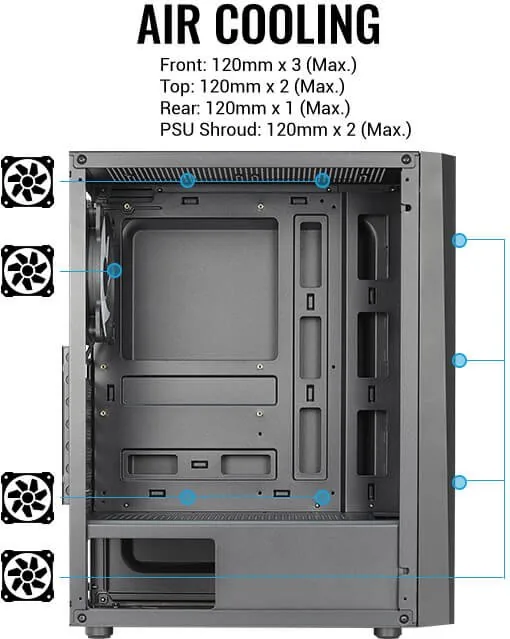
Fan (front)
3x 4.72in (optional)
Fan (rear)
1x 4.72in
Fan (left)
N/A
Fan (right)
N/A
Fan (top)
2x 4.72in (optional)
Fan (bottom)
N/A
Fan (other)
2x 4.72in (optional)
Radiator sizes
N/A front, N/A top, 4.72in rear
Motherboard
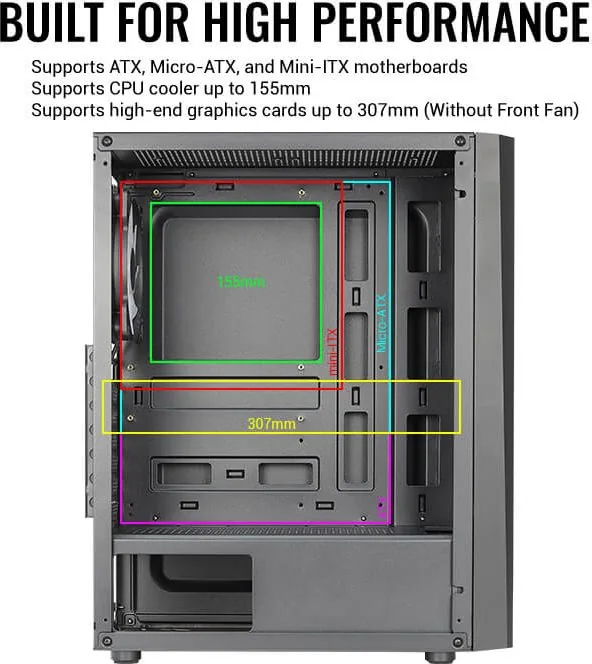
up to ATX
Supported Motherboards
Mini-ITX (6.7"x6.7")/µATX (9.6"x9.6")/ATX (12"x9.6")
Power Supply
ATX (max. 5.94in deep)
Power Supply Position
bottom
CPU Cooler
max. 6.10in height
Graphics Cards
max. 12.09in (without radiator)
Color
black, interior black
Lighting
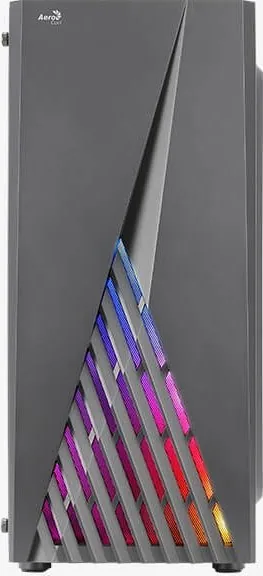
integrated LED controller, integrated RGB LED lighting
Dimensions (WxDxH)
7.76x16.97x14.06in
Volume
1.07cu ft
Chassis Type
Mid-Tower
Front
closed, ventilation slots bottom
Top
partially closed, mostly fan grille
Bottom
partially closed, fan grille rear, dust filter outside
Right
closed
Back
partially closed, fan grille right top, PCI slots (7x horizontal)
Front I/O Position
Chassis side: top, Height: Front, Position: center
USB Spelling
Link
Product Description
AeroCool Delta: The Ultimate Mid Tower RGB Case
The AeroCool Delta stands as a premier choice for enthusiasts seeking a blend of aesthetic appeal and functional design. This RGB mid-tower case is engineered to accommodate high-performance components while offering exceptional airflow and cable management solutions. Whether you are building a gaming rig or a content creation workstation, the Delta provides a robust foundation for your hardware needs.
One of the standout features of the AeroCool Delta is its comprehensive support for storage and expansion. The chassis includes dedicated mounting points for multiple 3.5-inch hard drives and 2.5-inch solid-state drives, ensuring ample space for your data and operating system files. The front I/O panel is thoughtfully designed with USB 3.0 ports, standard USB 2.0 connections, and HD audio jacks, providing convenient access to peripherals without reaching behind the desk.
Installation is streamlined with clear guides included in the package. Users can easily install the motherboard, power supply unit, add-on cards, and various cooling solutions including front, top, rear fans, and even rear radiators for liquid cooling setups. The case supports extensive fan configurations, allowing for optimal thermal performance tailored to specific build requirements. The inclusion of an RGB lighting control button enables users to customize the visual ambiance of their system with a single press.
The AeroDelta also emphasizes versatility. Its spacious interior accommodates large graphics cards and diverse cooling arrangements. The pre-installed standoffs and screw kits simplify the assembly process, reducing the time spent on setup. With its sleek design and focus on user experience, the AeroCool Delta delivers a reliable platform for modern computing builds.
Search for 67,706 Manuals online


Type-in Brand or Model