
AeroCool CS-106 Manual
PDF manual · 2 Pages
English



Quick check
Incorrect answer, please try again.
Chat with your AeroCool CS-106 manual using AI
Get instant AI answers from your AeroCool CS-106 manual
Ask anything about the AeroCool CS-106. Answers come from this manual, with the pages they are based on.
Ask a Question
Do you recommend CS-106?
Yes No
Julia M
5 months ago
Is the metal sheeting too thin for a sturdy build?
Frequently Asked Questions
The case supports ATX, Micro-ATX, and Mini-ITX motherboards, offering flexibility for different build requirements and component sizes.
Is this answer helpful?
You can install one 2.5-inch SSD and one 3.5-inch HDD simultaneously, providing a balanced mix of speed and capacity for most users.
Is this answer helpful?
No, the power supply unit is not included in the box. You must purchase a compatible PSU separately based on your system's wattage needs.
Is this answer helpful?
This specific model does not support radiator installation as there are no mounting points for radiators inside the chassis.
Is this answer helpful?
The front I/O panel includes two USB 2.0 ports, two USB 3.0 ports, and standard HD Audio jacks for microphone and headphone connections.
Is this answer helpful?
Yes, the side panels are tool-less or use simple thumbscrews, allowing for quick removal to access internal components for upgrades or cleaning.
Is this answer helpful?
The AeroCool CS-106 comes with one pre-installed rear exhaust fan to help expel hot air from the system during operation.
Is this answer helpful?
Advantages and Disadvantages
Advantages

- Supports ATX, Micro-ATX, and Mini-ITX motherboards
- Includes USB 3.0 and USB 2.0 ports
- Fits one 2.5-inch SSD and one 3.5-inch HDD
- Comes with a rear exhaust fan installed
- Compact Mini Tower design saves desk space
Disadvantages

- No mounting points for liquid cooling radiators
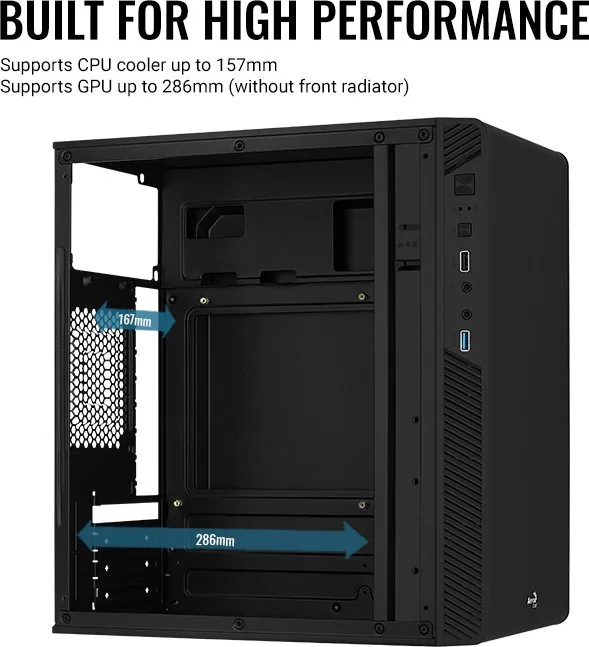
- Limited clearance for very large graphics cards
- No pre-installed front intake fans
- Restricted cable management area
- Lacks modern Type-C front port connectivity
Product Specification
Extern
N/A
Intern
1x 3.5", 2x 2.5"
Connectors
1x USB-A 3.0 (5Gb/s), 1x USB-A 2.0 (480Mb/s), 1x 3.5mm Jack (Line-Out), 1x 3.5mm Jack (Line-In)
PCI Slots
4
Fan (front)
1x 120mm (optional) or 2x 120mm (optional)
Fan (rear)
1x 120mm (optional)
Fan (left)
1x 120mm (optional)
Fan (right)
N/A
Fan (top)
N/A
Fan (bottom)
N/A
Fan (other)
N/A
Radiator sizes
120mm front, N/A top
Motherboard
up to µATX
Supported Motherboards
Mini-ITX (6.7"x6.7")/µATX (9.6"x9.6")
Power Supply
ATX
Power Supply Position
top
CPU Cooler
max. 6.57 inches height
Graphics Cards
max. 11.26 inches
Color
black, black interior
Lighting
no lighting
Dimensions (WxDxH)
7.83x13.90x13.41 inches
Volume
1.46 cu ft
Chassis Type
Mini-Tower
Front
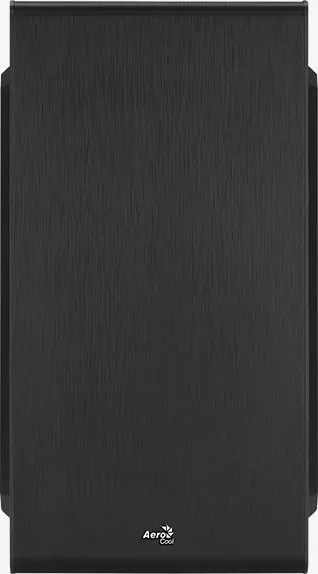
closed, ventilation slots on sides
Top
closed
Bottom
closed
Left
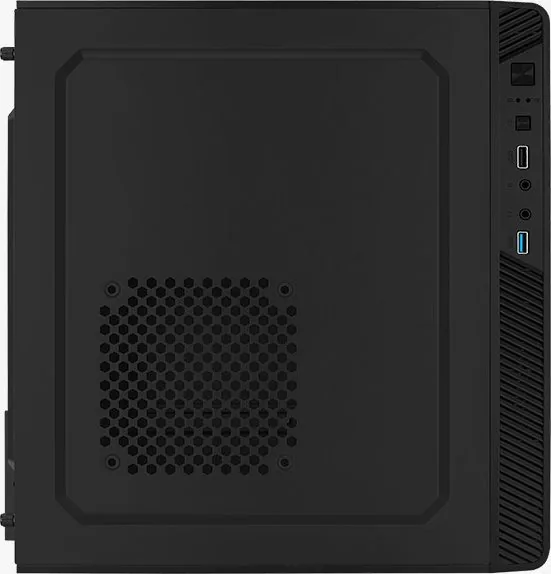
partially closed, fan grille center, ventilation slots front
Right
closed, ventilation slots front
Rear
partially closed, fan grille right center, PCI slots bottom (4x horizontal)
Front I/O Position
Chassis side: left, Height: top, Position: Front
Features
cable management
USB Spelling
Link
Product Description
AeroCool CS-106 Mini Tower Case Overview
The AeroCool CS-106 is a compact Mini Tower computer case designed for users who need reliable hardware housing without taking up excessive desk space. This chassis supports standard ATX, Micro-ATX, and Mini-ITX motherboards, making it a versatile choice for various build sizes. The front panel features a clean aesthetic with integrated connectivity options, including USB 2.0 and USB 3.0 ports alongside audio jacks for microphone and headphones.
Installation and Expansion
Building with the CS-106 is straightforward thanks to its thoughtful internal layout. The case accommodates one 2.5-inch SSD and one 3.5-inch HDD, allowing for flexible storage configurations. Users can easily install an add-on graphics card or other expansion cards in the designated PCIe slots. Power supply unit installation is simplified with dedicated mounting points that ensure stability and proper cable management.
Cooling and Connectivity
Airflow is managed through multiple fan mounting locations. The rear of the case includes a pre-installed exhaust fan, while the front panel offers space for additional intake fans to cool high-performance components. A side panel location allows for extra cooling options if needed. The front I/O panel provides quick access to essential connections, ensuring your peripherals are always within reach.
Important Notes
Specifications may vary depending on your region. Always consult your local retailer for specific availability and regional differences. Ensure you refer to your motherboard manual for detailed pinout instructions when connecting front panel cables like power switches and LEDs.
Pros and Cons
Pros
- Supports multiple motherboard form factors including ATX and Mini-ITX.
- Includes USB 3.0 and USB 2.0 ports for fast data transfer.
- Provides dedicated drive bays for both 2.5-inch SSDs and 3.5-inch HDDs.
- Features a rear exhaust fan for improved airflow out of the case.
- Compact Mini Tower design saves valuable desk space.
Cons
- Does not include a radiator for liquid cooling systems.
- Limited space for large graphics cards compared to full towers.
- No pre-installed front fans requiring user purchase and setup.
- Cable management space is somewhat restricted due to size.
- Front I/O does not include Type-C connectivity in this model.
Frequently Asked Questions
What motherboard sizes does the AeroCool CS-106 support?
The case supports ATX, Micro-ATX, and Mini-ITX motherboards, offering flexibility for different build requirements and component sizes.
How many hard drives can I install in this case?
You can install one 2.5-inch SSD and one 3.5-inch HDD simultaneously, providing a balanced mix of speed and capacity for most users.
Does the case come with a power supply included?
No, the power supply unit is not included in the box. You must purchase a compatible PSU separately based on your system's wattage needs.
Can I install a water cooling radiator in this case?
This specific model does not support radiator installation as there are no mounting points for radiators inside the chassis.
What front panel connectors are available?
The front I/O panel includes two USB 2.0 ports, two USB 3.0 ports, and standard HD Audio jacks for microphone and headphone connections.
Is the side panel easy to remove for maintenance?
Yes, the side panels are tool-less or use simple thumbscrews, allowing for quick removal to access internal components for upgrades or cleaning.
Does the case have any pre-installed fans?
The AeroCool CS-106 comes with one pre-installed rear exhaust fan to help expel hot air from the system during operation.
Search for 67,706 Manuals online


Type-in Brand or Model
Thad O'Kon
6 months ago
Does this case support a 5.25-inch optical drive as shown in the official images?
Manual.ly
6 months ago
Thank you for your inquiry. After reviewing the product specifications and physical design, we can confirm that while the product description mentions compatibility with an optical drive, the front panel of this specific model does not include the necessary cutout or mounting points. Therefore, it is not possible to install a standard 5.25-inch drive in this chassis.