
AeroCool Cipher Manual
PDF manual · 2 Pages
English



Quick check
Incorrect answer, please try again.
Chat with your AeroCool Cipher manual using AI
Get instant AI answers from your AeroCool Cipher manual
Ask anything about the AeroCool Cipher. Answers come from this manual, with the pages they are based on.
Ask a Question
Do you recommend Cipher?
Yes No
Jasmine Ward
6 months ago
How many drive bays does this case support for a large HDD array?
Frequently Asked Questions
The case supports up to eight 3.5-inch HDDs depending on the configuration used. It also provides mounting points for two 2.5-inch SSDs to complement your storage needs.
Is this answer helpful?
No, the AeroCool Cipher does not include pre-installed fans. However, it features multiple mounting locations at the front, top, and rear for users to install their own cooling solutions.
Is this answer helpful?
It features a built-in ARGB hub with physical buttons. You can switch between motherboard control and direct hub control, or turn off LEDs completely by holding the button for six seconds.
Is this answer helpful?
Yes, the case supports standard ATX motherboards and larger variants. Ensure you check your specific motherboard manual for detailed connector placements before assembly.
Is this answer helpful?
Absolutely. The Cipher allows radiator installation at the front, top, and rear positions, giving you the flexibility to choose the best spot for your cooling loop.
Is this answer helpful?
Advantages and Disadvantages
Advantages

- Supports up to eight 3.5-inch HDDs and multiple 2.5-inch SSDs for massive storage capacity
- Flexible fan and radiator mounting options including front, top, and rear positions for superior cooling
- Includes ARGB control hub with simple buttons for switching between motherboard and direct control
Disadvantages

- No pre-installed fans included in the standard package requiring separate purchases
- Cable management could be improved with more dedicated routing channels behind the tray
- LED control logic requires holding buttons for extended periods which may confuse new users
Product Specification
Extern
N/A
Intern
11x 3.5" (horizontal, hard drive cage), 1x 2.5"/3.5", 4x 2.5"
Ports
1x USB-A 3.0 (5Gb/s), 2x USB-A 2.0 (480Mb/s), 1x 3.5mm jack (Line-Out), 1x 3.5mm jack (Line-In)
PCI Slots
9 (2x Riser Card)
Fan (front)
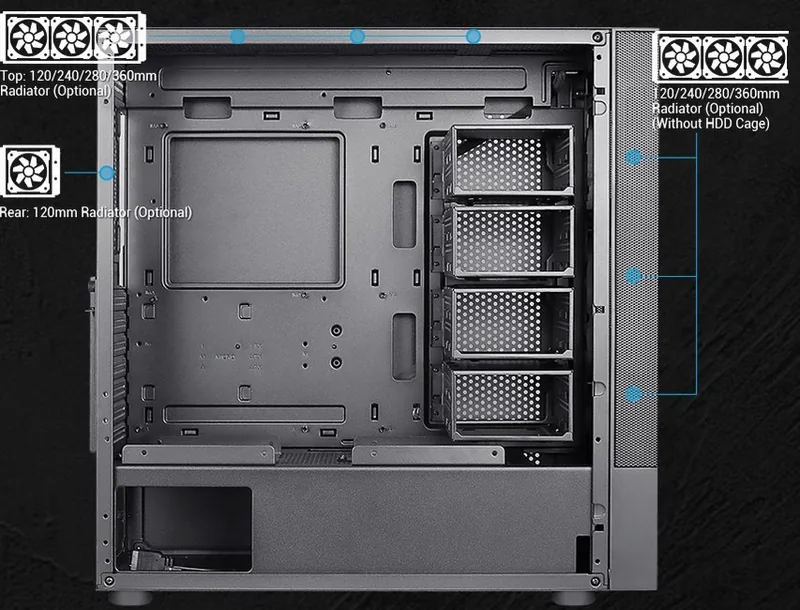
3x 140mm (optional)
Fan (rear)
1x 120mm (optional)
Fan (left)
N/A
Fan (right)
N/A
Fan (top)
3x 120mm (optional) or 2x 140mm (optional)
Fan (bottom)
N/A
Fan (other)
N/A
Radiator Sizes
120/240/280/360mm front, 120/240/280/360mm top, 120mm rear
Motherboard
up to ATX
Supported Motherboards
Mini-ITX (6.7"x6.7")/µATX (9.6"x9.6")/ATX (12"x9.6")
Power Supply
ATX (max. 9.0 inches deep)
Power Supply Position
bottom
CPU Cooler
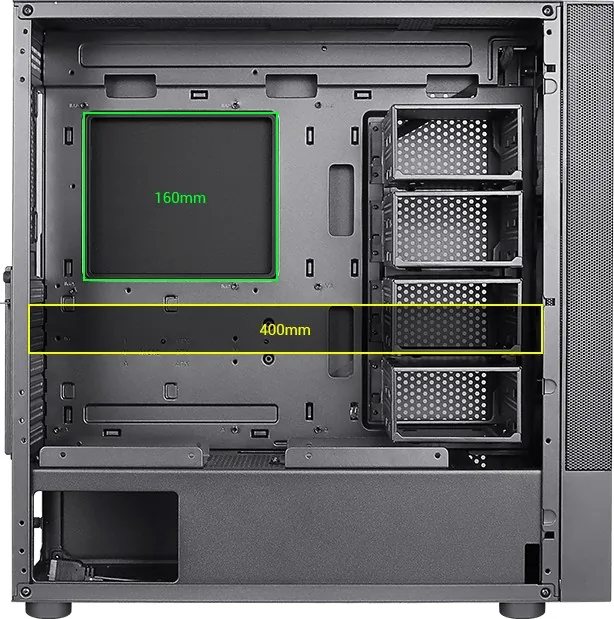
max. 6.3 inches height
Graphics Cards
max. 15.7 inches (11.4 inches with HDD cage)
Color
black, black interior
Lighting
no lighting
Dimensions (WxDxH)
8.1x19.1x19.1 inches
Volume
2.93 cubic feet
Chassis Type
Midi-Tower
Front
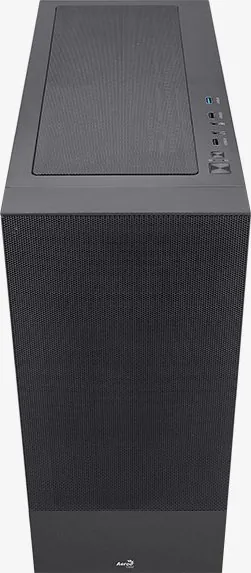
Mesh
Top
partially closed, mostly fan grille, dust filter outside
Bottom
partially closed, fan grille at back, dust filter outside
Left
partially closed, fan grille front
Right
partially closed, fan grille front
Back
partially closed, fan grille top right, PCI slots (7x horizontal, 2x vertical)
Front I/O Position
Chassis side: top, Height: middle, Position: right
Features
Cable management, dust filter, graphics card mountable vertically
USB Spelling
Link
Product Description
AeroCool Cipher: The Ultimate Mid Tower Case for Custom Builds
The AeroCool Cipher is a versatile mid tower case designed for enthusiasts who want to build powerful, efficient, and aesthetically pleasing systems. This chassis offers an expansive interior that accommodates a wide range of hardware configurations, making it ideal for both gaming rigs and professional workstations. With its focus on airflow and modularity, the Cipher ensures your components stay cool under heavy loads while allowing you to customize every aspect of your setup.
One of the standout features of the AeroCool Cipher is its storage flexibility. The case supports up to eight 3.5-inch hard drives or three if utilizing specific mounting configurations, alongside ample space for two 2.5-inch SSDs. This capacity allows users to create massive storage arrays without sacrificing performance. The installation process is straightforward, with clear guides for mounting motherboards, power supply units, and add-on cards. Whether you are installing a high-end graphics card or a custom liquid cooling loop, the Cipher provides the necessary room and structural support.
Thermal management is critical in any high-performance build, and the Cipher excels here as well. It includes multiple fan mounting points at the front, top, and rear, enabling optimal air intake and exhaust flow. Users can also install radiators for advanced water cooling solutions, ensuring that even the most demanding CPUs and GPUs remain within safe temperature ranges. The front I/O panel is conveniently located and equipped with USB 3.0 ports, HD audio jacks, and controls for LED lighting, providing easy access to essential functions.
The aesthetic appeal of the Cipher is enhanced by its support for RGB integration. The case features a dedicated hub for controlling ARGB fans and strips, allowing users to synchronize lighting effects across their entire system. Simple button controls let you switch between motherboard and hub control modes, or toggle LEDs off entirely for a clean look. This level of customization helps users create a unique visual identity for their machine.
Building with the AeroCool Cipher is an accessible experience for beginners and veterans alike. The package includes all necessary screws, cable ties, and standoffs to get started immediately. The manual provides step-by-step instructions in multiple languages, covering everything from motherboard installation to fan and radiator placement. By combining affordability with robust features, the Cipher stands out as a reliable choice for anyone looking to save money while building a better PC.
Search for 67,706 Manuals online


Type-in Brand or Model
quidem81
5 months ago
Is this case suitable for building a NAS server with multiple HDDs?
Manual.ly
5 months ago
Yes, the case is designed to accommodate multiple hard drives, making it an excellent choice for NAS server builds. It offers ample space and proper ventilation for storage-focused setups.