
AeroCool Aero-300 Manual
PDF manual · 2 Pages
English



Quick check
Incorrect answer, please try again.
Chat with your AeroCool Aero-300 manual using AI
Get instant AI answers from your AeroCool Aero-300 manual
Ask anything about the AeroCool Aero-300. Answers come from this manual, with the pages they are based on.
Ask a Question
Do you recommend Aero-300?
Yes NoFrequently Asked Questions
It is a good fit for simple, budget-friendly desktop builds, office PCs, and users who want a straightforward case with support for the most common components.
Is this answer helpful?
The case supports 3.5-inch HDDs and 2.5-inch SSDs, and it also includes space for an optical drive in the internal layout.
Is this answer helpful?
Yes. It supports common front panel connections such as power, reset, HDD LED, USB, and HD audio, which are useful for everyday PC use.
Is this answer helpful?
Yes. The accessory bag includes multiple screws and standoffs for installing the motherboard, drives, PSU, PCI parts, and fans.
Is this answer helpful?
Not always. The general structure is the same, but some case parts and details may vary depending on the country or region.
Is this answer helpful?
Yes. The case guide helps with placement, but the motherboard manual is important for confirming front panel pin connections and other board-specific details.
Is this answer helpful?
Advantages and Disadvantages
Advantages

- Supports common build parts: motherboard, PSU, SSD, HDD, ODD, and fans.
- Includes an accessory bag with screws and standoffs for easier assembly.
- Front panel connections cover power, reset, USB, HDD LED, and HD audio.
- Practical layout makes the case approachable for basic system builds.
Disadvantages

- Images and part references may vary by country or region.
- Front panel wiring may still require the motherboard manual for accuracy.
- The design is functional rather than feature-rich or premium.
- Limited detail is provided about airflow tuning or advanced cable management.
Product Specification
External
1x 5.25 in
Internal
2x 3.5 in (transverse, drive rails), 3x 2.5 in
Ports
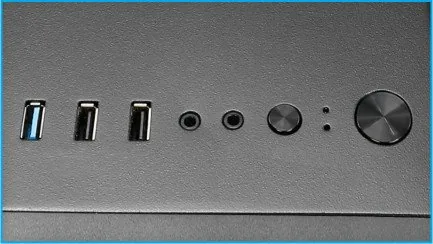
1x USB-A 3.0 (5Gb/s), 2x USB-A 2.0 (480Mb/s), 1x 3.5mm jack (Line-Out), 1x 3.5mm jack (Line-In)
PCI slots
7
Fans (front)
3x 4.72 in (optional)
Fans (rear)
1x 4.72 in, 1200rpm, 35.99 CFM, 22 dB(A)
Fans (left)
1x 4.72 in (optional)
Fans (right)
N/A
Fans (top)
1x 4.72 in (optional)
Fans (bottom)
N/A
Fans (other)
1x 4.72 in (optional)
Radiator sizes
9.45 in front (optional)
Motherboard
up to ATX
Supported motherboards
ATX (12 in x 9.6 in)
Power supply
ATX
Power supply position
bottom
CPU cooler
max. 6.30 in height
Graphics cards
max. 13.62 in (14.65 in without fan)
Color
black, interior black
Lighting
without lighting
Dimensions (WxHxD)
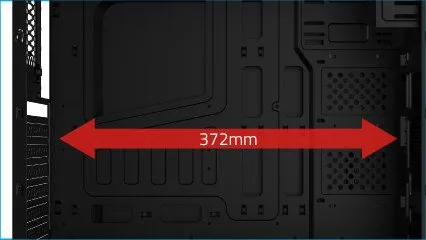
7.80 x 18.11 x 16.34 in
Volume
9.98 gal
Weight
7.94 lb
Case type
Midi-Tower
Front
partially closed, partially Mesh
Top
partially closed, fan grille rear, dust filter outside
Bottom
partially closed, fan grille rear, dust filter outside
Right
closed
Rear
partially closed, fan grille top right, PCI slots (7x horizontal)
Front I/O Position
Case side: top, Height: Front, Position: middle
USB notation
Link
Product Description
AeroCool Aero-300 Manual: A Practical Mid-Tower for Straightforward Builds
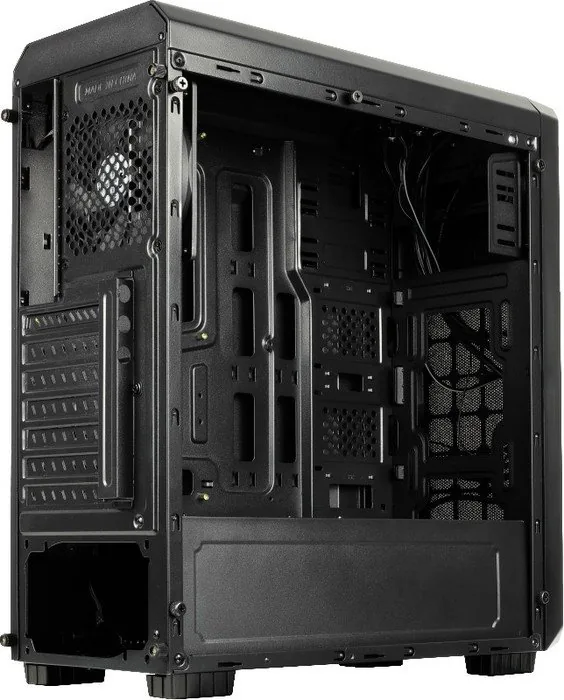
The AeroCool Aero-300 is designed for builders who want a clean, functional case with a simple installation path. The overall layout focuses on the essentials: a motherboard tray, space for a power supply, support for storage drives, and mounting points for cooling. In the spirit of the AeroCool Aero-300 Manual, the design feels approachable, with installation steps that are easy to follow even for a first-time PC builder.
One of the case’s biggest strengths is its practical internal structure. It supports a range of common components, including a motherboard, PSU, 3.5-inch HDDs, 2.5-inch SSDs, an optical drive, and multiple fans. That makes it a flexible choice for everyday systems, office builds, or a budget gaming setup. The layout is organized to help users place each part in the right location without unnecessary complexity.
The front panel connections also matter here. The case includes front I/O and a front panel connector system for power, reset, HDD LED, USB, and HD audio. These connections are essential for a modern build, and the manual-style guidance makes the wiring process more manageable. For users who prefer a tidy setup, the cable connection approach keeps the build focused and functional.
Another useful detail is the included accessory bag. It provides the screws and standoffs needed for several installation types, including motherboard mounting, SSD attachment, ODD installation, PSU mounting, and fan setup. That small touch makes the Aero-300 feel builder-friendly and reduces the chance of missing hardware during assembly.
The case also stands out for its broad compatibility in a compact, no-frills format. While the exact parts may vary by country, the core concept remains the same: a dependable chassis with support for the most common hardware combinations. It is not flashy, but it is practical, and that can be a major advantage for users who value simplicity over extras.
Notes
- Best suited for simple, budget-conscious builds.
- Front I/O and internal mounts are easy to understand.
- Part availability may differ depending on region.
- For connector details, checking the motherboard guide is helpful.
Search for 67,706 Manuals online


Type-in Brand or Model