
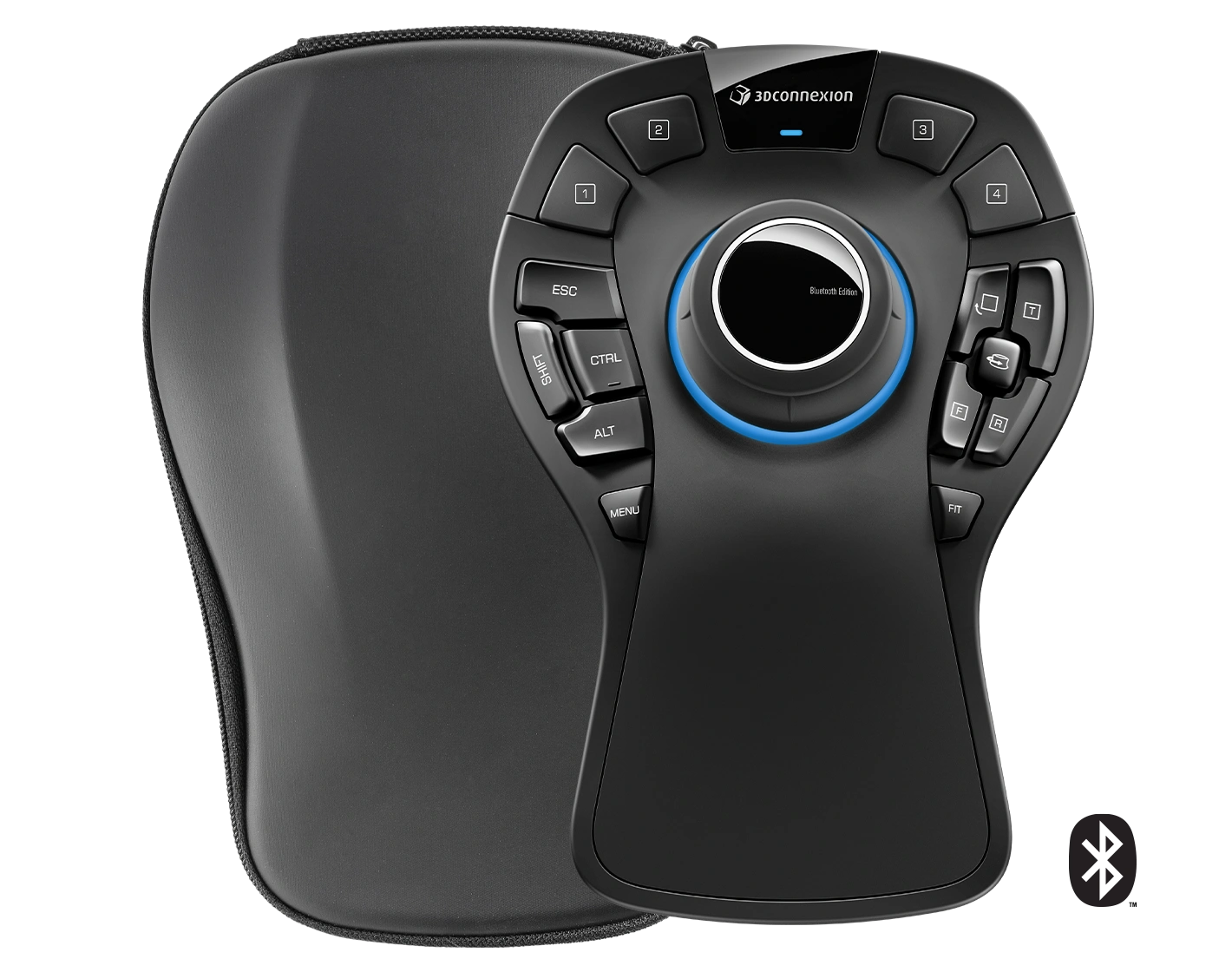


3Dconnexion SpaceMouse Pro Wireless Bluetooth Edition Manual
PDF manual · 16 Pages
English



Quick check
Incorrect answer, please try again.
Chat with your 3Dconnexion SpaceMouse Pro Wireless Bluetooth Edition manual using AI
Get instant AI answers from your 3Dconnexion SpaceMouse Pro Wireless Bluetooth Edition manual
Ask anything about the 3Dconnexion SpaceMouse Pro Wireless Bluetooth Edition. Answers come from this manual, with the pages they are based on.
Ask a Question
Do you recommend SpaceMouse Pro Wireless Bluetooth Edition?
Yes NoVideo Manual
Quick review of the SpaceMouse Wireless bluetooth
Frequently Asked Questions
It is a professional 3D navigation controller for moving through CAD drawings, 3D models, and scenes. Its controller cap supports pan, zoom, rotation, and tilt while a standard mouse can remain dedicated to selection and editing tasks.
Is this answer helpful?
The device can connect through the included 3Dconnexion Universal Receiver, Bluetooth, a compatible 3Dconnexion Keyboard Pro, or the included USB-A to USB-C cable.
Is this answer helpful?
Yes. 3Dconnexion Settings lets users assign commands, keyboard shortcuts, macros, and radial menus. Settings can be configured separately for supported applications, allowing different workflows for different software.
Is this answer helpful?
QuickView buttons provide rapid access to selected model or drawing views. The Fit button brings the drawing or 3D model back into view and centers it on the screen.
Is this answer helpful?
Connect the SpaceMouse to a computer charging port using the supplied USB cable. The status LED flashes green while charging and stays green when the battery is fully charged. Red indicates less than 10 percent battery remaining.
Is this answer helpful?
The SpaceMouse Pro Wireless Bluetooth Edition supports Microsoft Windows and macOS. It requires 3DxWare 10.8.15 or later for current configuration and feature support.
Is this answer helpful?
Advantages and Disadvantages
Advantages

- Six-degrees-of-freedom controller provides precise pan, zoom, rotate, and tilt navigation for 3D work.
- Connect through the Universal Receiver, Bluetooth, compatible Keyboard Pro, or USB cable.
- Four programmable buttons, modifier keys, QuickView controls, macros, and radial menus support custom workflows.
- Application-specific settings allow separate navigation speed, axis, command, and mode preferences.
- Includes a rechargeable 1,100 mAh battery, USB-A to USB-C cable, receiver, and travel case.
Disadvantages

- Advanced customization and application-specific controls may require time to learn.
- Bluetooth pairing requires removing the pre-paired Universal Receiver before pairing.
- The 549 g desktop controller may take up more space than compact input devices.
- Some advanced navigation options depend on the application being used.
Product Specification
Type
3D mouse
Buttons
15 (15 programmable)
Connectivity
wireless (Bluetooth LE) or wired (4.92 ft), USB-C
Power Supply
built-in rechargeable battery (1,100 mAh)
Dimensions (WxHxD)
5.59 x 2.28 x 8.03 in
Weight
1.21 lb
Features
palm rest, includes carrying case
Product Description
3Dconnexion SpaceMouse Pro Wireless Bluetooth Edition USB/Bluetooth - Read, Download & Print Free
The 3Dconnexion SpaceMouse Pro Wireless Bluetooth Edition USB/Bluetooth is a professional 3D navigation controller designed for engineers, CAD specialists, designers, and creators who work with complex models. Its ergonomic controller cap uses a six-degrees-of-freedom sensor, allowing users to pan, zoom, rotate, and tilt models with smooth, precise input. This leaves the standard mouse free for selecting, editing, and creating.
Flexible 3D Navigation for Serious Workflows
The controller supports object-style navigation for handling a model as though it were in your hand, along with camera-oriented modes for moving through a scene. Adjustable movement, zoom, rotation, axis direction, and speed settings make it easier to tailor navigation to individual projects and supported applications.
Four QuickView buttons provide fast access to useful viewpoints, while the Fit button recenters a drawing or model on screen. A dedicated rotation lock helps maintain a stable orientation when precise positioning matters. The shaped cap guides the hand into a comfortable working position for controlled movement during long design sessions.
Wireless, Bluetooth, and USB Connectivity
Choose the connection that suits your desk setup: use the included 3Dconnexion Universal Receiver, pair over Bluetooth, connect through a compatible 3Dconnexion Keyboard Pro, or work via the supplied USB-A to USB-C cable. The rechargeable 1,100 mAh lithium-polymer battery is monitored by status LEDs, which indicate charge level, pairing readiness, and connection mode.
The package also includes a travel case, making the device practical for mobile professionals. At 204 x 142 x 58 mm and 549 g, it has a substantial desktop presence while remaining portable.
Custom Commands at Your Fingertips
Four programmable 3Dconnexion buttons can automatically show frequently used commands for active applications. The on-screen display reveals assigned functions while a button is held. Four modifier keys and customizable controls support efficient shortcut access without repeatedly reaching for the keyboard.
With 3DxWare 10.8.15 or later, users can create application-specific button assignments, macros, and four- or eight-section radial menus. Macros can combine keystrokes, application commands, text, and delays to streamline recurring actions. 3Dconnexion Home also provides a trainer, settings access, model viewer, practice demo, videos, and support resources.
Note: The SpaceMouse Pro Wireless Bluetooth Edition supports Windows and macOS. A three-year limited hardware warranty is included.
Search for 67,706 Manuals online


Type-in Brand or Model