
3Dconnexion Numpad Pro Manual
PDF manual · 11 Pages
English



Quick check
Incorrect answer, please try again.
Chat with your 3Dconnexion Numpad Pro manual using AI
Get instant AI answers from your 3Dconnexion Numpad Pro manual
Ask anything about the 3Dconnexion Numpad Pro. Answers come from this manual, with the pages they are based on.
Ask a Question
Do you recommend Numpad Pro?
Yes NoFrequently Asked Questions
It connects through Bluetooth, including Swift Pair support, or with the included USB-A to USB-C cable. Bluetooth must be enabled on the Windows computer before pairing.
Is this answer helpful?
Install 3DxWare version 10.8.8 or later. The driver enables the 3Dconnexion keys, application-aware command assignments, on-screen display, and detailed personalization through 3Dconnexion Settings.
Is this answer helpful?
Yes. Programmable keys can be assigned application commands, keyboard shortcuts, macros, or radial menus. Five global programmable keys retain their function across the system, while other assignments can change by application.
Is this answer helpful?
The LED shows battery, charging, pairing, and connection states. Green indicates charge status, red indicates under 10 percent battery, and blue indicates Bluetooth pairing or connection. It turns off after successful connection.
Is this answer helpful?
Yes. In 3Dconnexion Settings, the decimal key can use the system setting automatically or be set to a period or comma for individual applications.
Is this answer helpful?
The package includes the 3Dconnexion Numpad Pro and a 1.5 m USB-A to USB-C cable. The cable can be used for wired operation and charging.
Is this answer helpful?
Advantages and Disadvantages
Advantages

- Bluetooth and USB connectivity provide flexible desk setup options.
- Four 3Dconnexion keys and five global programmable keys support custom workflows.
- Application-specific commands, macros, and radial menus can speed up repetitive work.
- Encrypted wireless connection, charging LED feedback, and a rechargeable battery improve daily usability.
- Configurable decimal separator supports different regional and professional input needs.
Disadvantages

- Programmable 3Dconnexion key features require 3DxWare software.
- Supported operating system information is limited to Microsoft Windows.
- Advanced customization may take time to configure for each application.
- The compact layout may not suit users who need a full-size keyboard with integrated numpad.
Product Specification
Type
Numeric keypad
Compatibility
PC
Key type
Rubber dome
Keys
25
Backlighting
N/A
Key height
Low-profile
Key shape
Concave
Wrist rest
N/A
Housing
Plastic
Housing color
Solid black
Connectivity
Wireless (2.4 GHz, Bluetooth LE) or wired (4.92 ft), USB-A
Power supply
Built-in rechargeable battery, 350 mAh
Dimensions (W x H x D)
4.49 x 0.63 x 9.02 in
Weight
0.55 lb
Features
Chiclet, 4 programmable keys, detachable USB cable (USB-C)
Product Description
3Dconnexion Numpad Pro Black, USB/Bluetooth Manual
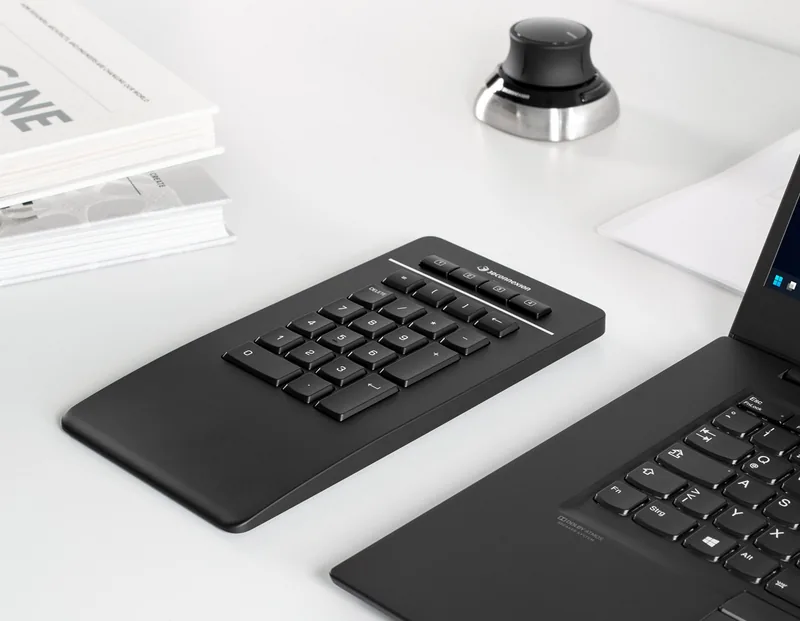
The 3Dconnexion Numpad Pro Black is a compact, professional numeric keypad designed to make repetitive number entry and command access more comfortable. It is especially useful for CAD users, designers, engineers, finance professionals, and anyone who prefers a dedicated numpad positioned independently from the main keyboard. Its slim profile, black finish, and flexible placement support an organized, ergonomic desktop setup.
Flexible wired and wireless connectivity
The keypad can connect through Bluetooth or the included USB-A to USB-C cable. Bluetooth pairing supports Swift Pair for a faster Windows setup, while the wired connection also allows convenient charging. Wireless communication is encrypted to help protect data during everyday work. A built-in status LED communicates battery and connection information at a glance.
The rechargeable 350 mAh lithium-polymer battery is designed for cable-free operation. Green LED signals show charging status, while red warns when the battery level is below 10 percent. Blue illumination indicates Bluetooth pairing or a successful Bluetooth connection.
Custom controls for productive workflows
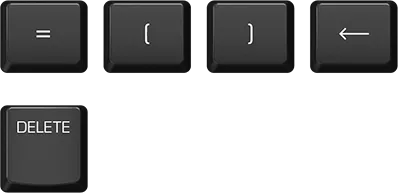
Beyond standard numeric keys, the Numpad Pro provides four programmable 3Dconnexion keys and five globally programmable keys. With 3DxWare 10.8.8 or later, the device can recognize supported applications and automatically present commonly used commands. This gives users quicker access to frequently repeated actions without moving away from the keypad.
3Dconnexion Settings enables application-specific customization. Commands, keyboard shortcuts, macros, and radial menus can be assigned to programmable keys. The optional on-screen display shows the active key assignments, helping users remember controls while switching between applications. Some supported programs can also use context-sensitive mappings for changing command layouts.
Small details that improve accuracy
The decimal separator can be configured per application, allowing a period, comma, or automatic system behavior. This is useful for teams that work across regional settings or enter technical and financial values. At 114 x 229 x 16 mm and 250 g, the keypad remains compact while providing a stable desktop accessory.
Note: Programmable 3Dconnexion functions require the 3DxWare driver and are supported on Microsoft Windows. The package includes the Numpad Pro and a 1.5 m USB-A to USB-C cable.
Search for 67,706 Manuals online


Type-in Brand or Model