


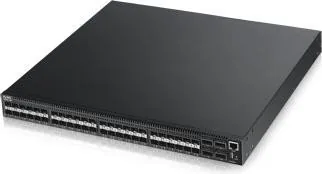
Zyxel XS3900-48F Manual
PDF manual · 332 Pages
English



Quick check
Incorrect answer, please try again.
Chat with your Zyxel XS3900-48F manual using AI
Get instant AI answers from your Zyxel XS3900-48F manual
Ask anything about the Zyxel XS3900-48F. Answers come from this manual, with the pages they are based on.
Ask a Question
Do you recommend XS3900-48F?
Yes NoFrequently Asked Questions
It is used for high-speed aggregation and top-of-rack switching in data centers or enterprise networks. Its mix of 10GbE access ports and 40GbE uplinks makes it suitable for dense, performance-focused deployments.
Is this answer helpful?
Yes. It includes Data Center Bridging-related functions such as FCoE support, Priority-based Flow Control, Enhanced Transmission Selection, and DCBX, which help manage mixed Ethernet and storage traffic efficiently.
Is this answer helpful?
You can manage it through the web configurator, CLI, SNMP, Telnet, console access, and FTP for maintenance tasks. The web interface is best for daily administration, while CLI is useful for advanced setup.
Is this answer helpful?
No, the switch does not come with transceivers. You need to choose compatible SFP+ or QSFP+ modules based on your fiber or copper connection requirements.
Is this answer helpful?
Yes. The hardware includes dual power module slots and dual fan module slots, and the power design supports redundancy so the system can continue running if one module fails.
Is this answer helpful?
The switch supports features such as port security, 802.1x authentication, MAC authentication, DHCP snooping, ARP inspection, loop guard, and access control tools for better network protection.
Is this answer helpful?
Advantages and Disadvantages
Advantages

- High-density design with 48 SFP+ and 4 QSFP+ ports for fast aggregation.
- Supports advanced features like VLANs, QoS, link aggregation, and multicast control.
- Built for data center use with DCB, FCoE, PFC, ETS, and DCBX support.
- Redundant hot-swappable power and fan modules improve uptime and maintenance.
Disadvantages

- Advanced DCB configuration is CLI-based, which may be less convenient for some admins.
- The feature set is broad, so setup can be complex for smaller teams.
- Transceivers are not included, adding extra planning and cost.
- Default login credentials are weak and must be changed right away.
Product Specification
Function
Switch
Type
Standalone, Rackmount (via optional mounting bracket)
Network ports
48x SFP+, 4x QSFP+
Speeds
48x SFP+ (10Gb/s), 4x QSFP+ (40Gb/s)
PoE
N/A
Backplane
1.28Tb/s, 952.4Mp/s, 9MB packet buffer, 128K Mac addresses
Officially supported standards
802.1AX, 802.1, 802.1AB, 802.1D, 802.1Q, 802.1Qaz, 802.1Qbb, 802.1X, 802.1ad, 802.1ag, 802.1p, 802.1s, 802.1w, 802.1X, 802.3ah, 802.3aq, 802.3ba, 802.3x, 802.3z, IGMPv3
Configuration
Web interface, Console, Network (RJ-45, dedicated, 10/100/1000Base-T), serial (USB-A 2.0)
Cooling
active, 4x fans (1.57in, rear to front, 2x hot-plug each)
Dimensions (WxHxD)
17.32x1.69x17.91in, 1U
Weight
22.48lbs
Color
anthracite
Special features
Metal housing, firmware updates possible, redundant power supply (redundant power feed)
Manufacturer's warranty
lifetime (10 years in AT/DE) + five years
Note
For this device, "link aggregation" was officially specified with the obsolete standard IEEE802.3ad. Since 2008, the function is no longer managed by IEEE "Working Group 3" (IEEE 802.3, CSMA/CD - Ethernet), but by "Working Group 1" (IEEE 802.1, High Level Interface - Internetworking) and technically defined unchanged via IEEE 802.1AX.
Product Description
ZyXEL XGS3900 Rackmount 10G Managed Switch, 48x SFP+, 4x QSFP+ Manual
The ZyXEL XGS3900 Rackmount 10G Managed Switch is built for high-density networks that need speed, flexibility, and reliable uptime. With 48 SFP+ 10GbE ports and 4 QSFP+ 40GbE uplinks, it is designed to handle demanding aggregation, top-of-rack, and data center environments where traffic needs to move quickly and predictably.
Built for modern switching demands
This switch is more than a simple port hub. It supports advanced Layer 2 features such as VLANs, link aggregation, spanning tree protection, port security, and multicast controls. That makes it a strong fit for environments that need clean segmentation, stable performance, and efficient traffic handling across multiple teams or services.
One of its standout strengths is its data center readiness. Features like Data Center Bridging, FCoE support, Priority-based Flow Control, Enhanced Transmission Selection, and DCBX help the switch align with mixed Ethernet and storage traffic. For organizations moving toward converged infrastructure, that can simplify network design while preserving performance goals.
Easy management and flexible deployment
The XGS3900 series supports multiple management methods, including web-based configuration, CLI, SNMP, Telnet, FTP, and console access. That gives administrators several ways to monitor, deploy, and maintain the device depending on the task at hand. The web configurator is especially useful for everyday operations, while the CLI is there for deeper tuning and advanced scenarios.
Its hardware design also supports practical deployment needs. Hot-swappable power and fan modules improve serviceability, and redundant power helps keep the network running if one supply fails. The front panel’s high-density optical layout makes it suitable for compact rack installations where every slot matters.
Why it stands out
For teams building fast campus backbones, server aggregation layers, or storage-aware switching environments, this switch offers a balanced mix of throughput and control. It can support VLAN-based segmentation, guest access designs, DHCP snooping, PPPoE intermediate agent workflows, and security-focused features like ARP inspection and loop protection.
The result is a switch that feels engineered for real network operations rather than just raw port count. It gives administrators room to scale, protect, and fine-tune the network while keeping the platform adaptable for future growth.
Notes
- Default access credentials should be changed immediately after setup.
- Transceivers are not included and must be selected separately.
- DCB setup may require CLI-based configuration for advanced use cases.
Search for 67,732 Manuals online


Type-in Brand or Model