


Zyxel XS3800-28 Manual
PDF manual · 529 Pages
English



Quick check
Incorrect answer, please try again.
Chat with your Zyxel XS3800-28 manual using AI
Get instant AI answers from your Zyxel XS3800-28 manual
Ask anything about the Zyxel XS3800-28. Answers come from this manual, with the pages they are based on.
Ask a Question
Do you recommend XS3800-28?
Yes NoFrequently Asked Questions
It is best for SMB and enterprise networks that need 10G performance, flexible port types, and advanced switching features. It works well in aggregation, backbone, and segmented LAN environments.
Is this answer helpful?
Yes. The port mix includes RJ-45 copper interfaces and SFP+ slots for fiber or high-speed uplinks, making it adaptable for mixed deployments.
Is this answer helpful?
The switch includes features such as port authentication, port security, AAA, DHCP snooping, ARP inspection, IP source guard, BPDU guard, and access control options.
Is this answer helpful?
Yes. It supports 802.1Q VLANs and related tools like VLAN stacking, VLAN mapping, voice VLAN, port-based VLANs, and private VLAN options.
Is this answer helpful?
Yes. The switch supports IPv6 features including dual stack operation, stateless auto-configuration, DHCPv6 client and relay, neighbor discovery, and multicast support.
Is this answer helpful?
Make sure the rack can support the total weight, leave enough clearance for airflow, use the correct mounting brackets and screws, and confirm that grounding and power access are ready.
Is this answer helpful?
Advantages and Disadvantages
Advantages

- High-speed 10G switching with flexible copper and SFP+ port options for mixed network designs.
- Supports VLANs, QoS, link aggregation, multicast, and security features for scalable business use.
- Offers multiple management methods, including web, CLI, SNMP, FTP, and cloud-ready options.
- Rackmount design and airflow guidance make it suitable for professional installations.
Disadvantages

- Advanced feature set may be more than small networks need for simple office use.
- Proper setup requires networking knowledge to use VLAN, routing, and security features effectively.
- Rack installation needs enough space, mounting hardware, and careful airflow planning.
- Cloud management and mode changes can overwrite settings if not handled carefully.
Product Specification
Function
Switch
Type
Standalone, Rackmount (via mounting brackets)
Network ports
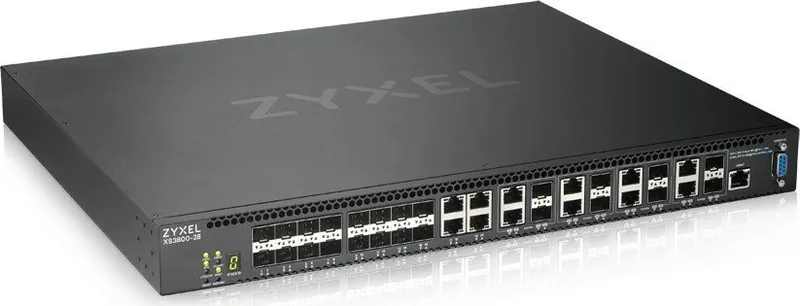
4x RJ-45, 8x RJ-45/SFP+, 16x SFP+
Speeds
12x RJ-45 (100/1000/2.5G/5G/10GBase-T), 8x SFP+ (1G/10Gb/s), 16x SFP+ (1G/10Gb/s)
PoE
N/A
Backplane
560Gb/s, 416Mp/s, 4MB packet buffer, 32K Mac addresses
Officially supported standards
802.1AX, 802.1AB, 802.1D, 802.1Q, 802.1ad, 802.1p, 802.1s, 802.1w, 802.1X, 802.3ab, 802.3ae, 802.3ah, 802.3an, 802.3az, 802.3bz, 802.3x, 802.3z, IGMPv3, MLDv2
Configuration
Web interface, Console, Serial (RJ-45, DB9), via Cloud
Cooling
active, 3x fans (1.57in, rear)
Dimensions (WxHxD)
17.36x1.73x14.17in, 1U
Weight
23.37lb
Color
anthracite
Special features
Metal housing, removable mounting brackets, Display, Firmware updates possible, redundant power supply (redundant power feed), Anti-theft protection (Kensington Lock)
Manufacturer warranty
lifetime (10 years in AT/DE) + five years
Note
For this device, "link aggregation" was officially specified with the obsolete standard IEEE802.3ad. Since 2008, the function is no longer managed by the IEEE "Working Group 3" (IEEE 802.3, CSMA/CD - Ethernet), but by "Working Group 1" (IEEE 802.1, High Level Interface - Internetworking) and technically defined unchanged via IEEE 802.1AX.
Product Description
ZyXEL XS3800 Rackmount 10G Managed Stack Switch Overview
The ZyXEL XS3800 Rackmount 10G Managed Stack Switch is built for networks that need speed, control, and room to grow. Designed for rack installations, it combines a strong 10 Gigabit switching foundation with flexible port options, including 4x RJ-45, 8x RJ-45/SFP+, and 16x SFP+ connections. That mix makes it a practical choice for environments where copper access, fiber uplinks, and high-density aggregation all need to work together smoothly.
At its core, this switch is aimed at business users who want more than basic connectivity. It supports Layer 2 switching and also includes useful Layer 3 features such as static routing, making it a solid fit for SMBs and enterprise edge networks. The platform is also designed with modern deployment needs in mind, offering VLAN segmentation, link aggregation, IGMP/MLD multicast handling, QoS tools, security controls, and IPv6 support. In other words, it is not just fast; it is flexible enough to support organized, scalable network design.
Management is another highlight. The switch can be handled through a web configurator, CLI, SNMP, Telnet, and FTP-based maintenance workflows. For teams that prefer simplified operations, Zyxel’s Nebula cloud option and ZON utility add extra convenience for monitoring and setup. The guide also emphasizes practical administration habits such as password protection, configuration backups, and recovery planning, which are especially valuable in busy network environments.
Physical installation is straightforward, with both freestanding and rackmount options supported. The manual also stresses clear airflow, proper grounding, and careful rack placement, showing that reliability was considered alongside performance. Combined with features like dual power modules and a strong port layout, the XS3800 series is clearly aimed at dependable operation in demanding setups.
Notes
- Best suited for high-bandwidth business networks
- Strong fit for aggregation, backbone links, and segmented VLAN designs
- Cloud, web, and CLI management options provide deployment flexibility
- Backup and security practices are essential for stable long-term use
Search for 67,732 Manuals online


Type-in Brand or Model