


Zyxel XS1930 Series Manual
PDF manual · 381 Pages
English



Quick check
Incorrect answer, please try again.
Chat with your Zyxel XS1930 Series manual using AI
Get instant AI answers from your Zyxel XS1930 Series manual
Ask anything about the Zyxel XS1930 Series. Answers come from this manual, with the pages they are based on.
Ask a Question
Do you recommend XS1930 Series?
Yes NoFrequently Asked Questions
The XS1930 supports 100 Mbps, 1 Gbps, 2.5 Gbps, 5 Gbps and 10 Gbps on its RJ-45 multi-gig ports; SFP+ slots support 1 Gbps and 10 Gbps depending on transceivers used.
Is this answer helpful?
You can run the XS1930 in standalone mode using its web configurator or in Nebula cloud-managed mode via Zyxel Nebula Control Center. NebulaFlex allows switching between modes but changing modes may overwrite settings or reset the device to defaults.
Is this answer helpful?
The XS1930-12HP model provides PoE and supports IEEE 802.3af, 802.3at (PoE+) and 802.3bt (4P PoE). It includes a finite PoE power budget; monitor PoE LED indicators to track consumption.
Is this answer helpful?
To reach 10 Gbps over copper, use Cat6a cable for up to 100 meters. Cat6 can work up to 50 meters for 10 Gbps; Cat5e supports lower multi-gig speeds (up to 2.5/5 Gbps depending on devices).
Is this answer helpful?
Default credentials are username: admin and password: 1234. For security, change the administrator password and SNMP community immediately after first login.
Is this answer helpful?
Yes. The XS1930 supports hot-pluggable SFP/SFP+ transceivers and DACs. Install or remove transceivers while the switch is powered on and verify link/LED status afterward.
Is this answer helpful?
Use the web configurator (recommended browsers supported) for VLAN, QoS, firmware upgrades, configuration backup/restore (FTP) and other settings; Nebula provides cloud-based management alternatives.
Is this answer helpful?
Advantages and Disadvantages
Advantages

- Multi-gig RJ-45 ports (100Mb–10Gb) provide flexible high-speed connections without full rewiring.
- Two 10G SFP+ uplinks support fiber or DAC for high-bandwidth backbones and aggregation.
- NebulaFlex allows cloud-managed (Nebula) or standalone (web UI) operation for flexible management.
- PoE-capable model (XS1930-12HP) supports IEEE 802.3af/at/bt to power cameras, APs and phones.
- Broad L2 feature set (VLANs, LACP, QoS, IGMP snooping, STP) with static L3 routing support.
Disadvantages

- Switch overwrites local configuration when switched to Nebula mode — careful when changing modes.
- Default credentials (admin/1234) require immediate change for security.
- 10Gb copper distances require Cat6a to reach full 100 m; older cabling may limit speed.
- PoE budget limits on PoE model require planning when powering multiple PDs.
- Some advanced features and visuals may differ across firmware versions and models.
Product Specification
Function
Switch
Type
Standalone, Rackmount (via mounting brackets)
Network ports
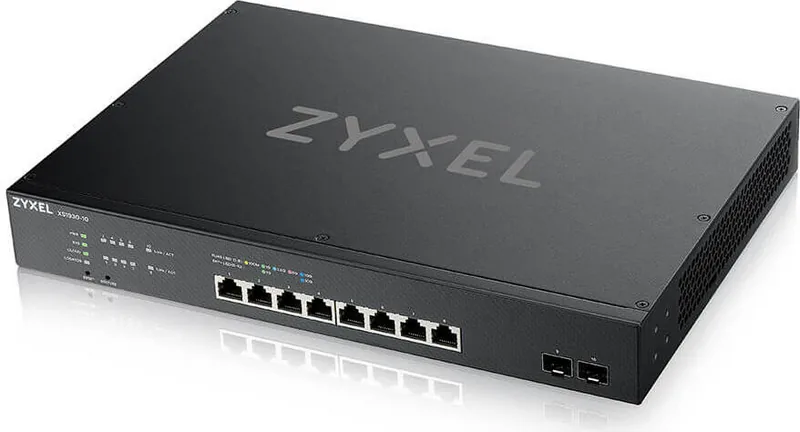
8x RJ-45, 2x SFP+
Speeds
8x RJ-45 (100/1000/2.5G/5G/10GBase-T), 2x SFP+ (1G/10Gb/s)
PoE
N/A
Backplane
200Gb/s, 148.8Mp/s, 2MB packet buffer, 16K MAC addresses
Officially supported standards
802.1AB, 802.1AX, 802.1D, 802.1Q, 802.1X, 802.1p, 802.1s, 802.1w, 802.3ab, 802.3ad, 802.3ae, 802.3an, 802.3bz, 802.3x, 802.3z, IGMPv3
Configuration
Web interface, via Cloud
Cooling
active, 1x fan (1.57in)
Dimensions (WxHxD)
12.99x1.73x9.06in, 1U
Weight
5.29 lb
Color
anthracite
Features
Metal housing, removable mounting brackets, anti-theft protection (Kensington Lock), firmware updates possible
Manufacturer warranty
lifetime (10 years in AT/DE) + five years
Note
For this device, "link aggregation" was officially specified with the obsolete standard IEEE802.3ad. Since 2008, this function is no longer managed by IEEE "Working Group 3" (IEEE 802.3, CSMA/CD - Ethernet), but by "Working Group 1" (IEEE 802.1, High Level Interface - Internetworking) and technically defined unchanged via IEEE 802.1AX.
Product Description
ZyXEL XS1930 Desktop 10G Smart Switch, 8x RJ-45, 2x SFP+
The ZyXEL XS1930 Desktop 10G Smart Switch is a compact, multi-gigabit smart-managed switch designed for small offices, advanced home networks, and growing workgroups that need reliable high-speed connectivity. Featuring eight RJ-45 10GBase-T multi-gig ports and two 10G SFP+ uplink slots, the XS1930 delivers flexible port speeds (100 Mbps, 1 Gbps, 2.5 Gbps, 5 Gbps and 10 Gbps), simple management, and robust Layer 2 features with some Layer 3 static routing capability.
This desktop model supports NebulaFlex, letting you run the switch either in standalone mode via the web configurator or in Nebula cloud-managed mode through the Zyxel Nebula Control Center. The device is ideal as a backbone or aggregation switch for servers, NAS, gaming rigs, or Wi‑Fi 6/6E access points that benefit from multi-gig links. The XS1930-12HP variant adds PoE (IEEE 802.3af/at/bt) for powering cameras, phones, or access points and includes a built-in PoE power budget and monitoring LEDs.
Hardware and performance highlights include auto-negotiation and auto-MDIX on all copper ports, support for SFP+ transceivers and direct-attach copper (DAC) for flexible uplinks, and fan configuration depending on model. The switch supports VLANs, link aggregation, QoS, IGMP snooping, spanning tree variants, port security and authentication (802.1X/MAC), bandwidth control, multicast handling, and common management features (SNMP, FTP for firmware/config backup, ZON utility, cluster management). LEDs and front/rear panel controls provide quick visual status of power, system health, PoE usage, link speed/activity and cloud/locator status.
Deployment examples suited for this switch include small campus or office backbones, high-performance workgroups requiring multi-gig connectivity, PoE-powered edge device aggregation, and fiber or high-speed uplink bridging using SFP+ modules. The device’s multi-gig RJ-45 ports let you upgrade performance without rewiring existing Cat5e/Cat6 cabling up to supported distances. Nebula cloud management enables remote provisioning, monitoring, and site organization, while standalone mode retains full local web configurator control.
Overall, the ZyXEL XS1930 is a versatile, cost-effective multi-gig smart switch for users who want higher-than-gigabit speeds, flexible uplinks and modern management options in a compact desktop or rack-mountable form.
Notes
- Use Cat6a (or Cat6 for shorter distances) to attain 10 Gbps over copper; Cat5e supports up to 5 Gbps in many cases.
- Nebula mode overwrites local settings; unregistering from Nebula resets the switch to factory defaults.
- XS1930-12HP includes a PoE budget (example: 375 W) — monitor PoE LEDs to avoid exceeding budget.
- Default login: admin / 1234 (change immediately).
Search for 67,732 Manuals online


Type-in Brand or Model
Lena Schneider
10 months ago
My switch keeps hanging and gets very hot. Is this a known issue and what can I do to prevent it?
Manual.ly
10 months ago
If the switch is hanging and running very hot, first check airflow and placement. Make sure ventilation openings are unobstructed, allow free space around the device, and avoid installing it in enclosed cabinets without cooling. If it supports it, confirm the correct power supply and that all cables are firmly seated. Try a firmware reset/update if available and restart the switch to clear any stuck state. Also verify connected devices are not overloading the ports (e.g., too many high-power consumers) and reduce the load if needed. If overheating and lockups continue after these steps, it likely indicates a hardware problem and the unit should be inspected or replaced under warranty.