


Zyxel XMG1915-10E Manual
PDF manual · 408 Pages
English



Quick check
Incorrect answer, please try again.
Chat with your Zyxel XMG1915-10E manual using AI
Get instant AI answers from your Zyxel XMG1915-10E manual
Ask anything about the Zyxel XMG1915-10E. Answers come from this manual, with the pages they are based on.
Ask a Question
Do you recommend XMG1915-10E?
Yes NoFrequently Asked Questions
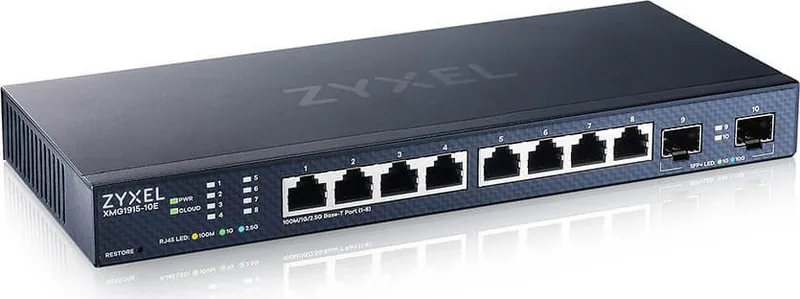
The XMG-1915-10E includes eight auto-negotiating 100M/1G/2.5G RJ-45 ports and two SFP+ slots for 1G/10G fiber or DAC uplinks, enabling high-speed uplink and flexible connectivity for small networks.
Is this answer helpful?
Yes. NebulaFlex lets you operate the switch in standalone mode using the built-in Web Configurator or in cloud mode via Zyxel Nebula Control Center (NCC). Note that when in Nebula cloud mode, some local settings are controlled from the cloud and the device will use Nebula-provided configuration.
Is this answer helpful?
No. The XMG-1915-10E is the non-PoE desktop model. PoE functionality (IEEE 802.3af/at/bt) is available in other models of the XMG1915 family (for example XMG1915-10EP and XMG1915-18EP).
Is this answer helpful?
Default local credentials are admin / 1234. Use the RESTORE button: press 2–6 seconds to reboot, press for more than 6 seconds to restore factory-default settings. Change default passwords after initial login and keep backups of your configuration.
Is this answer helpful?
Use Category 5e or better cabling to attain 1G/2.5G speeds with a maximum recommended run length of 100 meters. Choosing proper cabling ensures reliable multi-gig performance.
Is this answer helpful?
You can use the Web Configurator for full local management, the Zyxel One Network (ZON) Utility for discovery and initial setup, Nebula NCC for cloud management, and standard tools like SNMP, syslog, FTP for monitoring and firmware/config backups. The GUI includes wizards for VLAN, QoS, and protection features.
Is this answer helpful?
Unregister the device from your Nebula organization inventory via the Nebula web portal. Removing it will reboot the switch and restore factory defaults; afterwards you can configure it locally in standalone mode.
Is this answer helpful?
Advantages and Disadvantages
Advantages

- Multi-gigabit auto-negotiating RJ-45 ports (100M/1G/2.5G) for higher-than‑1Gbps without new cabling.
- Two SFP+ uplinks for fiber or high-speed backbone connectivity.
- NebulaFlex supports both standalone Web GUI and cloud management via Zyxel Nebula.
- Fanless desktop design for quiet small office or home use; wall-mountable for flexible placement.
- Rich smart-switch features: VLAN, QoS, link aggregation, IGMP snooping, SNMP and static routing.
Disadvantages

- Non-PoE model (XMG-1915-10E) lacks power delivery for cameras or APs; PoE available only in other family variants.
- Some advanced features limited in cloud-managed mode; local Web GUI may be needed for full configuration.
- Default credentials shipped (admin/1234), requiring immediate password change for security.
- Desktop form factor limits port count compared with rack units—larger networks may need rack models.
- 2.5G speeds require Cat5e or better and runs under 100 m; legacy cabling may not reach multi-gig rates.
Product Specification
Function
Switch
Type
Standalone
Network ports
8x RJ-45, 2x SFP+
Speeds
8x RJ-45 (100/1000/2.5GBase-T), 2x SFP+ (1G/10Gb/s)
PoE
N/A
Backplane
80Gb/s, 59.5Mp/s, 12KB Jumboframes, 1.5MB Packet buffer, 16K MAC addresses
Officially supported standards
802.1AB, 802.1AX, 802.1D, 802.1Q, 802.1p, 802.1s, 802.1w, 802.3ab, 802.3ad, 802.3ae, 802.3az, 802.3bz, 802.3x, 802.3z, IGMPv3
Configuration
Web interface, Configuration software (Windows, Android, iOS), via control unit, via Cloud
Cooling
passive
Dimensions (WxHxD)
9.84x1.06x4.09in
Weight
1.68 lb
Color
anthracite
Special features
Metal housing, external power supply, anti-theft protection (Kensington Lock), overvoltage protection (4kV)
Manufacturer's warranty
two years
Note
For this device, "link aggregation" was officially specified with the obsolete standard IEEE802.3ad. Since 2008, the function is no longer managed by IEEE "Working Group 3" (IEEE 802.3, CSMA/CD - Ethernet), but by "Working Group 1" (IEEE 802.1, High Level Interface - Internetworking) and technically unchanged defined via IEEE 802.1AX.
Product Description
ZyXEL XMG-1915-10E Desktop 2.5G Smart Switch — Overview and Manual
The ZyXEL XMG-1915-10E Desktop 2.5G Smart Switch is a compact, high-performance multi-gigabit switch designed for small offices, home labs, and branch deployments that need greater than 1 Gbps connectivity without overhauling cabling. Featuring eight 100M/1G/2.5G RJ-45 ports and two SFP+ uplinks, the XMG-1915-10E delivers flexible wired connectivity and robust Layer‑2 switching with basic Layer‑3 static routing capabilities. It supports both standalone management via a built-in Web Configurator and cloud-based management through Zyxel Nebula (NebulaFlex), making it easy to operate locally or centrally.
Key capabilities and what to expect
This desktop switch provides auto-negotiating multi-gigabit Ethernet ports that automatically choose 100 Mbps, 1 Gbps, or 2.5 Gbps speeds and support auto-MDI/MDIX. The two SFP+ slots serve as high-speed uplink or fiber links for backbone connections. The device is fanless and desktop-ready with rubber feet and optional wall-mounting; a rack-mount variant exists in the family for heavier deployments.
Management is flexible: use the Web Configurator for direct local configuration, Zyxel One Network (ZON) Utility for discovery and initial setup, or register the switch with Zyxel Nebula Control Center (NCC) for cloud provisioning and monitoring. The Web GUI includes wizards for VLAN, QoS, and protection features, plus diagnostic and backup/restore utilities. The switch supports VLANs, link aggregation, QoS, spanning tree variants, ACLs, IGMP snooping, DHCP relay/snooping, SNMP, syslog, and many standard L2/L3 features found in small-business smart switches.
For PoE models in the same XMG1915 family, Zyxel adds IEEE 802.3af/at/bt support and higher power budgets; while the XMG-1915-10E itself is the non-PoE desktop 2.5G option. The product ships with default admin credentials and provides easy reset and restore options for recovering the device to factory settings.
Installation and practical notes
The switch supports simple desktop placement, optional wall mounting (XMG1915-10E and 10EP), or rack mounting for larger models. Cable selection matters to reach the desired multi-gigabit speeds (Cat5e or better recommended for 1G/2.5G). NebulaFlex lets you switch between standalone and cloud management; unregistering in Nebula returns the unit to standalone mode (factory default). Regular best practices include changing default passwords, backing up configurations, and placing the unit where it can ventilate properly.
Notes
- Use Cat5e or better for 1G/2.5G connections and keep runs within 100 m.
- Default local login: user = admin, password = 1234 (change immediately).
- Nebula registration overwrites local settings; keep local credentials for Web GUI access in cloud mode.
- Restore button: 2–6s = reboot; >6s = factory default restore.
Pros and cons are summarized below, followed by FAQs to help with common setup and management questions.
Search for 67,732 Manuals online


Type-in Brand or Model