


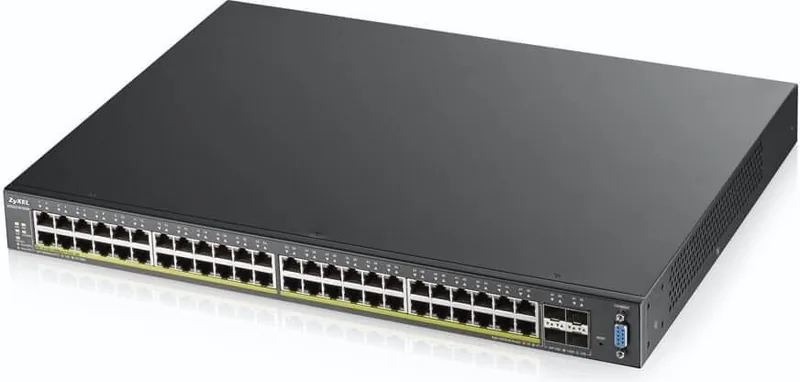
Zyxel XGS2210-52HP Manual
PDF manual · 532 Pages
English



Quick check
Incorrect answer, please try again.
Chat with your Zyxel XGS2210-52HP manual using AI
Get instant AI answers from your Zyxel XGS2210-52HP manual
Ask anything about the Zyxel XGS2210-52HP. Answers come from this manual, with the pages they are based on.
Ask a Question
Do you recommend XGS2210-52HP?
Yes NoFrequently Asked Questions
It is designed to connect many wired devices in a managed business network, with Gigabit access ports, fast uplinks, and tools for segmentation, security, and traffic control.
Is this answer helpful?
It fits offices, schools, retail sites, surveillance networks, and wiring closets that need a reliable rackmount switch with room for growth and centralized management.
Is this answer helpful?
Yes, the HP models support PoE and PoE+, which allows compatible devices like IP phones, cameras, and wireless access points to receive power through the network cable.
Is this answer helpful?
It can be managed through the web configurator, CLI, Telnet, SNMP, and FTP for firmware or configuration tasks, giving administrators several control options.
Is this answer helpful?
No. The switch has SFP+ slots, but the transceivers are separate accessories, so you need to choose modules that match your fiber or uplink requirements.
Is this answer helpful?
Stacking makes expansion easier by letting multiple switches behave more like one managed system, which can reduce administration time and simplify network growth.
Is this answer helpful?
Advantages and Disadvantages
Advantages

- 48 Gigabit RJ-45 ports provide high endpoint density for office and access-layer deployments.
- 4 SFP+ uplinks offer fast fiber or aggregation connections for backbone and server traffic.
- PoE+ on HP models simplifies powering phones, cameras, and access points.
- Multiple management options support both easy browser setup and advanced admin workflows.
Disadvantages

- SFP/SFP+ modules are not included, so uplink expansion requires separate purchases.
- Advanced feature set may be complex for small teams with limited networking experience.
- Rack installation needs proper space and ventilation to avoid heat buildup.
- PoE capability is limited to HP variants, not every model in the series.
Product Specification
Function
Switch
Type
Standalone, Rackmount (via mounting brackets)
Network ports
48x RJ-45, 4x SFP+
Speeds
48x RJ-45 (10/100/1000Base-T), 4x SFP+ (1G/10Gb/s)
PoE
48x RJ-45 PoE+, total: 375W
Backplane
176Gb/s, 130.9Mp/s, 9KB Jumboframes, 1.5MB Packet buffer, 16K Mac addresses
Officially supported standards
802.1AX, 802.1AB, 802.1D, 802.1Q, 802.1X, 802.1p, 802.1s, 802.1w, 802.1X, 802.3, 802.3ab, 802.3ae, 802.3af, 802.3at, 802.3az, 802.3u, 802.3x, 802.3z, IGMPv3
Configuration
Web interface, Console, serial (DB9)
Cooling
active, 4x fans (1.57 in)
Dimensions (WxHxD)
17.32x1.75x12.99 in, 1U
Weight
11.86 lb
Color
black
Special features
Metal casing, removable mounting brackets, firmware updates possible, anti-theft protection (Kensington Lock)
Manufacturer warranty
lifetime (10 years in AT/DE) + five years
Note
For this device, "link aggregation" was officially specified with the obsolete standard IEEE802.3ad. Since 2008, this function is no longer managed by IEEE "Working Group 3" (IEEE 802.3, CSMA/CD - Ethernet), but by "Working Group 1" (IEEE 802.1, High Level Interface - Internetworking) and technically defined unchanged via IEEE 802.1AX.
Product Description
ZyXEL XGS2210 Rackmount Gigabit Managed Stack Switch, 48x RJ-45, 4x SFP+, PoE+ Manual
The ZyXEL XGS2210 Rackmount Gigabit Managed Stack Switch is a practical fit for networks that need dense copper access, fast fiber uplinks, and steady control in a compact rack-friendly form. With 48 RJ-45 Gigabit ports and 4 SFP+ slots, it is built to support busy offices, surveillance systems, wireless deployments, and server aggregation without forcing a major redesign of the network.
What makes this switch appealing is the way it blends speed with flexibility. The stackable design simplifies expansion, while the available uplink paths help traffic move efficiently between switches, servers, and core devices. In environments where every port matters, the high port count makes it easier to connect endpoints directly while keeping the cabling organized and predictable. The manual also emphasizes support for both everyday switching and more advanced network handling, which gives the device a broader role than a simple access switch.
Management is another strong point. The web configurator offers a straightforward browser-based interface, while CLI, SNMP, Telnet, and FTP support provide more control for administrators who prefer deeper configuration or maintenance workflows. That combination is useful when the network grows, because it allows teams to adjust VLANs, port behavior, and monitoring tools without replacing hardware. Features such as ZON neighbor discovery and cluster management also help reduce the time spent on routine administration.
On the traffic-control side, the switch includes a wide set of tools that support stable operation in real deployments. VLAN segmentation, spanning tree options, link aggregation, bandwidth control, multicast handling, authentication, and source protection features all work together to improve performance and limit unwanted traffic. For organizations that need stronger policy enforcement, these functions make the switch more than just a port hub; it becomes a controllable part of the network fabric.
The PoE+ variants add even more value by delivering power and data over the same cable. That makes it easier to deploy IP phones, cameras, and access points in places where power outlets are limited. For branch offices, schools, retail stores, or wiring closets, the ZyXEL XGS2210 delivers a well-rounded mix of scale, speed, and manageability.
Notes
- SFP+ transceivers are required separately.
- PoE support is available on HP models.
- Rack ventilation should be planned carefully.
- Default login credentials should be changed after setup.
- Best suited for managed business networks with growth in mind.
Search for 67,732 Manuals online


Type-in Brand or Model