


Zyxel XGS1930-28 Manual
PDF manual · 375 Pages
English



Quick check
Incorrect answer, please try again.
Chat with your Zyxel XGS1930-28 manual using AI
Get instant AI answers from your Zyxel XGS1930-28 manual
Ask anything about the Zyxel XGS1930-28. Answers come from this manual, with the pages they are based on.
Ask a Question
Do you recommend XGS1930-28?
Yes NoFrequently Asked Questions
It suits small to midsize business networks that need reliable Gigabit access, flexible uplinks, and room to grow. It works well for offices, labs, and branch sites that want managed switching without unnecessary complexity.
Is this answer helpful?
Yes. It supports Nebula cloud management, so you can register the switch and manage it remotely. It can also operate in standalone mode with local web-based administration.
Is this answer helpful?
No. PoE is available only on the HP versions. Those models can power compatible devices such as IP cameras, wireless access points, and VoIP phones through the Ethernet ports.
Is this answer helpful?
The switch includes four SFP+ slots for 1G or 10G fiber connections. These uplinks are useful for server links, aggregation, and fast connections to other network equipment.
Is this answer helpful?
VLANs help separate traffic into logical groups for better control and less broadcast noise. Link aggregation combines ports for higher throughput and better resilience between devices.
Is this answer helpful?
Change the default administrator password, review SNMP settings, and save a backup of the configuration. It is also wise to check airflow, grounding, and port settings before production use.
Is this answer helpful?
Advantages and Disadvantages
Advantages

- 24 RJ-45 ports plus 4 SFP+ uplinks give strong access and backbone flexibility.
- Hybrid standalone and Nebula cloud management supports both local and remote control.
- Rich feature set includes VLAN, LACP, QoS, SNMP, LLDP, and routing tools.
- PoE models can power access points, cameras, and phones without extra adapters.
Disadvantages

- The feature set is deep, so first-time users may need time to learn the interface.
- Some capabilities depend on model, firmware, or whether cloud mode is enabled.
- Default credentials must be changed right away for better security.
- Rack placement and airflow need attention to avoid overheating or instability.
Product Specification
Function
Switch
Type
Standalone, Rackmount (via mounting brackets)
Network ports
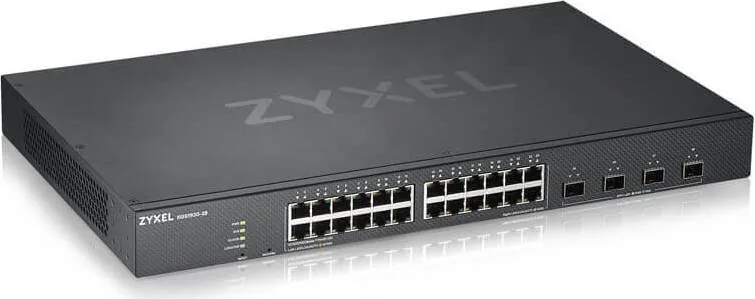
24x RJ-45, 4x SFP+
Speeds
24x RJ-45 (100/1000Base-T), 4x SFP+ (1G/10Gb/s)
PoE
N/A
Backplane
128Gb/s, 95.2Mp/s, 1.5MB packet buffer, 16K Mac addresses
Officially supported standards
802.1AX, 802.1AB, 802.1D, 802.1Q, 802.1X, 802.1p, 802.1s, 802.1w, 802.3, 802.3ab, 802.3ae, 802.3az, 802.3u, 802.3x, 802.3z, IGMPv3
Configuration
Web interface, via Cloud
Cooling
passive
Dimensions (WxHxD)
17.36x1.73x10.63in, 1U
Weight
7.50lb
Color
black
Special features
Metal housing, removable mounting brackets, firmware updates possible, anti-theft protection (Kensington Lock)
Manufacturer's warranty
lifetime (10 years in AT/DE) + five years
Note
For this device, "link aggregation" was officially specified with the obsolete standard IEEE802.3ad. Since 2008, this function is no longer managed by the IEEE "Working Group 3" (IEEE 802.3, CSMA/CD - Ethernet), but by "Working Group 1" (IEEE 802.1, High Level Interface - Internetworking) and technically defined unchanged via IEEE 802.1AX.
Product Description
ZyXEL XGS1930 Rackmount Gigabit Smart Switch, 24x RJ-45, 4x SFP+ Manual
The ZyXEL XGS1930 Rackmount Gigabit Smart Switch is built for networks that need dependable access, flexible uplinks, and simple day-to-day control. With 24 RJ-45 Gigabit ports and 4 SFP+ slots, it offers a smart balance between copper connectivity and high-speed fiber expansion. It fits well in offices, branch locations, labs, and growing workgroups that want more than a basic unmanaged switch.
What makes this family especially practical is its management flexibility. The switch can run in standalone mode through a web configurator or move into Nebula cloud management for remote visibility and centralized administration. That hybrid approach is useful for teams that want local control today and cloud-based scaling later. The built-in wizard, SNMP options, and ZON support also help simplify setup, discovery, and maintenance.
The hardware design is equally thoughtful. Rackmount support makes it a strong match for structured installations, while the SFP+ uplinks provide a clean path to faster aggregation, server connectivity, or backbone links. On the PoE models, power delivery adds even more value by letting you run access points, cameras, and phones directly from the switch. Combined with VLANs, link aggregation, QoS, multicast handling, and static routing, the platform can handle many traffic patterns with confidence.
For administrators, the ZyXEL XGS1930 Rackmount Gigabit Smart Switch, 24x RJ-45, 4x SFP+ Manual reflects a straightforward but capable operating model. The guide emphasizes secure login practices, configuration backups, proper grounding, and careful airflow management, all of which matter for long-term reliability. It is not only about moving packets; it is about building a stable network foundation that stays organized and easy to expand.
The switch also includes useful visibility and protection tools such as spanning tree, storm control, port security, LLDP, diagnostics, and detailed status pages. These features help reduce loops, limit broadcast problems, and make connected devices easier to track. For teams that value uptime, that extra layer of control can make a basic network feel much more resilient.
Notes
- Change the default password immediately after first login.
- Save and back up configurations before making major changes.
- Keep the unit well ventilated, especially in rack installations.
- Use the PoE-capable models if powered devices must be supported.
Search for 67,732 Manuals online


Type-in Brand or Model