

Zyxel XGS1210-12 V2 Manual
PDF manual · 81 Pages
English



Quick check
Incorrect answer, please try again.
Chat with your Zyxel XGS1210-12 V2 manual using AI
Get instant AI answers from your Zyxel XGS1210-12 V2 manual
Ask anything about the Zyxel XGS1210-12 V2. Answers come from this manual, with the pages they are based on.
Ask a Question
Do you recommend XGS1210-12 V2?
Yes NoFrequently Asked Questions
The default management IP address for this switch is 192.168.1.3. You must connect to this address using a web browser to access the configuration screen. It is located in the same subnet as your computer.
Is this answer helpful?
The default password is 1234. It is highly recommended that you change this default password immediately after the first login to ensure the security of your network configuration and access.
Is this answer helpful?
The device supports 10M, 100M, 1000M, and 2.5G speeds on specific RJ-45 ports. Ports 9 and 10 support up to 2.5G, while ports 1 through 8 support up to 1000M. This allows for flexible connectivity options for various devices.
Is this answer helpful?
Click Management in the navigation panel to access the password change screen. Enter your old password, then type your new password twice for confirmation. The new password must be between 8 to 15 characters long.
Is this answer helpful?
You need a Windows operating system version 7 through 11 with at least a Core i3 processor and 2 GB RAM. You also require 100 MB of free hard disk space and a WXGA display resolution of 1280 by 800 pixels minimum.
Is this answer helpful?
The XGS1210-12 model operates without a fan and relies on passive cooling. The XGS1250-12 model includes a Smart Fan that adjusts speed to manage internal temperature. Proper ventilation is crucial for the fanless model.
Is this answer helpful?
Press the RESET button on the front panel for more than 6 seconds until the PWR/SYS LED blinks. This restores factory defaults including the IP address 192.168.1.3 and password 1234, clearing all custom configurations.
Is this answer helpful?
Advantages and Disadvantages
Advantages

- Multi-Gigabit Ethernet ports support speeds up to 2.5G for enhanced performance on connected devices.
- Intuitive Web Configurator allows easy management and configuration through standard web browsers without extra software.
- VLAN support enables logical segmentation of network traffic to improve security and reduce broadcast domains.
- Automatic loop prevention detects and stops network loops to maintain stability and prevent broadcast storms.
- Energy Efficient Ethernet technology reduces power consumption during idle times for greener operations.
Disadvantages

- Default administrative password is 1234 which poses a security risk if changed immediately to a complex password.
- Fanless design on XGS1210-12 requires adequate clearance to prevent overheating during heavy usage periods.
- Wall mounting screws are not provided so users must source them independently based on wall type.
- No Power over Ethernet support is mentioned for any port, requiring external adapters for powered devices.
- Switch lockout can occur if all ports are removed from VLAN1 during initial configuration without setup.
Product Specification
Function
Switch
Type
Standalone
Network Ports
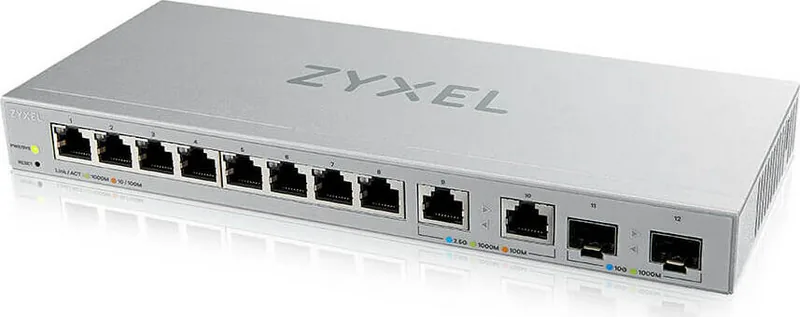
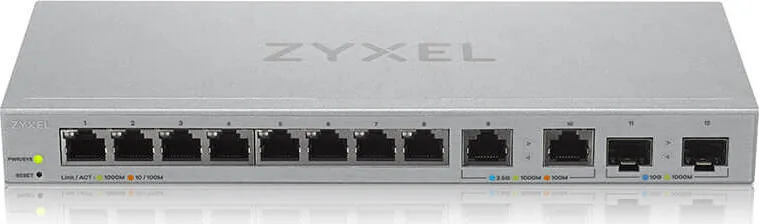
10x RJ-45, 2x SFP+
Speeds
8x RJ-45 (10/100/1000Base-T), 2x RJ-45 (100/1000/2.5GBase-T), 2x SFP+ (1G/10Gb/s)
PoE
N/A
Backplane
66Gb/s, 49Mpps, 12KB Jumboframes, 1.5MB Packet Buffer, 16K MAC Addresses
Officially Supported Standards
802.1p, 802.3, 802.3ab, 802.3az, 802.3bz, 802.3u, 802.3x, IGMPv3
Configuration
Web Interface
Cooling
Passive
Dimensions (WxHxD)
9.84x1.06x4.09 inches
Weight
1.69 lbs
Color
Grey
Features
Metal chassis, Firmware updates possible, external power supply
Manufacturer Warranty
Lifetime (10 years in AT/DE) + five years
Product Description
ZyXEL XGS1210 Desktop Gigabit Smart Switch
The ZyXEL XGS1210 Desktop Gigabit Smart Switch delivers robust networking performance tailored for modern office environments and growing small businesses. This versatile device features ten RJ-45 ports and two SFP+ slots, catering to diverse connectivity needs within a compact chassis. You can connect standard computers, printers, IoT devices, and servers seamlessly while utilizing the high-speed fiber uplinks for reliable backbone connections. The Multi-Gigabit ports support speeds up to 2.5G, ensuring your critical applications run smoothly without bottlenecks or latency issues.
Security and management are paramount with this smart switch. Users gain full control through an intuitive Web Configurator interface accessible via standard browsers. You can easily set up VLANs to segment traffic logically and protect sensitive data from unauthorized access. Quality of Service features prioritize voice and video traffic, preventing lag during important calls or streaming sessions. The hardware design includes comprehensive status LEDs for quick troubleshooting, letting you see the operational health of every port at a glance. Installation is straightforward, suitable for desktop placement or wall mounting depending on your available space and layout preferences.
Reliability is built into the core architecture to minimize downtime risks. Intelligent features like automatic loop prevention detect and stop broadcast storms instantly. Energy Efficient Ethernet reduces overall power consumption when data is idle, promoting sustainable operations and lower utility costs. Firmware upgrades are simple and can be performed directly from the management interface, ensuring you always have the latest security patches and bug fixes. This switch bridges the gap between basic connectivity and advanced enterprise management without breaking the budget or requiring specialized hardware.
Whether you are expanding a small business network or managing a dedicated campus link, this device stands as a reliable workhorse for daily operations. Its compact form factor fits easily on a desk without taking up excessive room or obstructing airflow significantly. The combination of copper and optical interfaces provides flexibility for future growth as bandwidth demands increase. Managing the network becomes less of a chore with guided tutorials and clear configuration paths. Stay ahead of performance issues by monitoring traffic flow through the included management tools easily. Trust this hardware to keep your connectivity solid and secure under constant load during peak business hours. It empowers IT staff with tools needed for immediate deployment and long-term stability. Experience seamless integration for a resilient network.
Important Note
Remember to change the default password for security reasons. Keep configuration backups safe on your local computer. Consult support if hardware issues persist during installation.
Search for 67,732 Manuals online


Type-in Brand or Model