

Zyxel WAH7601 Manual
PDF manual · 111 Pages
English



Quick check
Incorrect answer, please try again.
Chat with your Zyxel WAH7601 manual using AI
Get instant AI answers from your Zyxel WAH7601 manual
Ask anything about the Zyxel WAH7601. Answers come from this manual, with the pages they are based on.
Ask a Question
Do you recommend WAH7601?
Yes NoFrequently Asked Questions
The default username is admin and the password is 1234. You should login using these credentials first to change them.
Is this answer helpful?
Remove the lid and press the reset button inside for 5 seconds. The signal LED will blink red then green to confirm reset.
Is this answer helpful?
Yes, the router has an SD card slot that allows file sharing over the local WiFi network even without outside internet access.
Is this answer helpful?
It complies with IEEE 802.11b/g/n standards for compatibility with most modern smartphones and laptops.
Is this answer helpful?
Use the Data Usage screen in the Web Configurator to set a total allowance in GB and receive notifications at specific percentages.
Is this answer helpful?
Yes, the firewall is designed to protect the LAN from incoming traffic from the WAN unless specific port forwarding rules are created.
Is this answer helpful?
Advantages and Disadvantages
Advantages

- Supports fast 4G LTE and 3G connectivity for on-the-go internet.
- Compact design with portable battery allows usage anywhere anytime.
- Built-in data usage monitoring prevents unexpected service charges.
- Web Configurator offers easy network management and firmware updates.
- Supports file sharing via SD card slot for network access.
Disadvantages

- Default password is public and must be changed immediately for security.
- Limit of ten simultaneous WiFi clients may be tight for large groups.
- Web interface may require specific browser settings for pop-ups.
- Signal strength depends heavily on nearby cellular tower availability.
- Firmware upgrade process requires stable connection to avoid errors.
Product Specification
Modem
GSM (900/1800), UMTS (900/2100), LTE (B1/B3/B7/B8/B20/B38/B40)
Network Standards
EDGE, GPRS, HSDPA, HSUPA, HSPA+
Bandwidth
150Mbps/50Mbps (LTE), 42Mbps/5.76Mbps (UMTS)
Interfaces
1x Micro-USB 2.0, Wi-Fi 4 (802.11b/g/n)
Dimensions
4.33x2.48x0.63 inches
Weight
3.70 oz
SIM Form Factor
Mini-SIM
Power Supply
Battery (2000mAh)
Features
microSD Slot, Hotspot (10 Devices)
Product Description
The ZyXEL WAH7601 Portable Router Experience
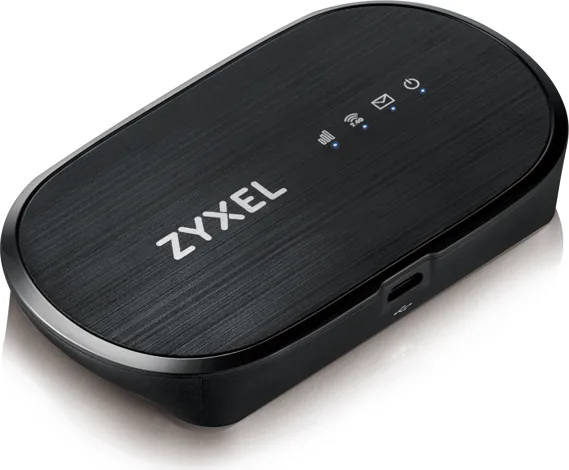
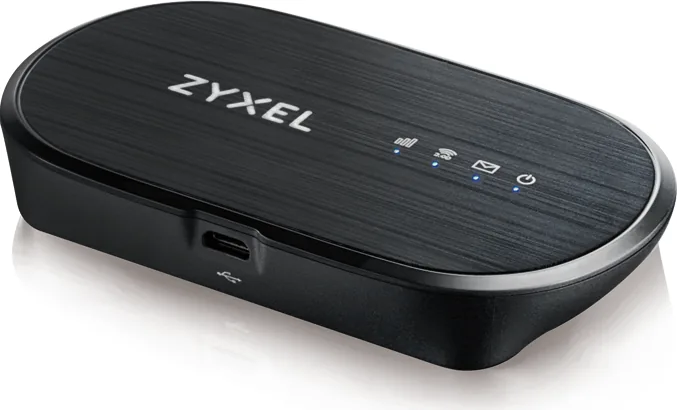
The ZyXEL WAH7601 is designed for users who need reliable internet access on the go. This 4G LTE portable router allows you to share high-speed internet connections via WiFi anytime and anywhere. It supports 4G, 3G, and 2G multi-mode networks, ensuring connectivity in various locations. The device comes with a compact design that makes it easy to carry anywhere. You can connect up to 10 simultaneous WiFi clients to the network. The hardware includes a mini SIM card slot, an SD memory card slot for file sharing, and a USB port. The LED indicators clearly show power status, signal strength, and WiFi activity. Different colors indicate charging levels and network types.
Managing Your Network
Accessing the settings is straightforward through the Web Configurator interface. Users simply navigate to the local gateway address provided in the ZyXEL WAH7601 Manual documentation to begin setup. The default login details are simple to remember for initial access. The interface allows you to configure network settings, monitor data usage, and manage security features effectively. You can set up data limits to avoid overage charges from your service provider. The system provides detailed statistics on upload and download traffic. The Setup Wizard guides you through initial configuration steps in minutes. It handles APN settings and WiFi profile creation automatically. You can monitor packet statistics and DHCP tables directly in the dashboard.
Browser and System Maintenance
Browser compatibility ensures smooth operation across different systems. Internet Explorer 11 or later is recommended for full functionality. Supported versions like Firefox and Safari also work well. Firmware upgrades are available through the system settings menu. This keeps the device secure and up to date with the latest features. Rebooting is possible without losing power by using the reboot function. Log settings help users track events for security auditing. The ARP table shows MAC address mappings for better network diagnostics.
Security and Connectivity
Security is a priority with built-in firewall capabilities. The device protects your local area network from unwanted external traffic and malware. It supports NAT and DMZ settings for advanced network configurations. WiFi Protected Setup, often called WPS, is available for quick and secure connections without manual key entry. The router also supports IPv6, future-proofing your network infrastructure. File sharing via the SD card allows easy access to media between devices on the network. The web interface supports multiple languages for broader accessibility. Troubleshooting guides are included to assist with common connection issues. Power management options help extend battery life during travel. The reset button ensures you can restore factory defaults if needed. Whether for business or personal use, this router provides a robust solution for portable connectivity needs. It simplifies complex networking tasks while maintaining high performance. SMS functions allow text messaging through the SIM card slot. The modem status screen displays detailed signal information. These features provide granular control over your internal network traffic. The unit complies with IEEE 802.11b/g/n standards. This ensures compatibility with most modern wireless devices. You can set up a guest network or disable WiFi entirely using the WPS button. Long press the button to disable the network or quick press to connect securely. Signal strength is visible on the status screen for easy troubleshooting.
Search for 67,732 Manuals online


Type-in Brand or Model