
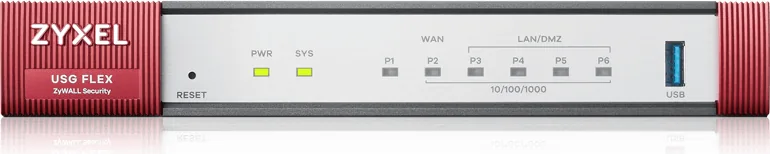
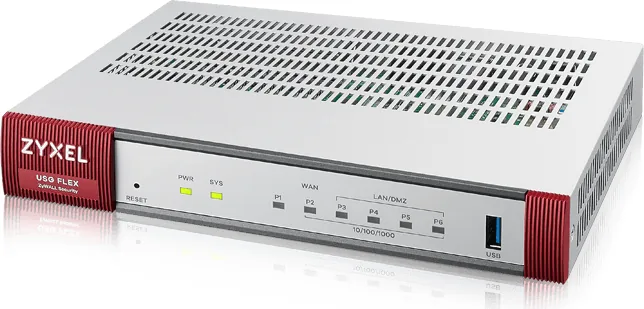

Zyxel USG FLEX 100 Manual
PDF manual · 462 Pages
English



Quick check
Incorrect answer, please try again.
Chat with your Zyxel USG FLEX 100 manual using AI
Get instant AI answers from your Zyxel USG FLEX 100 manual
Ask anything about the Zyxel USG FLEX 100. Answers come from this manual, with the pages they are based on.
Ask a Question
Do you recommend USG FLEX 100?
Yes NoFrequently Asked Questions
Access the device by navigating to https://192.168.1.1 in your web browser. Use the default username 'admin' and password '1234'. It is highly recommended to change these credentials immediately after the first login to ensure network security.
Is this answer helpful?
The ZyWALL USG FLEX 100 supports IPSec, SSL, and L2TP over IPSec VPN connections. These protocols allow for secure remote access and site-to-site connectivity, ensuring that data transmitted over public networks remains encrypted and protected from interception.
Is this answer helpful?
Yes, the device offers extensive monitoring capabilities. You can view port statistics, traffic graphs, session monitors, and system status screens directly through the web configurator. These tools help administrators identify bottlenecks and potential security threats instantly.
Is this answer helpful?
Absolutely. The device includes content filtering and reputation filters that automatically block access to malicious or inappropriate websites. You can customize these lists using white lists and black lists to tailor the security policy to your organization's specific needs.
Is this answer helpful?
You can configure the device to automatically download signature updates via the Cloud CNM or local server settings. Regular updates ensure that the anti-malware and intrusion prevention systems recognize the latest threats and can effectively block them.
Is this answer helpful?
Yes, it features an integrated AP controller that allows you to manage multiple wireless access points centrally. You can configure SSIDs, security settings, and radio parameters, making it easy to maintain a consistent wireless network across your facility.
Is this answer helpful?
Advantages and Disadvantages
Advantages

- Intuitive web configurator with helpful wizards for quick setup
- Comprehensive security suite including anti-malware and content filtering
- Supports multiple VPN types for secure remote access
- Flexible mounting options for various installation environments
- Real-time monitoring and detailed traffic analysis tools
Disadvantages

- Initial learning curve for advanced configuration features
- Some specific firmware features may not be available on all models
- Requires internet connection for signature updates and cloud services
- Default credentials must be changed immediately after setup
- Limited physical ports compared to larger enterprise appliances
Product Specification
Function
Firewall
Type
Standalone
Additional Ports
1x USB-A 3.0
Cooling
Passive
Color
White, Red
Product Description
ZyXEL ZyWALL USG FLEX 100: A Comprehensive Security Gateway
The ZyXEL ZyWALL USG FLEX 100 stands as a robust next-generation firewall designed to protect modern business networks from evolving cyber threats. This device integrates advanced security features into a single, manageable unit, ensuring that your data remains secure while maintaining high performance. With its flexible architecture, the USG FLEX 100 supports various deployment scenarios, making it ideal for small to medium-sized enterprises seeking reliable network protection.
At the heart of this system lies a powerful web configurator that simplifies complex configurations through intuitive wizards. Users can quickly set up internet access, configure virtual private networks, and manage wireless settings without needing deep technical expertise. The interface provides real-time help and detailed documentation, allowing administrators to navigate seamlessly through tasks like setting up IP/MAC binding or configuring SSL VPNs. The device also offers extensive monitoring capabilities, enabling users to track traffic statistics, view session logs, and analyze port usage in detail.
Security is paramount with the ZyXEL ZyWALL USG FLEX 100. It includes comprehensive features such as application patrol, content filtering, and anti-malware protection. These tools work together to block malicious traffic and prevent unauthorized access. The device supports multiple VPN protocols including IPSec, SSL, and L2TP, facilitating secure remote access for employees working outside the office. Additionally, features like identity detection and intrusion prevention systems add layers of defense against sophisticated attacks.
The hardware design supports both rack-mounting and wall-mounting options, providing flexibility in physical installation. Default login details are easily accessible, allowing immediate setup upon unboxing. The system encourages registration at myZyxel to unlock full feature potential and receive automatic signature updates for ongoing protection. Whether managing bandwidth, configuring load balancing, or setting up hotspots, the USG FLEX 100 delivers a complete solution for network management.
Key Features Overview
This gateway excels in delivering a balance between ease of use and advanced functionality. From initial setup wizards to detailed diagnostic tools, every aspect is designed to streamline operations. The inclusion of cloud-based management options further enhances its appeal for distributed networks. By combining these elements, the ZyXEL ZyWALL USG FLEX 100 ensures that businesses can focus on growth rather than worrying about network vulnerabilities.
Important Notes
- Always update firmware regularly to ensure maximum security.
- Use the web configurator for most configuration tasks unless CLI is required.
- Refer to the Quick Start Guide for initial connection diagrams.
Search for 67,732 Manuals online


Type-in Brand or Model