
Zyxel SFP10G-LR Manual
PDF manual · 1 Pages
English


Quick check
Incorrect answer, please try again.
Chat with your Zyxel SFP10G-LR manual using AI
Get instant AI answers from your Zyxel SFP10G-LR manual
Ask anything about the Zyxel SFP10G-LR. Answers come from this manual, with the pages they are based on.
Ask a Question
Do you recommend SFP10G-LR?
Yes NoFrequently Asked Questions
The ZyXEL SFP10G-LR supports single-mode fiber links up to 10 kilometers under standard optical conditions. Actual reach may vary with fiber quality, splicing, and connector losses.
Is this answer helpful?
Yes. The SFP10G-LR is hot-swappable, allowing safe insertion and removal without shutting down the host device, provided you follow ESD precautions and manufacturer instructions.
Is this answer helpful?
The module uses a 3.3V power input, consistent with SFP/SFP+ standards. Ensure the host port supplies the correct voltage and meets the platform's module power specifications.
Is this answer helpful?
Always attach an ESD wrist strap to a bare metal chassis, keep dust plugs on when not in use, avoid looking into active connectors, and only handle optics with clean hands and tools to prevent contamination and ESD damage.
Is this answer helpful?
While no formal certification is mandated, the manual advises that only trained and qualified personnel should install or replace modules due to laser safety and ESD risks. Follow organizational safety protocols.
Is this answer helpful?
Many SFP+ modules are interoperable, but compatibility can vary by vendor. Check ZyXEL’s supported transceivers list and the target device compatibility documentation before deployment.
Is this answer helpful?
The module contains a Class 1 laser; do not look into active fiber connectors. Laser radiation is present when powered. Use ESD protection, and handle or service only by trained personnel to avoid injury or equipment damage.
Is this answer helpful?
Advantages and Disadvantages
Advantages

- Supports 10G Ethernet over single-mode fiber up to 10 km for long-reach links.
- Hot-swappable SFP+ form factor enables in-service installation and removal.
- LC-duplex connectors and standard 3.3V interface ensure wide interoperability.
- Mechanical latch and Tx/Rx markings reduce risk of incorrect insertion.
- Compact design saves port density and space in networking equipment.
Disadvantages

- Single-mode only — not suitable for multimode fiber without media conversion.
- Requires careful ESD handling and dust protection to avoid optical damage.
- Class 1 laser caution limits handling to trained personnel for safety.
- Compatibility may vary; must confirm supported transceivers list for some devices.
- Limited to 10 km reach; not suitable for longer metropolitan links without amplifiers.
Product Specification
Type
LAN Transceiver
Form Factor
1x Transceiver
Interface
1x SFP+
Port
1x LC-Duplex (10Gb/s, Transmit Power -12.6 to 0.5dBm)
Transmission
1x LC-Duplex (10GBase-LR 1310nm 9/125µm SM OS1/OS2 10km)
Power Supply
Power supply only via interface
Dimensions
0.58x0.47x2.22in (WxHxD)
Compatibility
various models (Zyxel)
Special Features
MSA-Compliant, DDM (Digital Diagnostic Monitoring)
Product Description
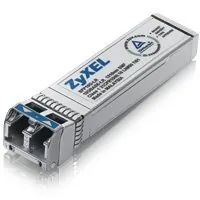
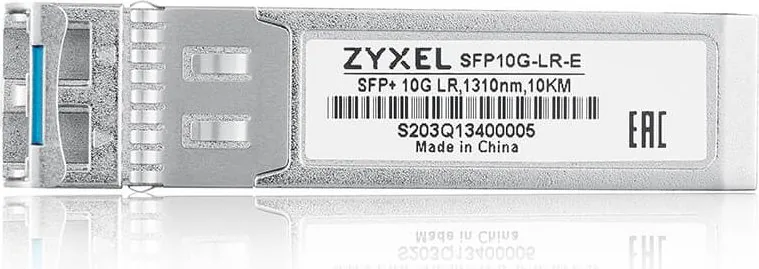
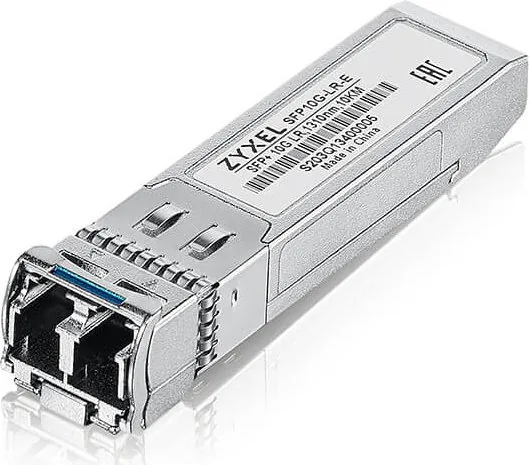
ZyXEL SFP10G-LR 10G LAN-Transceiver, LC-Duplex SM 10km, SFP+ Manual
The ZyXEL SFP10G-LR is a 10G SFP+ transceiver designed for long-reach single-mode fiber links up to 10 km. Engineered for high-performance network environments, it supports 10 Gigabit Ethernet and is compatible with LC-duplex connectors. The compact SFP+ form factor enables flexible deployment in switches, routers, and optical line equipment where density and space savings matter.
This module is hot-swappable, allowing installation and removal without powering down the host device. It operates on a 3.3V power input and follows standard SFP/SFP+ electrical and optical interfaces, ensuring broad interoperability when used with supported ZyXEL products and many third-party systems. The transceiver includes transmit (Tx) and receive (Rx) markings to simplify correct insertion and a mechanical latch to prevent incorrect seating.
Installation is straightforward: use ESD precautions, remove protective packaging and dust plugs, align Tx/Rx correctly, and insert until the latch engages. For removal, unlock and gently slide the module out using the built-in tabs or latch; do not force the module. The manual emphasizes ESD wrist strap use and dust-plug protection to prevent electrostatic and particulate damage to sensitive optics.
Safety guidance highlights the Class 1 laser inside the module. Never look into active fiber connectors and ensure only trained personnel handle module replacement. Environmental guidance recommends proper disposal per local regulations. For support and compatibility details, refer to ZyXEL support channels and compatibility lists.
Notes:
- Keep dust plugs on when not in use to protect optical bores.
- Follow ESD best practices during handling and installation.
- Verify device compatibility on ZyXEL’s supported transceivers list.
Search for 67,732 Manuals online


Type-in Brand or Model