
Zyxel RGS200 Manual
PDF manual · 260 Pages
English



Quick check
Incorrect answer, please try again.
Chat with your Zyxel RGS200 manual using AI
Get instant AI answers from your Zyxel RGS200 manual
Ask anything about the Zyxel RGS200. Answers come from this manual, with the pages they are based on.
Ask a Question
Do you recommend RGS200?
Yes NoFrequently Asked Questions
The factory default is http://192.168.1.1 with username 'admin' and password '1234'. Change credentials and IP on first login to secure the device.
Is this answer helpful?
The RGS200 provides 8 Gigabit RJ-45 copper ports and 4 SFP slots. SFPs support multimode or single-mode transceivers (LC connectors). Ensure TX/RX pairing is correct and follow fiber safety precautions.
Is this answer helpful?
PoE+ is available on specified ports with LEDs indicating status. The switch accepts dual DC inputs (12–58V) via a 6-pin terminal block; PoE budget depends on total available input power and must be planned accordingly.
Is this answer helpful?
Management options include the Web Configurator (Configuration, Monitor, Diagnostics, Maintenance menus), console via RS-232, CLI over Telnet/SSH, and SNMP (v1/v2c/v3). Use online Help in the UI for screen-specific guidance.
Is this answer helpful?
The RGS200 supports fast failover ring protection, dual power inputs with alarm relay outputs, and features such as spanning tree (RSTP/MST) and link monitoring to increase resilience in industrial deployments.
Is this answer helpful?
Use the web UI: Maintenance → Software → Upload to upload firmware. For configs, use Maintenance → Configuration to save, upload, download, activate, or revert configs. Avoid rebooting during firmware upload.
Is this answer helpful?
Security includes HTTPS/SSH, user accounts with privilege levels, TACACS+/RADIUS, ACLs, DHCP snooping/relay with Option 82, IP Source Guard, ARP inspection, port security and SNMPv3 support for encrypted management.
Is this answer helpful?
Advantages and Disadvantages
Advantages

- Rugged IP-30 metal chassis with wide operating temperature and dual DC power inputs for high reliability.
- 8x Gigabit RJ-45 and 4x SFP slots provide flexible copper and fiber uplink options.
- PoE+ support with per-port power management, scheduling and energy-saving features (EEE, ActiPHY, PerfectReach).
- Comprehensive L2+ features: VLAN, QoS, LACP/static aggregation, RSTP/MST and fast failover ring protection.
- Extensive management and security: Web UI, CLI, SNMPv1/v2c/v3, TACACS+/RADIUS, DHCP snooping/relay, ACLs and port security.
Disadvantages

- Default factory credentials and IP require prompt change to avoid exposure.
- Full feature set complexity demands experienced network administrators for advanced configurations.
- PoE budget and behavior depend on external power supply; careful planning needed for high PoE loads.
- Web UI and older browser recommendations (IE7+) may feel dated; some admins prefer modern management tools.
- Maximum interface and route counts (e.g., 8 IP interfaces, 32 routes) may limit very large or complex setups.
Product Specification
Function
Switch
Type
Standalone, DIN rail (TS 35), Wall mount (via mounting brackets)
Network ports
8x RJ-45, 4x SFP
Speeds
8x RJ-45 (10/100/1000Base-T), 4x SFP (100M/1Gb/s)
PoE
8x RJ-45 PoE+, total: 240W
Backplane
24Gb/s, 17.86Mp/s, 9KB Jumboframes, 512KB packet buffer, 8K MAC addresses
Officially supported standards
802.1AX, 802.1AB, 802.1D, 802.1Q, 802.1X, 802.1p, 802.1s, 802.1w, 802.3, 802.3ab, 802.3af, 802.3at, 802.3u, 802.3x, 802.3z, IGMPv3
Configuration
Web interface, Console, serial (RJ-45)
Cooling
passive
Dimensions (WxHxD)
3.03x6.06x5.01in
Weight
3.20lb
Color
black
Special features
Metal housing, removable mounting brackets, redundant power supply, screw terminals (12-58V), firmware updates possible, power supply only via remote feeding
Manufacturer warranty
two years
Note
For this device, "link aggregation" was officially specified with the obsolete standard IEEE802.3ad. Since 2008, the function is no longer managed by the IEEE "Working Group 3" (IEEE 802.3, CSMA/CD - Ethernet), but by "Working Group 1" (IEEE 802.1, High Level Interface - Internetworking) and technically defined unchanged via IEEE 802.1AX.
Product Description
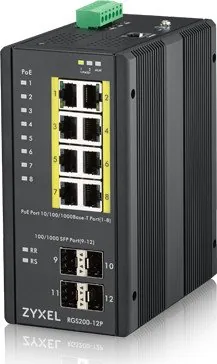
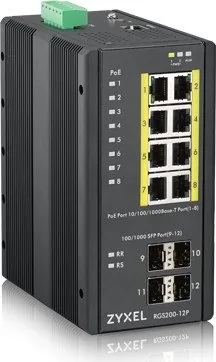
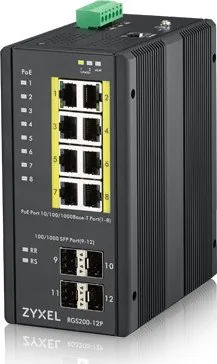
ZyXEL RGS200 Railmount Gigabit Managed Switch, 8x RJ-45, 4x SFP, PoE+ Manual
The ZyXEL RGS200 Railmount Gigabit Managed Switch is a rugged, industrial-grade L2+ managed switch designed for harsh or mission-critical environments. With 8 RJ-45 Gigabit copper ports and 4 SFP slots, dual DC power inputs (12–58V), PoE+ on selected ports, and a metal IP-30 chassis, the RGS200 series targets deployments that require reliability, extended temperature operation, and advanced network management.
Built for industrial networks, the RGS200 supports features expected from enterprise-class managed switches: VLANs, QoS, port aggregation (static and LACP), spanning tree variants (RSTP/MST), IGMP/MLD snooping, LLDP/LLDP-MED, robust SNMP support (v1/v2c/v3), RMON, and extensive logging/trap capabilities. Redundancy and resilience are enhanced with fast failover ring protection and power redundancy via dual input terminals, plus alarm relay outputs for fault notification.
Management options are flexible: a web configurator with contextual online Help, a CLI accessible via console/Telnet/SSH, and SNMP for centralized monitoring. Default factory credentials and IP (admin / 1234 at 192.168.1.1) are provided for initial access. The web interface organizes functions into Configuration, Monitor, Diagnostics, and Maintenance menus, making it straightforward to manage IP interfaces, NTP/time, firmware upgrades, backups, and factory reset or keep-IP resets.
Deployment and installation are streamlined with DIN-rail or wall-mount options, grounding points, and clear LED indicators for power, alarm, port link/activity and speeds. The switch supports SFP transceivers (multimode/single-mode) for fiber uplinks and enforces safe fiber handling warnings. PoE scheduling, per-port power management, and ActiPHY/PerfectReach/EEE power-saving features help optimize energy usage while supporting powered devices.
For administrators, the RGS200 offers granular security and access control: user accounts and privilege levels, TACACS+/RADIUS authentication, HTTPS/SSH, DHCP snooping/relay with Option 82, IP Source Guard, ARP inspection, ACLs with per-port ACEs and rate limiters, and port security/limit control with aging and shutdown/trap actions. Advanced telemetry includes port statistics, traffic overview, QoS counters, MAC and VLAN tables, and RMON history/alarm/event facilities.
Notes:
- Default login: http://192.168.1.1, user: admin, password: 1234 — change immediately after first login.
- PoE budgets and per-port capabilities depend on model and power input; verify power source and fused supply.
- Use recommended web browsers (modern IE/Edge, Firefox, Chrome) and consult the online Help for screen-level guidance.
Overall, the ZyXEL RGS200 series combines rugged hardware, flexible fiber/copper connectivity, managed networking features, and industrial-grade reliability for demanding installations.
Search for 67,732 Manuals online


Type-in Brand or Model