
Zyxel P-660H-D1 Manual
PDF manual · 448 Pages
English



Quick check
Incorrect answer, please try again.
Chat with your Zyxel P-660H-D1 manual using AI
Get instant AI answers from your Zyxel P-660H-D1 manual
Ask anything about the Zyxel P-660H-D1. Answers come from this manual, with the pages they are based on.
Ask a Question
Do you recommend P-660H-D1?
Yes NoVideo Manual
DevOps & SysAdmins: Zyxel P-660H-D1
Frequently Asked Questions
The P-660H-D1 supports ADSL2/ADSL2+ connections for DSL broadband service. It terminates the DSL line and provides NAT routing to share the single ISP IP address with multiple wired and wireless devices.
Is this answer helpful?
It supports WEP and WPA (WPA-PSK and WPA with RADIUS/802.1x) for encryption and authentication. For enterprise setups, the unit integrates with RADIUS servers for EAP-based authentication and supports MAC filtering and content filtering for additional access control.
Is this answer helpful?
Yes — the gateway provides NAT/SUA, port forwarding, and address mapping to expose internal servers to the internet. You can configure server IPs and service ports, and order mapping rules to allow inbound access while maintaining other NAT protections.
Is this answer helpful?
The device includes media bandwidth management and traffic shaping features. You can create bandwidth classes, apply filters by application or subnet, use priority/fairness schedulers, and set bandwidth borrowing or reservation rules to ensure critical services receive needed capacity.
Is this answer helpful?
Management options include a web configurator, SMT/CLI for advanced users, remote management controls (telnet/FTP/HTTP with restrictions), log and alert displays, diagnostic screens for DSL/LAN/WAN, and firmware/configuration upload and restore via FTP/TFTP.
Is this answer helpful?
Yes, UPnP is supported to allow compliant applications to traverse NAT dynamically. The feature can be enabled or disabled per security requirements; exercise caution as UPnP can open ports automatically for devices and applications.
Is this answer helpful?
Use WPA with a strong passphrase or RADIUS authentication, disable insecure protocols, change default admin credentials, enable firewall/anti-probing features, apply firmware updates, limit remote management, and monitor logs for suspicious activity.
Is this answer helpful?
Advantages and Disadvantages
Advantages

- ADSL2+ support for higher downstream speeds where available.
- Integrated 802.11g wireless plus four Ethernet ports for mixed wired/wireless networks.
- Comprehensive firewall, NAT/SUA, port forwarding and DoS protections.
- Advanced configuration: web GUI, SMT/CLI, traffic shaping and bandwidth management.
- Maintenance features: logs, firmware upload/restore, diagnostics and remote management.
Disadvantages

- 802.11g wireless is limited compared with modern 802.11n/ac/ax standards.
- Feature set and UI complexity may overwhelm non-technical users.
- Performance and speeds depend heavily on ISP DSL line quality and ADSL2+ support.
- Legacy device expectations: fewer modern security extras (e.g., WPA3) and USB features.
- Firmware updates and vendor support may be limited for older hardware models.
Product Specification
WAN
1x ADSL2+ over POTS (Annex A)
LAN
4x 100Base-TX
Product Description
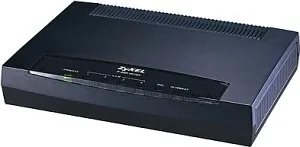
ZyXEL P-660H-D1 Overview
The ZyXEL P-660H-D1 is a compact ADSL2+ gateway designed to bring reliable broadband connectivity and versatile networking features to homes and small offices. Combining 802.11g wireless capability with four Ethernet LAN ports and an integrated ADSL interface, it offers a balanced mix of performance, security, and manageability for everyday internet tasks — from web browsing and streaming to small-scale file sharing and remote access.
Key features and usage
Equipped with ADSL2+ support, the ZyXEL P-660H-D1 can achieve higher downstream rates where supported by the ISP, while its 802.11g wireless radio provides broad Wi‑Fi coverage for devices throughout a home or small office. The built-in hardware NAT and firewall functions enable multiple devices to share a single public IP address securely. Advanced options such as DHCP, dynamic DNS, NAT/SUA server configuration, port forwarding, and traffic shaping allow adaptable network setups and finer control over bandwidth and service access.
The unit supports robust wireless and wired security measures, including WEP and WPA (with RADIUS support and 802.1x authentication), MAC filtering, keyword/content filtering, and remote management controls. Stateful packet inspection and anti-probing/DoS protections help guard the local network from common Internet threats. For power users, the gateway provides an extensive web-based configurator and CLI/SMT (System Management Terminal) for detailed configuration, firmware updates, logging, and diagnostics.
Practical scenarios
For a typical home setup, the P-660H-D1 serves as a single device that connects the ISP DSL line and shares the connection to multiple wired and wireless clients, while protecting them with NAT and the integrated firewall. Small offices can use its VLAN/NAT features, IP policy routing, bandwidth management, and scheduling tools to prioritize business-critical traffic (VoIP or VPN) and host internal servers using port forwarding or mapped public IPs.
The device also supports UPnP for easier NAT traversal of applications that need dynamic port mapping, and offers backup/traffic redirect options to maintain connectivity in multi-WAN or failover scenarios. Maintenance features include log and alert systems, firmware/configuration upload and restore via FTP/TFTP, and diagnostic screens to troubleshoot DSL, LAN, and WAN issues.
Conclusion
The ZyXEL P-660H-D1 is a feature-rich ADSL2+ gateway aimed at users who need a reliable, configurable, and secure broadband solution. It blends wireless convenience, solid routing/firewalling, and administrative depth that suits both non-technical home users and small business administrators.
Notes
- Best performance requires matching ISP ADSL2+ support and proper line conditions.
- WPA/WPA2 with a strong passphrase and RADIUS offers the strongest wireless security.
- Regular firmware updates and secure management credentials are recommended to maintain security and stability.
Search for 67,732 Manuals online


Type-in Brand or Model