
Zyxel NWD6602 Manual
PDF manual · 4 Pages
English



Quick check
Incorrect answer, please try again.
Chat with your Zyxel NWD6602 manual using AI
Get instant AI answers from your Zyxel NWD6602 manual
Ask anything about the Zyxel NWD6602. Answers come from this manual, with the pages they are based on.
Ask a Question
Do you recommend NWD6602?
Yes NoFrequently Asked Questions
It supports Windows 7, 8, 8.1, and 10. It also works with macOS versions 10.11 through 10.15 and Linux distributions like Fedora 20/23 and Ubuntu 15.04/18.04 with specific kernel versions.
Is this answer helpful?
Insert the device into a USB Type-A port, open a web browser, visit the ZyXEL support page for the NWD6602, download the driver, and follow the installation wizard prompts.
Is this answer helpful?
The 2.4GHz band offers better range and wall penetration, while the 5GHz band provides faster speeds with less interference, ideal for HD streaming and gaming.
Is this answer helpful?
No, the NWD6602 is powered directly through the USB Type-A port on your computer, requiring no additional power adapters.
Is this answer helpful?
Yes, provided your Linux distribution runs a compatible kernel version listed in the specifications, such as Kernel 3.11, 4.11, 3.19, or 4.15.
Is this answer helpful?
Advantages and Disadvantages
Advantages

- Supports both 2.4GHz and 5GHz bands for optimal speed and range
- Compatible with Windows, Mac, and various Linux distributions
- Simple plug-and-play installation via USB Type-A port
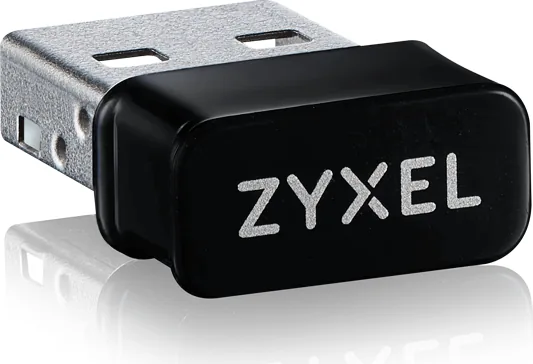
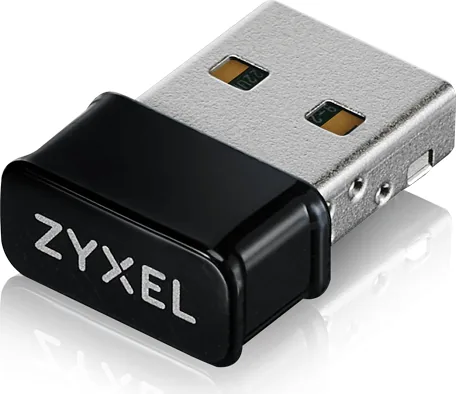
- Compact design allows for easy portability
Disadvantages

- Requires manual driver download and installation
- Limited to USB 2.0 speed which may bottleneck gigabit connections
- External antenna not included for extended range enhancement
Product Specification
Type
WLAN Adapter
Form Factor
1x USB Stick
Connection
1x USB-A 2.0 (Plug)
Link
1x WLAN 802.11a/b/g/n/ac (1x 2.4GHz or 1x 5GHz, WPS Button), 1x Signal Booster, 1x Antenna (Integrated, 2x Electric)
Transmission
1x 2.4GHz WLAN (300Mb/s, 2x2), 1x 5GHz WLAN (867Mb/s, 2x2)
Power Supply
Power supply only via Connection
Dimensions
0.59x0.28x0.79in (WxDxH)
Weight
0.18oz
Case Color
Black
Compatibility
Universal
Manufacturer Warranty
Two Years
USB Spelling
Link
Product Description
Unlock High-Speed Connectivity with the ZyXEL AC1200 DualBand Adapter
In today's fast-paced digital world, maintaining a stable and rapid internet connection is essential for both work and entertainment. The ZyXEL AC1200 DualBand 2.4GHz/5GHz WLAN USB-A 2.0 adapter stands out as a reliable solution for users seeking to upgrade their wireless capabilities without replacing their entire computer system. This compact device transforms any standard USB port into a powerful gateway for high-speed Wi-Fi access.
Experience Seamless Dual-Band Performance
The core strength of this adapter lies in its dual-band technology. By supporting both 2.4GHz and 5GHz frequencies, it offers flexibility that single-band devices cannot match. The 2.4GHz band provides excellent range and wall penetration, making it ideal for covering larger areas or older homes where signal strength can be an issue. Meanwhile, the 5GHz band delivers faster data transfer speeds with less interference, perfect for streaming high-definition video, online gaming, or large file downloads. This dual capability ensures that you always have the best connection available for your specific needs.
Easy Installation and Broad Compatibility
Setting up the NWD6602 is designed to be straightforward for users of all technical levels. Simply plug the device into a USB Type-A port on your computer, and the installation process begins. Users are guided through a simple wizard to download and install the necessary drivers from the official ZyXEL website. Once installed, the system automatically recognizes the new network interface, allowing for immediate connectivity.
This adapter boasts impressive compatibility across various operating systems. It supports Windows versions including 7, 8, 8.1, and 10, ensuring smooth operation for most PC users. For Mac users, it works seamlessly with macOS versions ranging from 10.11 up to 10.15. Additionally, Linux enthusiasts will appreciate its support for popular distributions like Fedora and Ubuntu, provided they are running compatible kernel versions such as 3.11, 4.11, 3.19, or 4.15. This wide range of support makes it a versatile choice for diverse computing environments.
Reliable Support and Global Availability
ZyXel backs this product with robust global support. Whether you are in the USA, Europe, or Asia, help is readily available through dedicated support lines and websites. The company provides comprehensive documentation, warranty cards, and safety warnings to ensure user confidence. With importers located in key regions like Denmark and the United States, customers receive localized assistance and genuine products.
Whether you are a casual home user looking to improve your streaming experience or a professional needing a backup connection, the ZyXEL AC1200 DualBand adapter delivers performance and reliability. Its plug-and-play nature combined with advanced dual-band technology makes it a smart investment for modern connectivity.
Search for 67,732 Manuals online


Type-in Brand or Model