
Zyxel NSG50 Manual
PDF manual · 48 Pages
English



Quick check
Incorrect answer, please try again.
Chat with your Zyxel NSG50 manual using AI
Get instant AI answers from your Zyxel NSG50 manual
Ask anything about the Zyxel NSG50. Answers come from this manual, with the pages they are based on.
Ask a Question
Do you recommend NSG50?
Yes NoFrequently Asked Questions
It is a cloud-managed security gateway for small offices and branch networks. It helps secure internet access, manage traffic, support VPN connections, and simplify remote administration through Zyxel Nebula.
Is this answer helpful?
Yes. It can be provisioned and monitored through Nebula Control Center when connected to the Internet. This allows administrators to review status and manage settings from a centralized cloud interface.
Is this answer helpful?
Yes. It includes a built-in web configurator for local access. Through it, you can check status, configure interfaces, manage users, and run diagnostics without relying only on cloud management.
Is this answer helpful?
The gateway supports diagnostics file generation, packet capture, ping, and traceroute. These tools help administrators identify network issues, inspect traffic, and prepare support information when needed.
Is this answer helpful?
Yes. It can save packet capture files and diagnostic information to a connected USB storage device, as long as the device is writable and uses a supported file system such as FAT16, FAT32, EXT2, or EXT3.
Is this answer helpful?
The NSG50 supports SSH access controls, password management, and secure cloud provisioning. Administrators can limit SSH access by client IP and should change the default password after first login.
Is this answer helpful?
Advantages and Disadvantages
Advantages

- Cloud-managed through Nebula Control Center for remote visibility and control.
- Includes firewall, VPN, ADP, NAT, and bandwidth management in one gateway.
- Built-in diagnostics, packet capture, and network tools aid troubleshooting.
- USB storage support helps save logs and capture files for later review.
Disadvantages

- USB storage works only with supported writable file systems and one device at a time.
- Initial setup requires careful password and interface configuration.
- Packet captures can affect performance while they are running.
- Some advanced tasks may still require local web access or CLI knowledge.
Product Specification
LAN
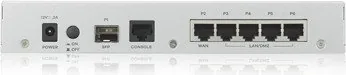
4x 1000Base-T
WAN
1x 1000Base-T, 1x SFP
VPN
10 IPsec VPN Tunnels
Additional Ports
1x USB, 1x RJ-45 Management
Miscellaneous
300Mbps Firewall Throughput, 70Mbps VPN Throughput (3DES)
Product Description
ZyXEL Nebula Cloud Managed Security Gateway NSG50: Smart Protection for Small Business Networks
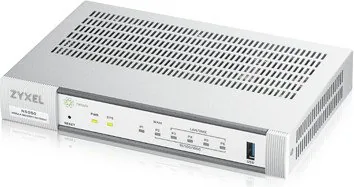
The ZyXEL Nebula Cloud Managed Security Gateway NSG50 is built for organizations that want simple cloud control without giving up serious security tools. Designed for small office and branch environments, it combines firewall protection, VPN support, anomaly detection, NAT, policy routing, bandwidth control, and DHCP services in one compact gateway. It is a practical fit for teams that need dependable connectivity and centralized oversight.
One of the strongest advantages of the NSG50 is its dual-management approach. When connected to the Internet, it can be provisioned and monitored through Zyxel Nebula Control Center, allowing administrators to manage settings remotely with ease. At the same time, the built-in web configurator provides local access for tasks such as WAN setup, status checks, diagnostics, and maintenance. This flexibility makes the device useful both for hands-on admins and for cloud-first environments.
The ZyXEL Nebula Cloud Managed Security Gateway NSG50 Manual highlights a system that focuses on visibility and control. The dashboard surfaces essential device details such as firmware version, uptime, connectivity status, and extension-slot information in widget-based panels. For troubleshooting, the gateway supports diagnostics file collection, packet capture, and ping or traceroute tools, which are especially valuable when network issues need fast isolation.
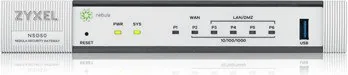
USB support is another useful feature. The NSG50 can store packet capture data and diagnostic information on compatible USB storage, helping teams preserve logs for later review or support cases. The device also includes clear LED indicators for power, system health, interface activity, and USB status, making it easier to assess operation at a glance.
Security is a recurring theme throughout the platform. SSH access can be restricted by client IP, the admin password should be changed after first login, and the interface settings allow administrators to define how the gateway connects to upstream networks. Support for DHCP, fixed IP, and PPPoE WAN modes further broadens deployment options.
For businesses that value straightforward administration, strong security features, and cloud-managed convenience, the NSG50 delivers a balanced network edge solution. It is especially appealing where remote management, capture-based troubleshooting, and simple day-to-day monitoring matter as much as raw protection.
Notes
- Use strong, unique passwords and update them regularly.
- Keep a USB device ready if you plan to store diagnostic or capture files.
- Review WAN and SSH access settings carefully before deployment.
Search for 67,732 Manuals online


Type-in Brand or Model