

Zyxel NR2301 Manual
PDF manual · 123 Pages
English



Quick check
Incorrect answer, please try again.
Chat with your Zyxel NR2301 manual using AI
Get instant AI answers from your Zyxel NR2301 manual
Ask anything about the Zyxel NR2301. Answers come from this manual, with the pages they are based on.
Ask a Question
Do you recommend NR2301?
Yes NoFrequently Asked Questions
Connect to the NR2301 via Wi‑Fi or USB, open a browser and go to http://192.168.1.1. Log in with username "admin" and the default password shown on the device About screen, then change the password for security.
Is this answer helpful?
The NR2301 supports theoretical 5G download speeds up to 3.4 Gbps and 4G up to 1.6 Gbps; Wi‑Fi 6 provides up to 1.8 Gbps (2x2 MU‑MIMO). Real‑world throughput depends on carrier coverage, SIM plan, signal strength, and network congestion.
Is this answer helpful?
Yes. You can enable 2.4GHz, 5GHz, or both, and optionally combine them under a single SSID. Channel, bandwidth, SSID broadcast, security mode, and max users are configurable via the Web Configurator.
Is this answer helpful?
The NR2301 supports up to 32 connected clients in total (including guest network clients). You can limit users per SSID through the Wi‑Fi settings.
Is this answer helpful?
Use the Web Configurator’s Update section to check for online updates or upload a firmware .pkg file manually. Configuration Backup lets you download a .bin file and later restore settings via Firmware Management > Configuration Backup.
Is this answer helpful?
Supported modes include WPA2‑PSK, WPA‑PSK/WPA2‑PSK, WPA3‑SAE, and combined WPA2/WPA3. You can hide SSIDs, use MAC whitelist/blacklist, enable guest isolation, and employ firewall rules for added protection.
Is this answer helpful?
Package Settings let you define daily, monthly, or custom periods with data limits and alarm thresholds. When limits are reached the device can disable cellular data according to the configured policy; calibration and usage statistics are available in the Web Configurator.
Is this answer helpful?
Advantages and Disadvantages
Advantages

- Fast cellular speeds: 5G up to 3.4 Gbps and 4G up to 1.6 Gbps for low‑latency broadband.
- Wi‑Fi 6 with 2x2 MU‑MIMO: up to 1.8 Gbps and better multi‑device performance.
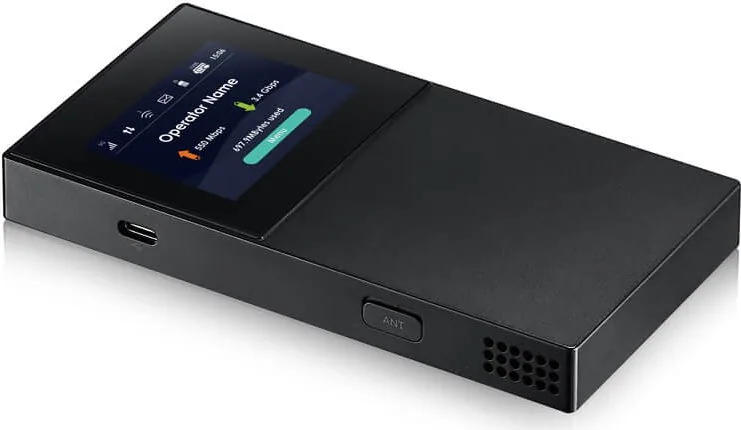
- Portable and feature‑rich: compact design, LCD status screen, external antenna port, USB 3.0 tethering.
- Comprehensive management: HTML5 Web Configurator with firewall, DHCP, APN, and VPN options.
- Data control & FOTA: package limits, alarms, backups, and automatic firmware updates.
Disadvantages

- Client limit: supports up to 32 devices, which may be restrictive for larger events.
- WPS limitations: WPS usable only with certain security modes (Open/WPA2/WPA‑PSK).
- Advanced setup: many features may require networking knowledge to configure securely.
- Dependent on carrier: actual 5G/4G speeds and roaming options vary by SIM and operator.
- No modem‑only mode: designed primarily as a router—may not suit those wanting standalone USB modem simplicity.
Product Specification
Modem
LTE (B1/B3/B7/B8/B20/B28/B32/B38/B40/B41/B42/B43/B71), 5G (n1/n3/n5/n7/n8/n20/n28/n38/n40/n41/n71/n75/n76/n77/n78)
Network Standards
LTE-A, 5G NR
Bandwidth
3.4Gbps/900Mbps (5G), 1.6Gb/200Mbps (LTE), 574Mbps (2.4GHz), 1200Mbps (5GHz)
Interfaces
Wi-Fi 6 (WLAN 802.11a/b/g/n/ac/ax), 1x USB-C 3.1
Dimensions
5.41x2.83x0.65in
Weight
0.43lb
SIM Form Factor
Nano-SIM
Power Supply
Battery operation
Special Features
Display (2.4"), Hotspot (32 Devices), WPA3, IPv6, Antenna connector (Cellular, TS9)
Product Description
ZyXEL NR2301 5G NR Portable Router — Overview
The ZyXEL NR2301 is a compact, travel-ready 5G NR portable router engineered to deliver high-speed cellular broadband and robust Wi‑Fi 6 connectivity for on‑the‑go users. With support for 3GPP Release 16, dual‑band Wi‑Fi (2.4GHz/5GHz), and USB 3.0 tethering, the NR2301 combines multi‑gigabit cellular throughput with flexible local networking options, making it ideal for remote work, travel, pop‑up offices, and situations where reliable internet access is essential.
Key features and user experience
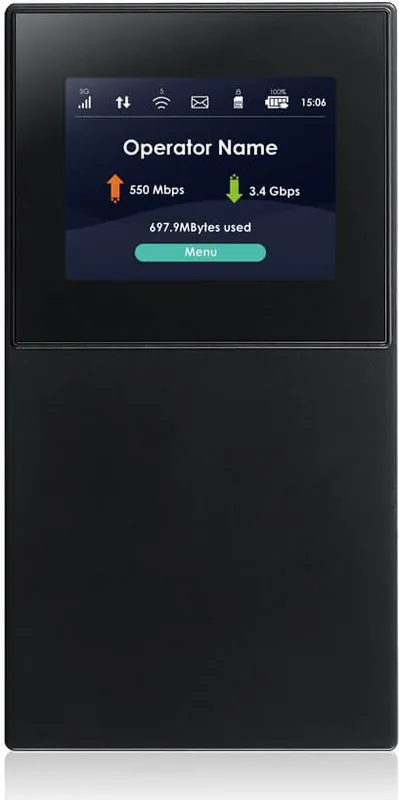
The NR2301 supports 5G download speeds up to 3.4 Gbps and 4G LTE up to 1.6 Gbps, while Wi‑Fi 6 offers up to 1.8 Gbps with 2x2 MU‑MIMO for smoother multi‑device streaming and reduced latency. It can handle up to 32 connected clients and offers both separate and combined SSID modes for 2.4GHz and 5GHz bands. The device includes an intuitive front LCD for quick status checks (signal, network type, battery, connected clients), an onboard WPS function for quick pairing, and a USB‑3.0 port for driver‑free USB tethering and Web Configurator access.
Hardware conveniences include an easy power button, SIM tray with reset button, external antenna port, and straightforward factory reset procedure. Firmware Over‑The‑Air (FOTA) keeps the device current, and the Web Configurator (HTML5‑based) provides full admin control over Wi‑Fi, network/APN settings, firewall, DHCP, guest network, MAC filtering, and advanced features like VPN passthrough, UPnP, DMZ, and scheduled reboots. Data‑package management supports daily, monthly, and longer billing cycles with alarm thresholds and automatic enforcement.
Management & security
Everyday management is recommended through the Web Configurator (http://192.168.1.1) using secure admin credentials (default username admin; the password appears on the device About screen and should be changed). The NR2301 supports WPA2, WPA3, combined modes, SSID broadcast control, MAC whitelist/blacklist, WPS (PBC and PIN), and firewall rules (IP/URL filtering, port forward/trigger, port filter) for granular security. Device maintenance features include manual firmware uploads, configuration backup/restore, and diagnostic tools.
Practical scenarios
This router is well suited for frequent travelers, remote teams needing temporary office connectivity, event networks, or home backup internet. Its combination of high cellular throughput, Wi‑Fi 6 efficiencies, and rich administrative controls gives both casual and power users the tools to deploy a secure, high‑performance mobile network quickly.
Notes
- Default Web login: http://192.168.1.1 (username: admin; default password shown on About screen).
- Supports up to 32 clients total (regular + guest networks combined).
- Ensure SIM is inserted before powering on; FOTA checks for updates automatically when connected.
Search for 67,732 Manuals online


Type-in Brand or Model