


Zyxel GS1900 Series Manual
PDF manual · 273 Pages
English



Quick check
Incorrect answer, please try again.
Chat with your Zyxel GS1900 Series manual using AI
Get instant AI answers from your Zyxel GS1900 Series manual
Ask anything about the Zyxel GS1900 Series. Answers come from this manual, with the pages they are based on.
Ask a Question
Do you recommend GS1900 Series?
Yes NoFrequently Asked Questions
The default in-band IP is 192.168.1.1 and the default credentials are user: admin and password: 1234. After a factory reset, those defaults are restored.
Is this answer helpful?
Yes. The GS1900 Rev.B1 includes two 1 Gbps SFP slots for fiber-optic uplinks. You must use MSA-compliant SFP transceivers (sold separately) and follow ESD and optical-safety precautions when installing them.
Is this answer helpful?
Yes. The switch supports Web Configurator for in-browser management, SNMP for integration with monitoring systems, and the Zyxel One Network (ZON) Utility for local discovery and basic remote operations. Some Zyxel cloud features may depend on specific firmware or model compatibility.
Is this answer helpful?
PoE availability depends on the GS1900 submodel. The GS1900 family includes PoE variants (e.g., GS1900-24HP). Verify the exact model SKU; the standard GS1900-24 (non-HP) provides gigabit ports but not PoE. PoE behavior and LEDs are managed via the PoE MODE button on PoE models.
Is this answer helpful?
For B1 and later hardware revisions use the RESTORE button; for some A1 units use RESET. Press and hold the button for more than 6 seconds while SYS is steady green. The switch will reset to factory defaults (IP 192.168.1.1, admin/1234). Reboot can also be performed via the Web Configurator or ZON Utility.
Is this answer helpful?
The GS1900 offers firmware upgrade (TFTP or Web UI), configuration backup/restore, syslog, SNMP, diagnostics (ping, traceroute, port test), and reboot/restore functions. The Web Configurator exposes modules for VLAN, QoS, security, AAA, LLDP, STP, IGMP, and more.
Is this answer helpful?
Use proper grounding (connect the grounding screw to building earth), follow rack or wall-mount screw specs, maintain ventilation clearances, avoid looking into active fiber ports, and use ESD precautions when handling SFP transceivers. Ensure power connections match local regulations and use the provided power cord.
Is this answer helpful?
Advantages and Disadvantages
Advantages

- 24 Gigabit RJ-45 ports plus 2 SFP slots for flexible copper and fiber connectivity.
- Comprehensive smart features: VLAN, link aggregation, QoS, LLDP, IGMP snooping, and IPv6 support.
- Web Configurator and ZON Utility simplify setup and remote device discovery/management.
Disadvantages

- Entry-level managed switch—lacks advanced L3 routing features found in higher-tier models.
- Some advanced functions depend on firmware version; check compatibility before deployment.
- Requires separate SFP transceivers for fiber—transceivers sold separately.
Product Specification
Function
Switch
Type
Standalone, Rackmount (via mounting brackets)
Network ports
24x RJ-45, 2x SFP
Speeds
24x RJ-45 (10/100/1000Base-T), 2x SFP (1Gb/s)
PoE
N/A
Backplane
52Gb/s, 39Mp/s, 9KB Jumboframes, 525kB Packet buffer, 8K Mac addresses
Officially supported standards
802.1AX, 802.1, 802.1D, 802.1Q, 802.1p, 802.1s, 802.1w, 802.1X, 802.3, 802.3ab, 802.3az, 802.3u, 802.3x, IGMPv3
Configuration
Web interface
Cooling
passive
Dimensions (WxHxD)
17.32x1.73x5.16in, 1U
Weight
4.61 lb
Color
anthracite
Special features
Metal housing, removable mounting brackets, firmware updates possible, anti-theft protection (Kensington Lock)
Manufacturer warranty
lifetime (10 years in AT/DE) + five years
Note
For this device, "link aggregation" was officially specified with the obsolete standard IEEE802.3ad. Since 2008, the function is no longer managed by the IEEE "Working Group 3" (IEEE 802.3, CSMA/CD - Ethernet), but by "Working Group 1" (IEEE 802.1, High Level Interface - Internetworking) and technically defined unchanged via IEEE 802.1AX.
Product Description
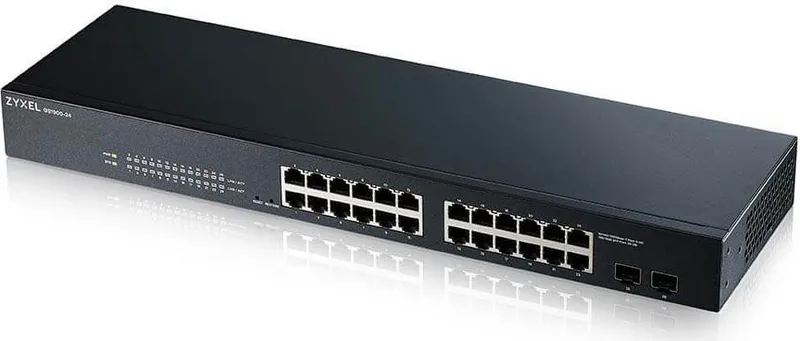
ZyXEL GS1900 Rackmount Gigabit Smart Switch, 24x RJ-45, 2x SFP, Rev.B1
The ZyXEL GS1900 Rackmount Gigabit Smart Switch, 24x RJ-45, 2x SFP, Rev.B1 is a versatile, entry-level managed switch designed for small to medium business networks that need dependable gigabit performance with smart management features. With 24 gigabit RJ-45 ports and two SFP uplink slots, it supports flexible wiring topologies and fiber uplinks for backbone or inter-building connections. The Rev.B1 hardware brings refinements such as the RESTORE behavior alignment and added reboot support on certain models, ensuring consistency across ZyXEL’s product line.
Key features and use cases
This switch is tailored for scenarios that require high local throughput: desktop gigabit to the workstation, departmental backbone aggregation, and PoE deployments (on PoE variants in the GS1900 family). It supports Web-based management via an intuitive Web Configurator, SNMP for centralized monitoring, and the ZON utility for quick discovery and initial setup. The switch supports VLAN (IEEE 802.1Q) for traffic segmentation, IPv6 (dual-stack, ICMPv6, DHCPv6 client, neighbor discovery), link aggregation, spanning tree, LLDP, IGMP snooping for multicast control, and a set of security features including port security and 802.1X.
Hardware-wise the unit offers 24 x 10/100/1000Base-T ports and two 1 Gbps SFP slots. Rear-panel grounding and rack-mount brackets are supported for data center or wiring-closet installation. The device includes standard diagnostic LEDs, a RESTORE/RESET procedure to return to default (IP 192.168.1.1, admin/1234), and firmware/backup utilities via TFTP and the Web Configurator. The product supports routine maintenance features—firmware upgrade, config backup/restore, reboot, and diagnostics like ping, traceroute, and port tests.
Management and deployment
For everyday management, the Web Configurator provides full access to configuration sections—VLANs, QoS, security, AAA, SNMP, syslog, and more. ZON Utility expedites discovery, initial IP settings, batch firmware updates, and remote actions like reboot or factory reset. The switch supports both in-band management and SNMP integration with network monitoring systems.
Notes:
- Default login: admin / 1234; default IP for in-band ports: 192.168.1.1.
- Use compatible SFP transceivers (MSA-compliant) and observe ESD and optical-safety precautions.
- Rev.B1 aligns RESTORE behavior with Zyxel standards and may include additional reboot support depending on the exact model variant.
Pros and Cons
Pros:
- "24 Gigabit RJ-45 ports plus 2 SFP slots for flexible copper and fiber connectivity."
- "Comprehensive smart features: VLAN, link aggregation, QoS, LLDP, IGMP snooping, and IPv6 support."
- "Web Configurator and ZON Utility simplify setup and remote device discovery/management."
Cons:
- "Entry-level managed switch—lacks advanced L3 routing features found in higher-tier models."
- "Some advanced functions depend on firmware version; check compatibility before deployment."
- "Requires separate SFP transceivers for fiber—transceivers sold separately."
FAQ
- { "question": "What are the default login credentials and IP?", "answer": "The default in-band IP is 192.168.1.1 and the default credentials are user: admin and password: 1234. After a factory reset, those defaults are restored." }
- { "question": "Does this model support fiber uplinks?", "answer": "Yes. The GS1900 Rev.B1 includes two 1 Gbps SFP slots for fiber-optic uplinks. You must use MSA-compliant SFP transceivers (sold separately) and follow ESD and optical-safety precautions when installing them." }
- { "question": "Can I manage the switch remotely or centrally?", "answer": "Yes. The switch supports Web Configurator for in-browser management, SNMP for integration with monitoring systems, and the Zyxel One Network (ZON) Utility for local discovery and basic remote operations. Some Zyxel cloud features may depend on specific firmware or model compatibility." }
- { "question": "Is PoE supported on this specific 24-port rackmount model?", "answer": "PoE availability depends on the GS1900 submodel. The GS1900 family includes PoE variants (e.g., GS1900-24HP). Verify the exact model SKU; the standard GS1900-24 (non-HP) provides gigabit ports but not PoE. PoE behavior and LEDs are managed via the PoE MODE button on PoE models." }
- { "question": "How do I reset or reboot the switch if I forget the password?", "answer": "For B1 and later hardware revisions use the RESTORE button; for some A1 units use RESET. Press and hold the button for more than 6 seconds while SYS is steady green. The switch will reset to factory defaults (IP 192.168.1.1, admin/1234). Reboot can also be performed via the Web Configurator or ZON Utility." }
- { "question": "Which management and maintenance features are available?", "answer": "The GS1900 offers firmware upgrade (TFTP or Web UI), configuration backup/restore, syslog, SNMP, diagnostics (ping, traceroute, port test), and reboot/restore functions. The Web Configurator exposes modules for VLAN, QoS, security, AAA, LLDP, STP, IGMP, and more." }
- { "question": "What safety and installation precautions should I follow?", "answer": "Use proper grounding (connect the grounding screw to building earth), follow rack or wall-mount screw specs, maintain ventilation clearances, avoid looking into active fiber ports, and use ESD precautions when handling SFP transceivers. Ensure power connections match local regulations and use the provided power cord." }
Search for 67,732 Manuals online


Type-in Brand or Model