

Zyxel GS1900-24HP Manual
PDF manual · 259 Pages
English



Quick check
Incorrect answer, please try again.
Chat with your Zyxel GS1900-24HP manual using AI
Get instant AI answers from your Zyxel GS1900-24HP manual
Ask anything about the Zyxel GS1900-24HP. Answers come from this manual, with the pages they are based on.
Ask a Question
Do you recommend GS1900-24HP?
Yes NoFrequently Asked Questions
You can use the Web Configurator via a browser, ZON Utility for initial deployment, SNMP for remote management, or TFTP for file transfers. The Web Configurator is recommended for everyday setup tasks.
Is this answer helpful?
The default IP address is 192.168.1.1. You must connect to this address via a browser to access the login screen for configuration.
Is this answer helpful?
Yes, the switch supports PoE+ up to 130W. It can supply power to devices like IP cameras and phones directly through the Ethernet connection without needing separate power supplies.
Is this answer helpful?
Use the reset button on the front panel. Press and hold for more than six seconds until the LED blinks. This restores factory defaults and clears all custom configurations.
Is this answer helpful?
Yes, it supports IEEE 802.1Q VLANs. This allows you to partition the physical network into multiple logical groups to reduce broadcast traffic and improve security.
Is this answer helpful?
Yes, you can mount it on a wall using specific screws. Ensure you follow the installation requirements for spacing and mounting hardware to prevent damage.
Is this answer helpful?
Yes, the switch supports dual stack IPv4 and IPv6 protocols. This ensures compatibility with modern networks and future-ready addressing capabilities for your infrastructure.
Is this answer helpful?
Advantages and Disadvantages
Advantages

- Provides 130W PoE+ budget allowing power to devices without extra outlets
- Supports multiple management tools including Web Configurator and ZON Utility
- Flexible installation fits desktop wall or standard rack environments
- Includes IPv6 support for future readiness and dual stack compatibility
- Offers VLAN support to partition networks and enhance security
Disadvantages

- Uses default credentials that must be changed for security
- SFP transceivers are not included in the package
- Requires manual mounting hardware for wall installation
- Configuration resets require backup restoration to save settings
- Advanced cloud management requires external Nebula Control Center setup
Product Specification
Function
Switch
Type
Standalone, Rackmount (via mounting brackets)
Network Connections
24x RJ-45
Speeds
24x RJ-45 (10/100/1000Base-T)
PoE
12x RJ-45 PoE+ (12x 30W), total: 130W
Backplane
48Gb/s, 35.7Mpackets/s, 9KB Jumbo frames, 525kB Packet buffer, 8K MAC addresses
Officially Supported Standards
802.1AX, 802.1, 802.1D, 802.1Q, 802.1p, 802.1s, 802.1w, 802.1X, 802.3, 802.3ab, 802.3af, 802.3at, 802.3az, 802.3u, 802.3x, IGMPv3
Configuration
Web interface
Cooling
active, 1x fan (40mm)
Dimensions (WxHxD)
12.99x1.73x9.06in, 1HE
Weight
5.47 lbs
Color
anthracite
Features
Metal housing, detachable mounting brackets, firmware updates possible
Manufacturer Warranty
lifetime (10 years in AT/DE) + 5 years
Note
For this device, "link aggregation" was officially specified with the obsolete standard IEEE 802.3ad. The function has not been managed since the year 2008 by the IEEE "Working Group 3" (IEEE 802.3, CSMA/CD - Ethernet), but by the "Working Group 1" (IEEE 802.1, High Level Interface - Internetworking) and is technically defined unchanged via IEEE 802.1AX.
Product Description
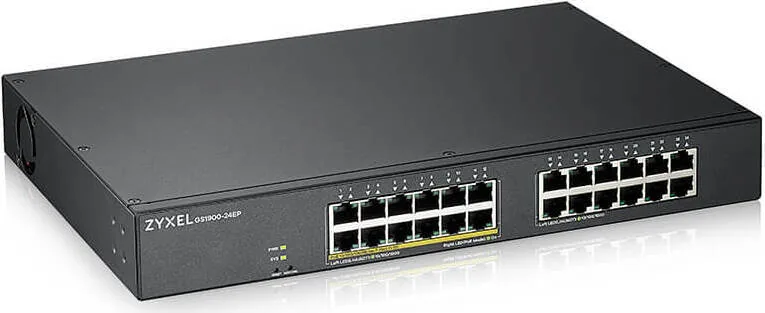
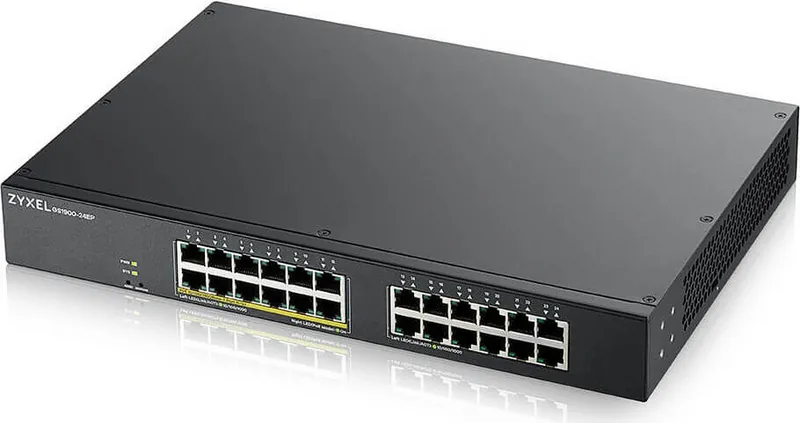
The ZyXEL GS1900 Desktop Gigabit Smart Switch
Networking efficiency is crucial for modern businesses and homes. The ZyXEL GS1900 Desktop Gigabit Smart Switch delivers robust performance with its extensive 24x RJ45 ports configuration. Designed for scalability, this unit ensures seamless connectivity for heavy traffic users. With a total budget of 130W PoE+, it powers essential connected devices directly through Ethernet cables. This feature is particularly valuable for deployments where power outlets are scarce.
Powerful Power over Ethernet Capabilities
The 130W PoE+ capability allows connected devices like IP cameras and wireless routers to receive power without extra electrical outlets. This saves significant cabling costs and simplifies installation in hard-to-reach places. Whether you need to deploy security sensors or VoIP phones, the switch handles the load efficiently while managing power consumption per port dynamically.
Versatile Management Options for Administrators
Managing your network infrastructure has never been easier with multiple tools provided. You can use the Web Configurator for intuitive setup via a standard web browser interface. For faster initial deployment, the ZON Utility discovers devices automatically on the same broadcast domain network. Advanced users may prefer SNMP or TFTP for remote firmware upgrades and regular configuration backups. Security is paramount, with comprehensive features like 802.1X authentication and Port Security protecting sensitive data from unauthorized access attempts.
Flexible Installation Scenarios and Hardware Design
This switch adapts to your physical environment properly. Place it on a sturdy desktop, mount it securely on a wall using screws, or rack-mount it in a cabinet. Ventilation holes ensure proper airflow during continuous operation to prevent overheating. The hardware overview highlights SFP slots for fiber uplinks, expanding your bandwidth options significantly beyond standard copper connections.
Advanced Networking Features for Modern Protocols
Support for IEEE 802.1Q VLANs lets you partition your physical network into multiple logical groups easily. This reduces broadcast traffic and enhances overall network security for different departments. IPv6 support ensures future-readiness with dual stack capabilities alongside IPv4 protocols. You can configure link aggregation to boost bandwidth between switches. Additionally, storm control protects against network floods and ensures stability during high traffic.
Getting Started and Maintenance Essentials
Initial setup is straightforward for new users. Connect to the default IP 192.168.1.1 using admin and 1234 credentials initially. Always change these default credentials immediately for security. Regular backups of your configuration file are vital in case of unexpected system instability or crashes. Resetting to factory defaults is possible via the hardware button if access is lost. Proper grounding and power connections stabilize the system during electrical outages. Troubleshooting tools help resolve connectivity issues. This makes the ZyXEL GS1900 a reliable choice for smart network management.
Search for 67,732 Manuals online


Type-in Brand or Model